EasyManua.ls Logo

Dexcom one - Transmitter and Display Device Safety

Dexcom one
20 pages
Print Icon
To Next Page IconTo Next Page

To Previous Page IconTo Previous Page
Loading...
11
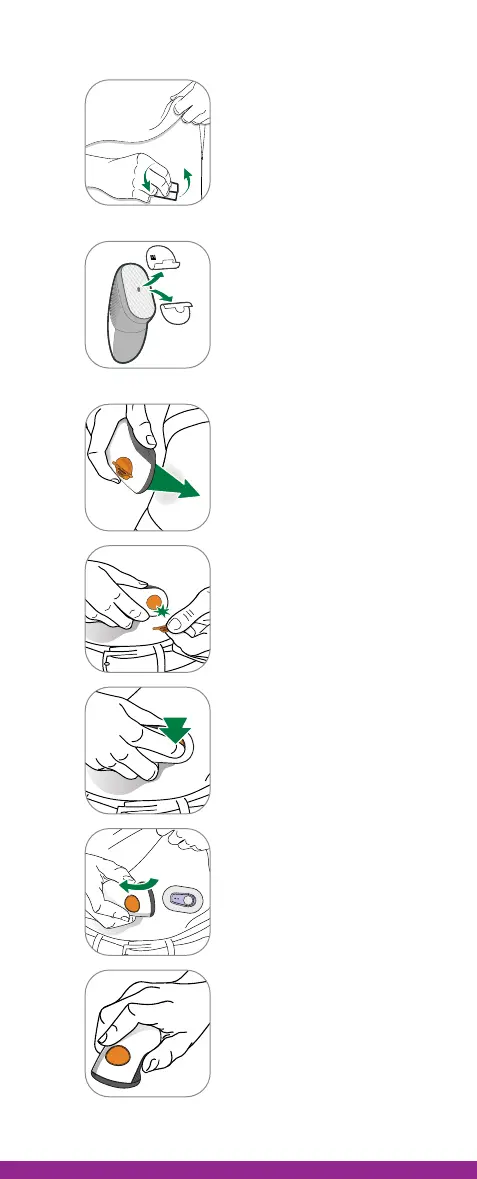
B. Insert sensor
1
Wash hands and sensor
site with soap. Dry.
Scrub sensor site with
alcohol wipe.
2
XXXX
XXXX
Peel off both adhesive
backings from applicator.
Do not touch adhesive.
Keep the backings. They
show your sensor code. Do
not place anything on the
adhesive. The adhesive
goes on your skin.
3
Place applicator on skin
before breaking safety
guard.
4
Fold and break off the
orange safety guard. Do
not twist.
5
Press orange button to
insert sensor.
6
Remove applicator from
skin leaving patch and
holder on.
7
Throw away applicator.
Follow local guidelines
for disposal of blood-
contacting components.

Other manuals for Dexcom one

Related product manuals