12
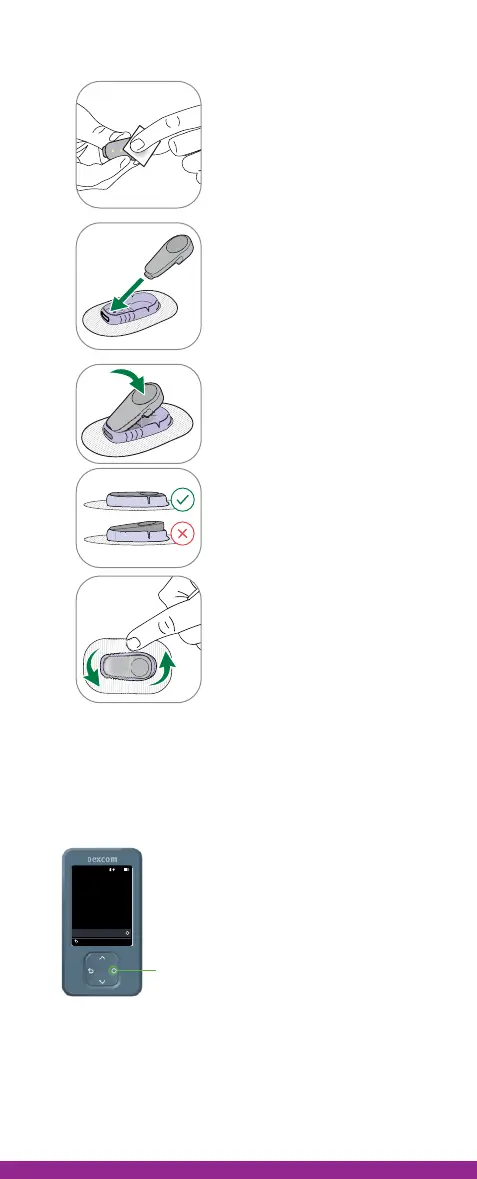
Step 3: Attach transmitter
1
Clean transmitter with
alcohol wipe.
2
Insert transmitter, tab first,
into holder.
3
Snap transmitter into
place. You will hear a click.
Make sure it is flat and
snug in holder.
4
Rub around patch 3 times
to help it stick.
Step 4: Pair transmitter
1. AFTER you insert the sensor and attach the
transmitter, press the Select button to begin
pairing your transmitter and your receiver.
2. Wait while your transmitter pairs with your
receiver. This can take up to 30 minutes.
3. Keep your receiver within 6 meters of your
transmitter.
Insert Sensor and
Attach Transmitter
10:30 50%
Confirm that your sensor is
inserted before pairing.
See insertion instructions in
product information.
Sensor is Inserted
Back
Select



 To Next Page