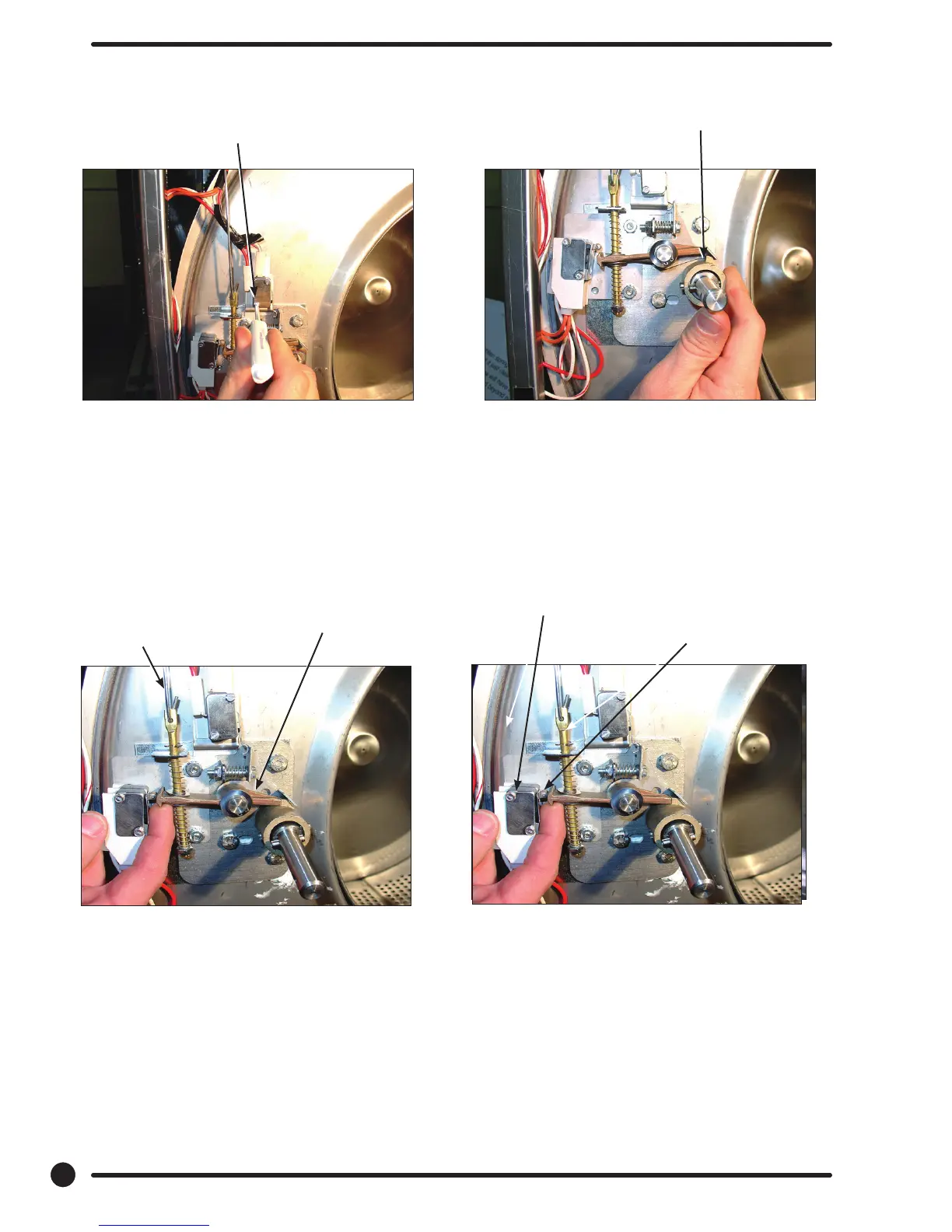
Step 4: Check for switch actuation at partial
turn of cam as in operation above. Door
handle goes from horizontal to six o’clock
vertical.
Step 3:
With switch actuator bracket adjusted you
will now need to adjust single switch by
loosening 2 at brade screws and allowing
swivel of switch. Move switch towards above
bracket until it actuates. Now tighten at
blade screws. Use a .040 thickness guage to
insert between bracket and switch and the
switch should close and open again upon
removal of thickness guage.
Step 5: Check that lock pawl arm swings to cam
lobe to lock position.
Step 6: The lock stacked switches (piggyback)
must be adjusted as door lock solonoid
pulls up on door rod and locking pawl is
now blocking door cam from turning and
is in full up position. The stacked swtiches
(piggyback) have a single actuator arm
and it must actuate when single actuator
roller wheel rolls to at side of locking
pawl. You will also notice a .040 gap
between actuator arm and switch bodies.
Note: Both stacked switches must operate
together!
Flat blade screw on
door switch latching
Door lock rod
Locking pawl blocking
Adjustment screw for
(piggyback switches)
Top at end of
locking pawl.
Door cam
check position
72
Part # 8533-081-001 1/18










 To Next Page