45
2
Hardware Installation
1
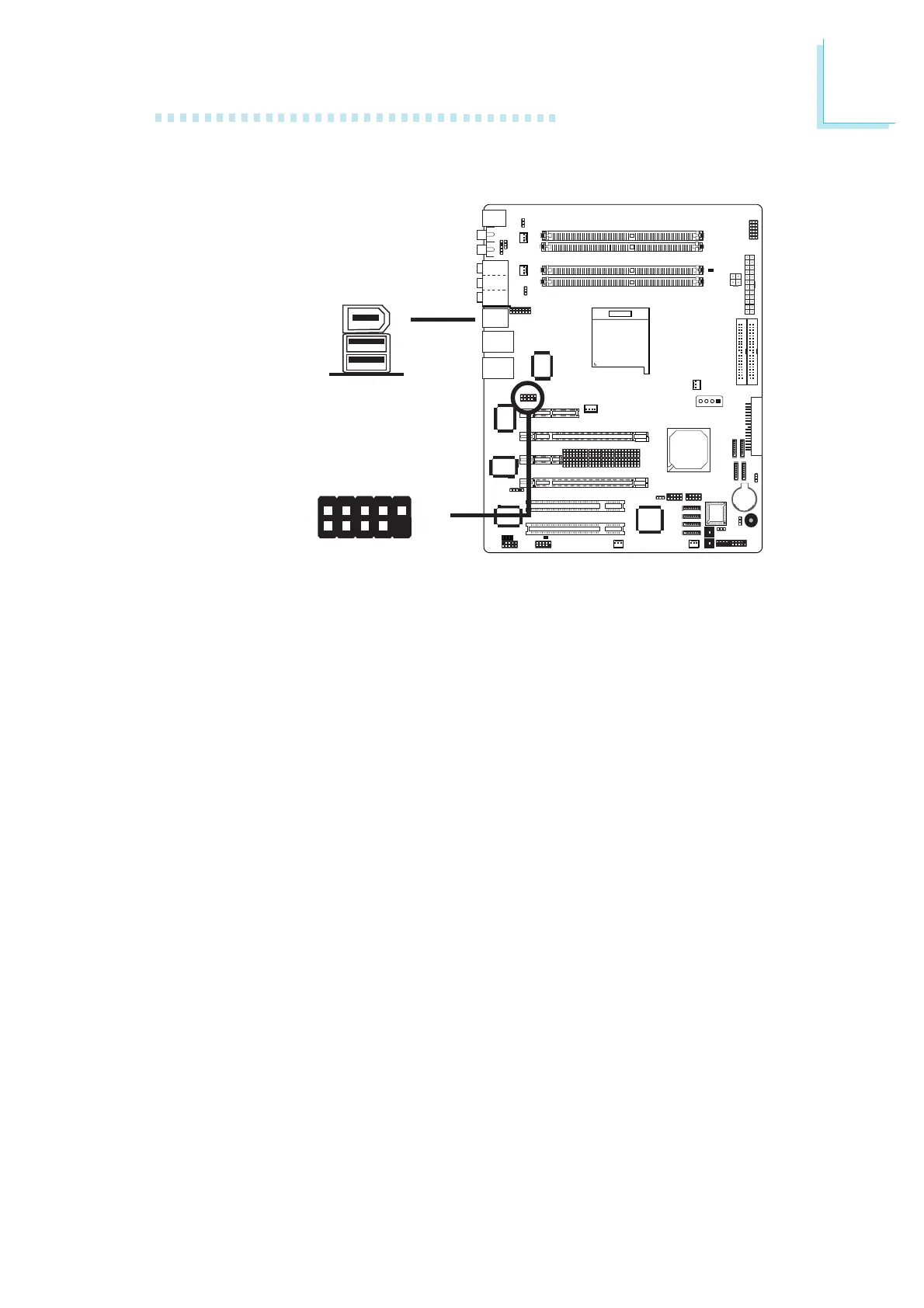
The system board is equipped with an onboard IEEE 1394 port at
location CN3 (IEEE 1394_1) of the system board.
It is also equipped with an IEEE 1394 connector at location J8
(1394_2) for connecting an additional 1394 device. The 1394 port
may come mounted on a card-edge bracket. Install the card-edge
bracket to the system chassis then insert the connector that is
attached to the 1394 port cable to J8. Make sure pin 1 of the
cable connector is aligned with pin 1 of the J8.
BIOS Setting
Enable or disable the onboard 1394 in the Genie BIOS Setting
submenu of the BIOS. Refer to chapter 3 for more information.
IEEE 1394
1394_1
W
W
1394_2
+12V (fused)
1
TPA+
Ground
TPB+
+12V (fused)
Key
TPA-
Ground
TPB-
Ground
2
10
9













 To Next Page