After Sales Support TEL:1800 189 941 10
ASSEMBLY AND PARTS LIST
1.6 Connecting to Equipment
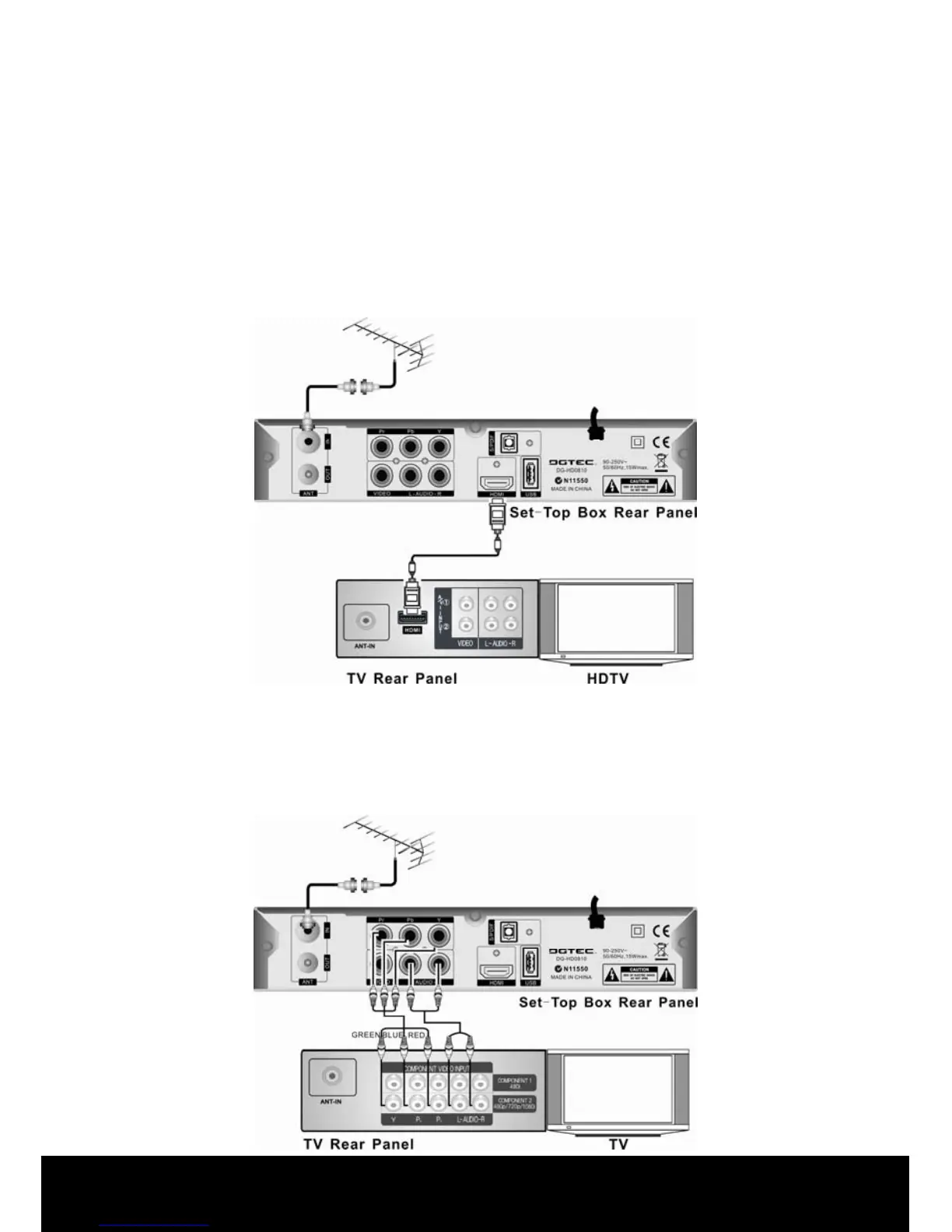
i. Connect your TV antenna cable to the “ANT IN” jack on the back of the STB using
coaxial RF cable.
CONNECTING TO A HIGH DEFINITION TELEVISION (HDTV)
OPTION 1- HDMI connection
ii. Connect the HDMI Out on the STB to HDMI In on the HDTV using a HDMI cable
(not provided).
OPTION 2- High Definition connection using YPbPr cables (not supplied )
iii. Connect the YPbPr connectors and AUDIO L/R connectors on the back of the
STB to the COMPONENT IN on your television using RED, GREEN & BLUE
RCA-type YPbPr cables. (Note: RED, GREEN & BLUE Component cables carry
video signal only, you will need to connect other cables for audio connection as
well.)



 To Next Page