500 Range
49-M500WMEN25
143
17.3. MENUS
The menus are implemented with a tree structure, being able to low levels pressing the key * or the
menu associated number, and level up pressing MENU. Press the MENU button for 2 seconds and you
exit the menu mode directly.
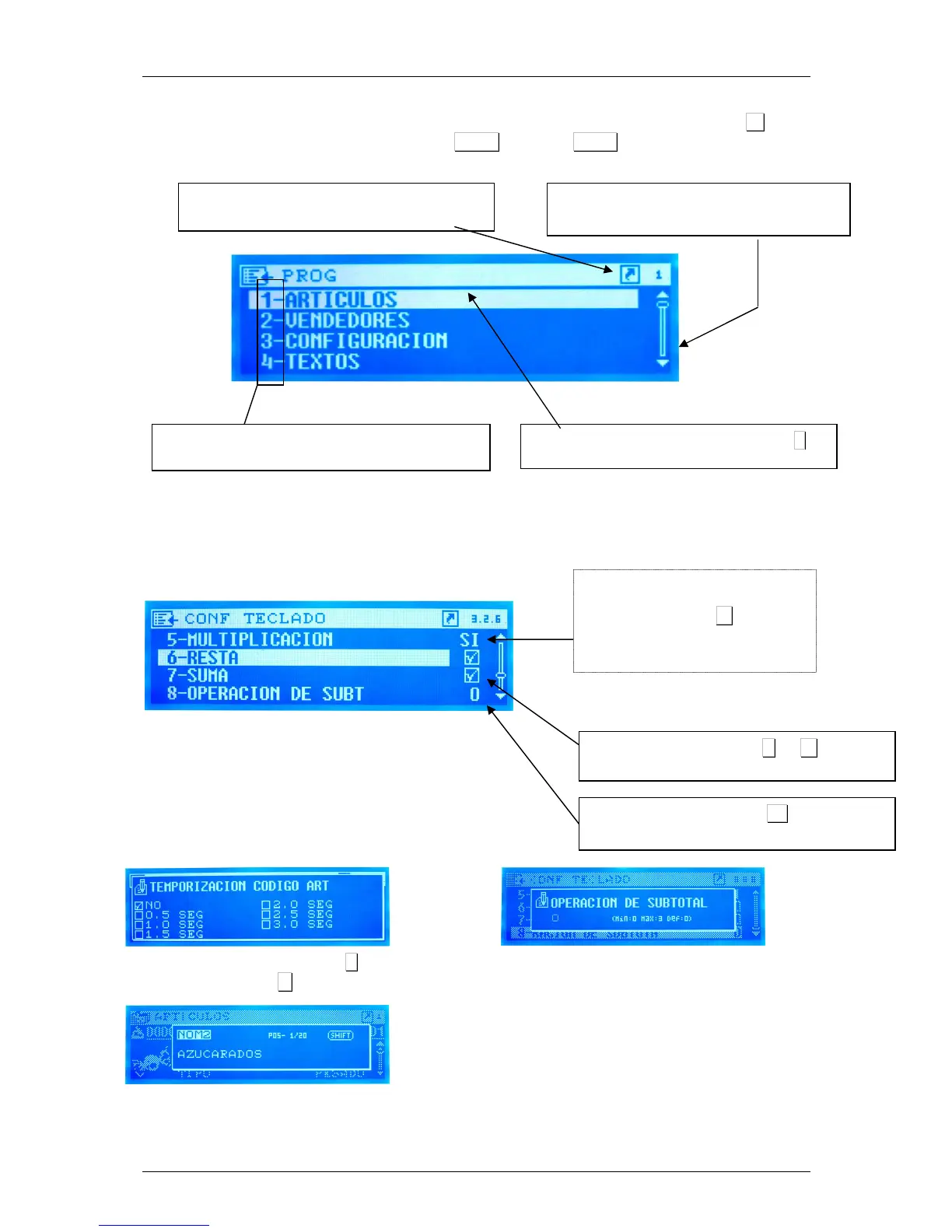
The last levels of the menus show the settings values:
Menu Number. You can access it directly pressing the
number directly on the numeric keypad.
Selected item. Accessed pressing key *
Direct access number. Indicates the key sequence
to access the current menu.
Scroll bar. Indicates the depth of the current
menu.
Adjust YES or NO. Press the
C
or
*
to change
the value
.
Numerical adjustment. Click
*
to change the
value
Complete options adjust screen. Press
C
to change
the value and
*
to accept
Numeric adjust screen. Shows the
minimum, maximum and default
values
Adjust text display
Setting options. If you press the C key
the different adjust options are
selected. If you press
*
you enter in
the setup screen with complete
options.



 To Next Page