15
Using the Camcorder/Camera
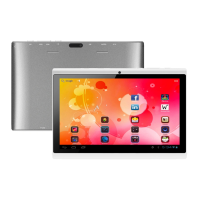
Tap the Camera in the application page to launch the Camera.
To start making video clips, tap on the Start/Stop button to start video
recording.
Tap on the Start/Stop button again to stop video recording or photographing.
The video clip / photo can be previewed in the Preview Window.
To play the video clip that you have made, enter the Video Player, and then tap the
video.
To view the photo that you have taken, enter the Photo Viewer mode, and then tap
the photo.
Exploring Files
You can explore files and folders with the FileBrowser and ASTRO application. In the
Home Screen, tap the Applications shortcut to display all
applications and then tap the FileBrowser icon or ASTRO
to enter the file explorer mode.
Using the FileBrowser
Navigate through Files and Folders
You can drag your finger up and down to scroll the file
list up and down.
Preview window
VCR mode
Start/Stop
Viewfinder
Photography mode
Zoom
Settings



 To Next Page