DS-425 Service Manual
1.6. Layout and Function
1.6.1. Key Sheet and Function
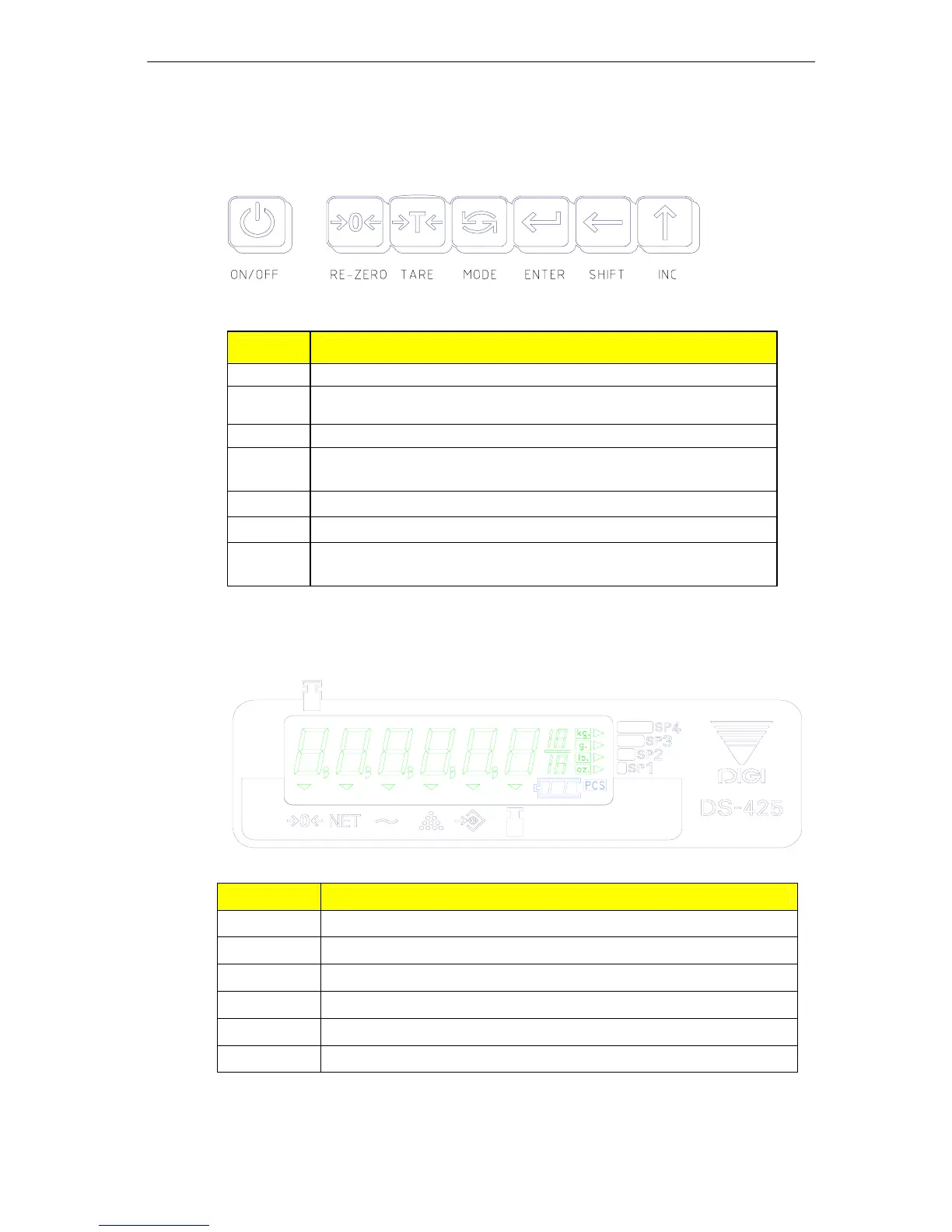
a) Key Layout
b) Key Function
Key Function
[On/Off] For turning the scale ON and OFF
[Re-
Zero]
Resetting the scale to zero.
[Tare] For setting & clearing tare value.
[Mode]
Used to entry into the following modes: Weighing mode or
Counting mode.
[Enter] Used for storing the data.
[Shift] Used to change digital position.
[INC]
1) Used for increase data value when digit blinking;
2) Switch the weight unit.
1.6.2. Display
a) Layout
b) Indicators
Indicator Function
->0<-
Light when display is zero and stable
NET
Light when displays net weight
~
Light when weight is stable
U.C
Light when working in counting mode
SAF
Set-point ALAME Mode is ”ON”, and during Fill Application
SAC
Set-point ALAME Mode is “ON”, At Check Weight Application
01 General Specification Page No. 3


 To Next Page