DS-425 Service Manual
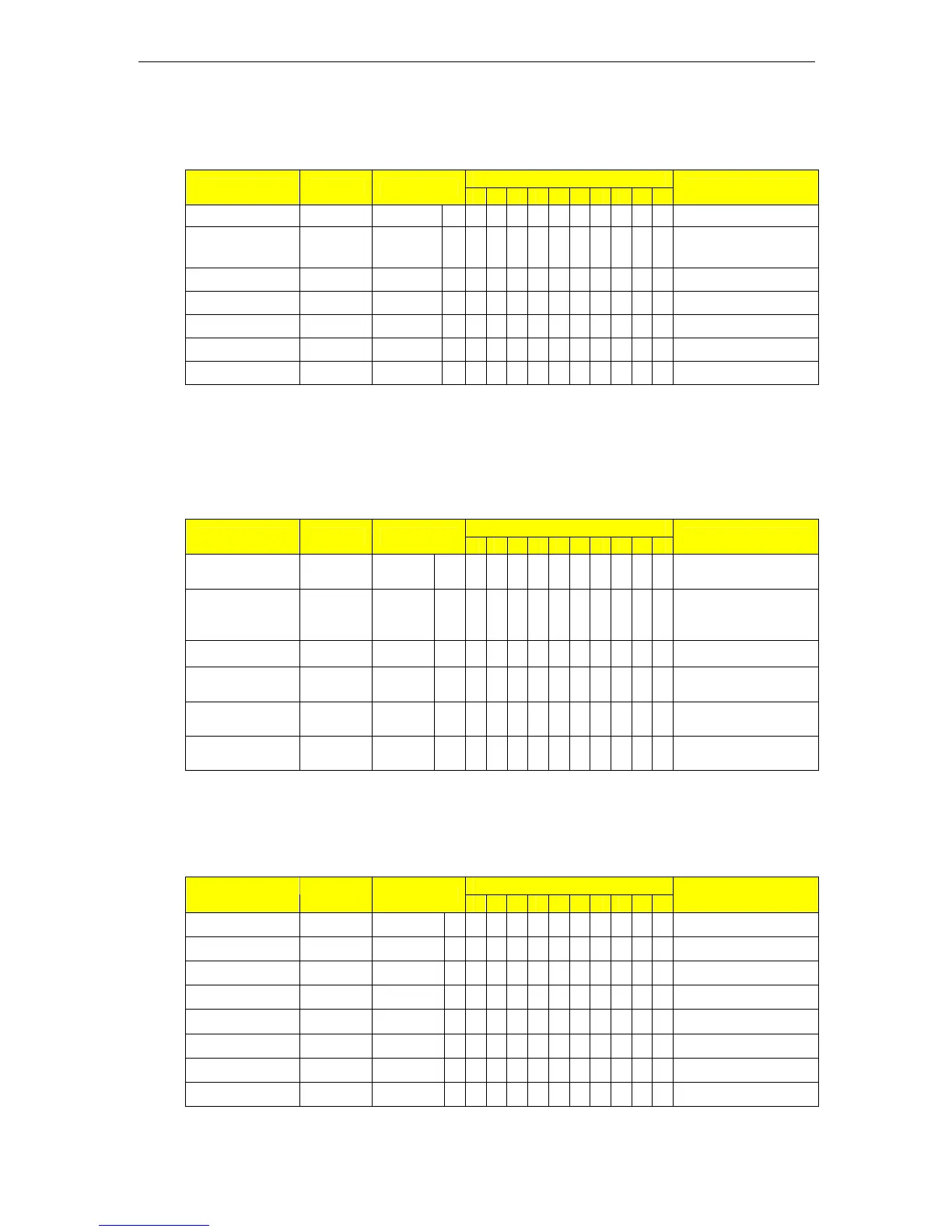
3.4. Gross / Net Display Toggle
Indication Flag: B - Bright S - Sparkling
1-ZERO 2-NET 3-STD 4-U.C 5-SAF 6-SAC 7-S1 8-S2 9-S3 10-S4
Indicator
Operation Key Weight
1 2 3 4 5 6 7 8 9 10
Remarks
Weight Stable 0.0000 kg B B Weighing mode
Load weight
(eg.0.6000kg)
0.6000 kg B Gross weight display
Excute tare [Tare] 0.0000 kg B B Net display
Toggle [INC] 0.6000 kg B Gross Weight display
Remove item 0.0000 kg B B Weighing mode
Toggle [INC] -0.6000 kg B B B Net weight
Tare clear [Tare] 0.0000 kg B B Weighing mode
Note: The function is available when SPEC11 BIT0=1 only.
This function will be unavailable when Weight Unit Conversion function is enabled.
3.5. Weight Unit Conversion
Indication Flag: B - Bright S - Sparkling
1-ZERO 2-NET 3-STD 4-U.C 5-SAF 6-SAC 7-S1 8-S2 9-S3 10-S4
Indicator
Operation Key Weight
1 2 3 4 5 6 7 8 9 10
Remarks
Weight Stable 0.0000
k
g
B
B
Weighing mode
Load weight
(eg.0.6000kg)
0.6000
k
g
B
Convert [INC] 1.3225 lb
B
Pound display
Convert [INC] 21.165
o
z
B
Ounce display
Convert [INC] 0.6000
k
g
B
Basic unit display
Remove items 0.0000
k
g
B
B
Weighing Mode.
Note: This operation is available when SPEC15 = 0100 or 1100 only.
3.6. Counting Operation
Indication Flag: B - Bright S - Sparkling
1-ZERO 2-NET 3-STD 4-U.C 5-SAF 6-SAC 7-S1 8-S2 9-S3 10-S4
Indicator
Operation Key Weight
1 2 3 4 5 6 7 8 9 10
Remarks
Weight Stable 0.0000 kg B B Weighing mode
Press [MODE] [Mode] Add 32 B Sample number 32
Change number [Shift][Shift]
Add 32
B 2
nd
digit selected
Chang value [INC][INC]
Add 52
B Sample number 52
Confirm [*] 0.0000 kg B B B Sample weight
Load 52 samples 0.6000 kg
BB
Weight for all samples
Confirm [*] 52 kg B B Counting mode
Exit [Mode] 0.6000 kg B B Weighing mode
03 Main Operation Page No. 12


 To Next Page