Digital Ally, Inc. | Device Conguration using VuVault
3-6
FirstVu HD Operation Guide | 860-00177-00 Rev J
Go Back To Table of Contents
3.4 Activating your FirstVu HD
Assigning a User to your FirstVu HD
Assigning a user to your device takes place during the VuVault
®
activation process.
When a user is assigned to the device, all uploaded video events will appear on the
user’s My Dashboard screen upon logging into VuVault
®
. The user may be reassigned
each time the FirstVu HD is activated.
Activating your FirstVu HD within VuVault
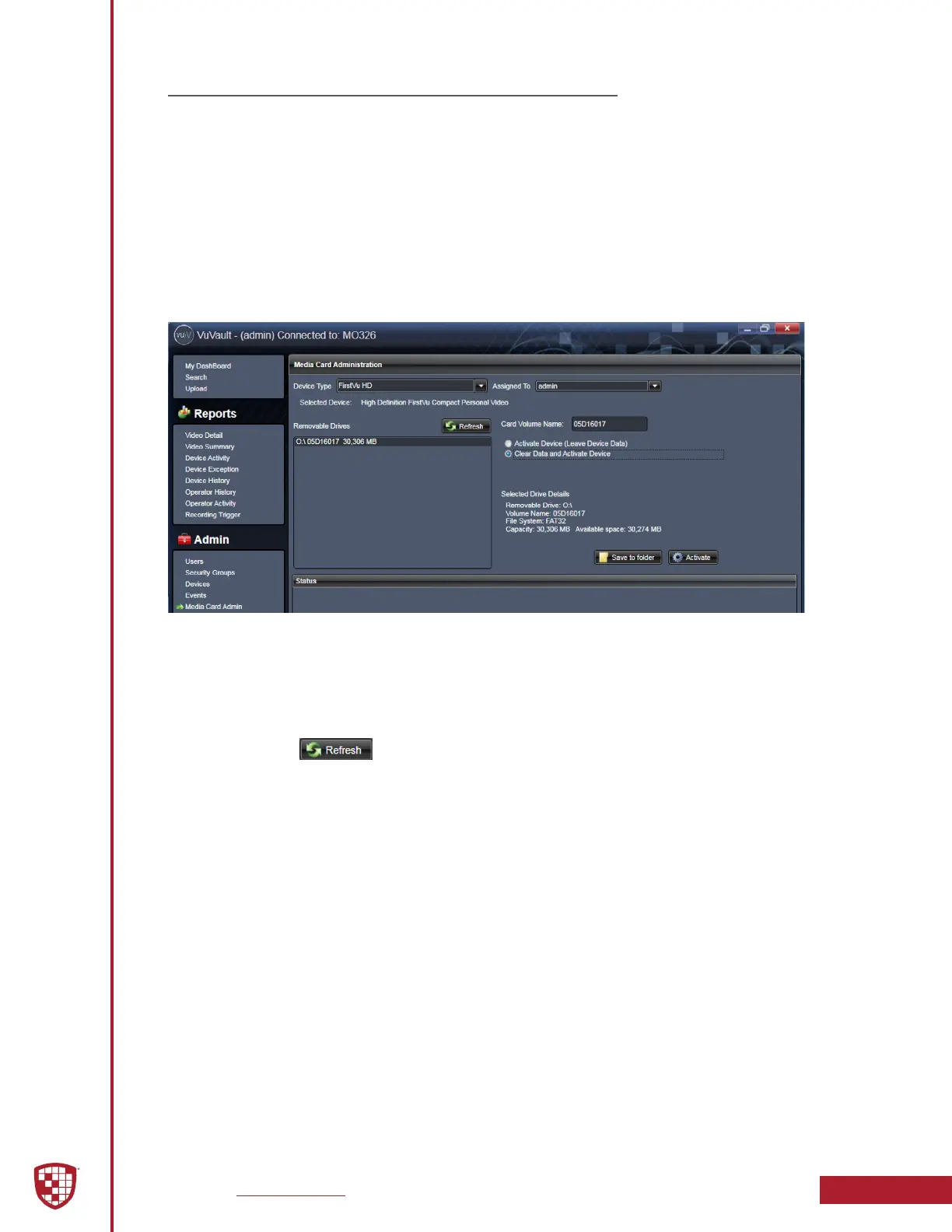
The Media Card Administration function is used to congure the FirstVu HD to the
settings which were selected in VuVault
®
. By selecting the Clear Data option, you may
also delete all video event data from the FirstVu HD internal memory.
The FirstVu HD must be connected to a VuVault
®
computer via USB port. Make sure it is
powered on and in the Standby mode.
1. Select Media Card Admin from the Admin navigation bar.
2. Select the correct Device Type from the available options. You must
select “FirstVu HD”.
3. Click the button to detect the FirstVu HD from the available
removable drives.
4. Select the drive assigned to the FirstVu HD.
5. In the Assigned To eld, select a user to assign the device. All video
events recorded after the activation will be associated to this user. The
assigned user may be changed each time the device is activated.
6. Note the Card Volume Name eld. If there is a current volume name, it
will show up automatically. If not, it will default to DA_DEVICE. This can
be changed according to customer preference to whatever is deemed
most appropriate.
7. Choose from one of two options to activate the device:
◦ Activate Device (Leave Data Intact) – this option simply
activates the FirstVu HD by writing the “devicecong” le to
internal memory. No existing video events located on the internal
memory are altered.
◦ Clear Data and Activate Device – this option erases all video
event data on the internal memory and activates it as above.
Always ensure that all relevant videos have been uploaded to the system before
deleting them from the FirstVu HD.


 To Next Page