20
DS6 User Manual
2. CONTROL / Setup page
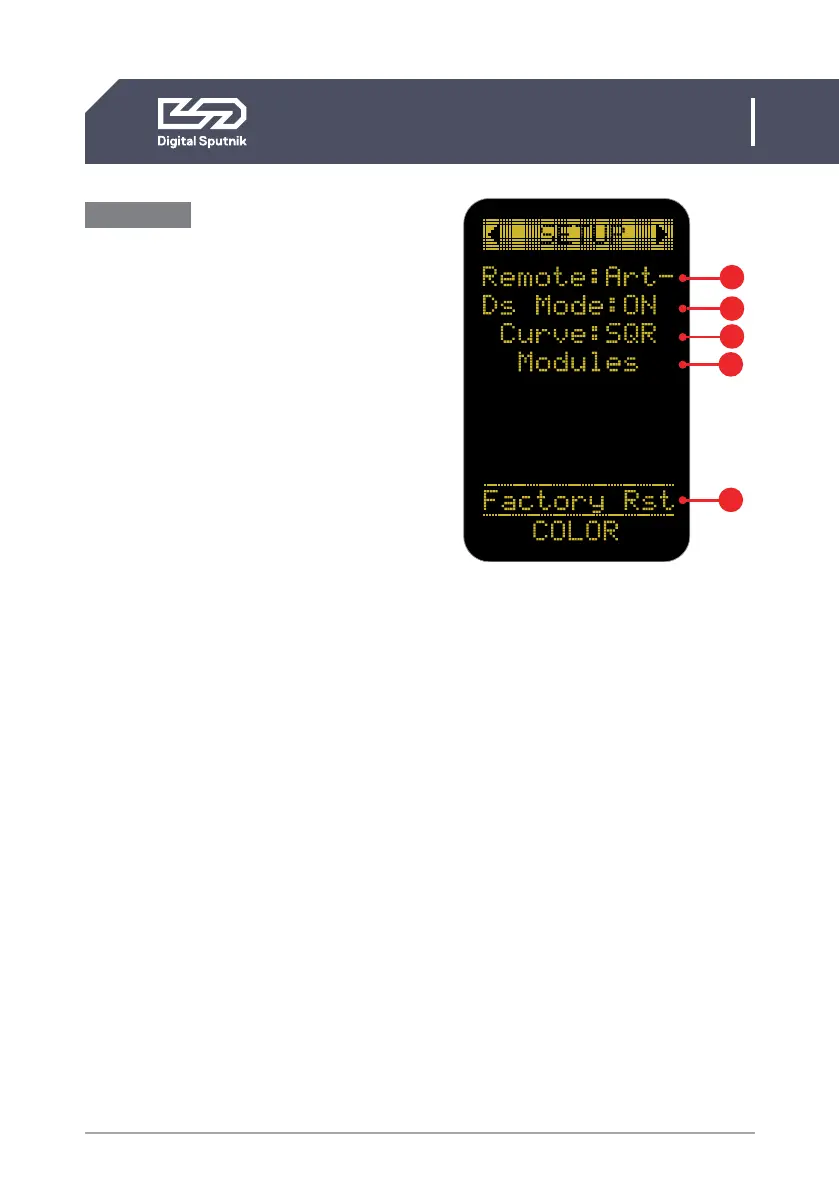
Setup Page
Allows the user to alter specific function-
ality and check working information about
the PSU and light modules.
To navigate between the DS DMX, SETUP
and WiFi pages, use the left and right ar-
row keys when the page name is highlight-
ed.
1. Remote - indicates the remote control
mode: It is automatically set to DMX or
ArtNet depending on the communication
handle installed on the PSU.
Select OFF to stop control by an outside
device if you intend to control your lights
from the power supply.
When no handle is present you can cycle
through all of the choices but we recom-
mend leaving the selection to OFF.
2. DS Mode- When turned on, the PSU will
run on DS Mode, which is a subset of the
full mode of operation, which is the DMX
mode used when DS Mode selection is set
to OFF.*
DS mode is a more simplistic approach to
DMX setup, eliminating the need to orien-
tate between DMX modes, universe selec-
tion and also making channel numbering
less cumbersome.
• DS mode is primarily meant to use
with DS DMX app for iOS. If using any
other control devices or controller
boards switch DS mode to OFF.
*Please refer to “DS DMX” section for more.
1
2
3
4
Setup page
5


 To Next Page