16
DS6 User Manual
2. CONTROL / Color page / Color control
Color page
From all menu pages “COLOR” menu will
always be accessible from the bottom of
the screen for quick manual control of the
light modules.
Use the up & down arrow keys to navigate
to “COLOR” menu and press OK when the
page name is highlighted.
Whenever the PSU is controlled remotely
through DMX or Art-Net, and regardless
of the DMX mode used, the color mix is
always expressed in ITSH values (Intensi-
ty, Temperature, Saturation, Hue) on the
screen of the PSUs COLOR menu.
2.CONTROL
Color control
Turn the rotary knob slowly for precise con-
trol. The incremental raise of the value in
influenced by the speed of which the but-
ton is turned.
Pressing down on the OK button or the Ro-
tary Knob for 1 second while highlighting
any ITSH parameter will cause it to enter
preset mode.
Use the left and right arrow keys or the ro-
tary knob to navigate between presets.
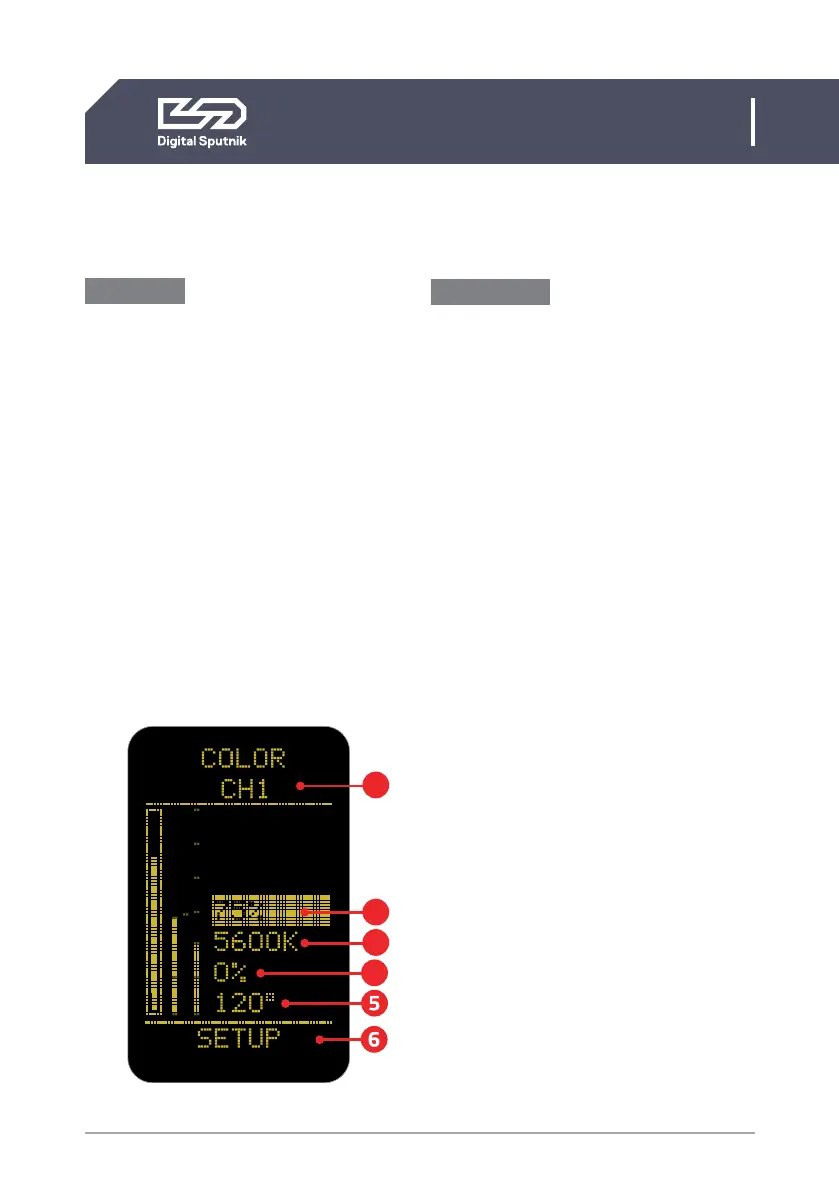
1. Channel selector - allows the user to
select specific light modules in the case of
disparate DMX addresses. All light modules
can be controlled simultaneously when
cycling the selection to “ALL”.* When all
of the modules are assigned to the same
DMX channel the only selection remaining
is “ALL”. By default it the lowest channel
number present.*
*For more information on DMX addressing please refer to
“DS DMX page”
2. Intensity (INT)- expressed in percentag-
es from 0 to 100, it serves as a dimmer.
On the intensity parameter, user tuned val-
ue is always saved as the starting point for
the presets. The presets alternate between
0%, “user value” and 100%. When no user
preset is defined it will just alter between
0% and 100%.
1
2
3
4


 To Next Page