26
WiFi page
Network information can be found on the
WiFi page of the menu.
To navigate between the DS DMX page,
SETUP and WiFi pages, use the left and
right arrow keys when the page name is
highlighted.
This page is only visible when the ArtNet
communication handle is installed and
the “REMOTE” mode on the setup page is
set to “WiFi”.
Depending on whether the PSU is set to
Server or Client mode, the information pre-
sented on the WiFi page will differ:
Server mode:
The WLAN Server mode is the default
mode. The created wifi network name is
by default the Serial Number of the WiFi
(ArtNet) handle. This WiFi network is capa-
ble of supporting up to 4 other DS PSUs as
clients, plus a controller. Larger networks
require a dedicated router.
DS6 User Manual
2. CONTROL / WiFi page
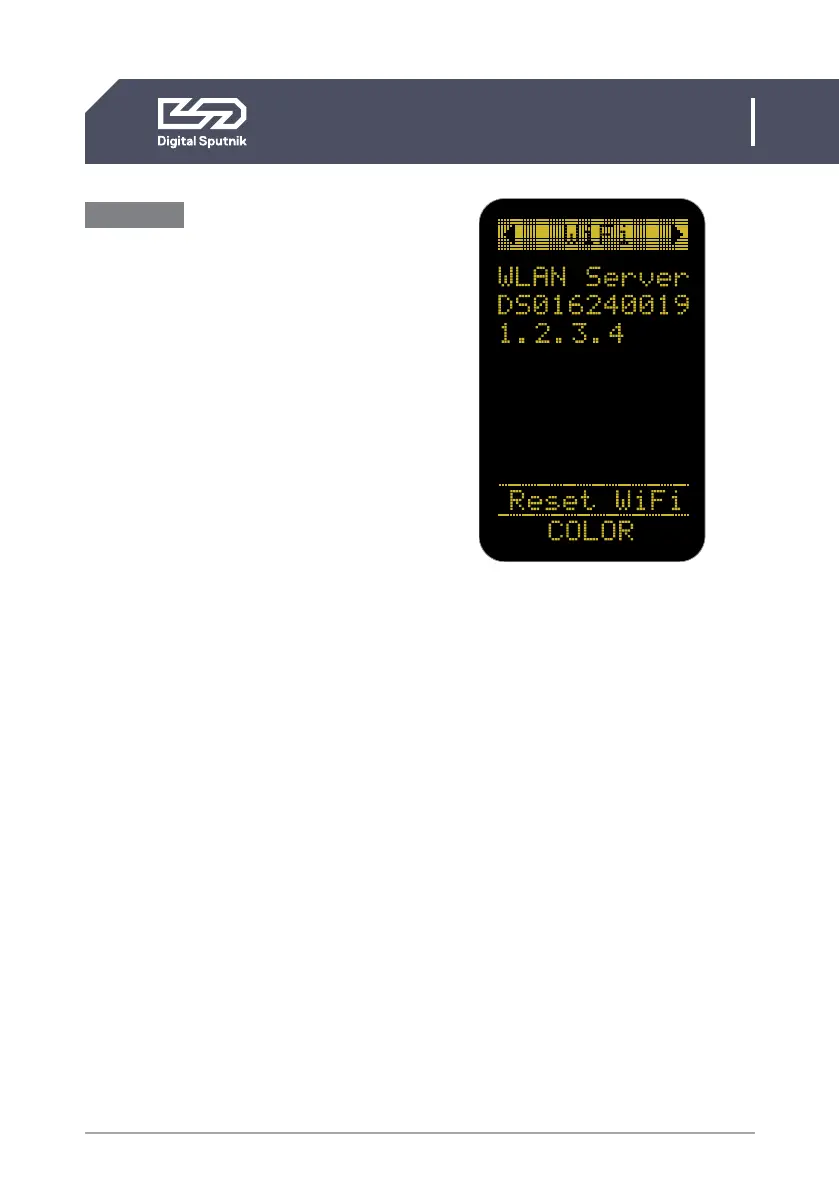
Server mode example
• WLAN Server
WIFI module is in the “Server” (Access Point)
mode
• DS016240019
WIFI network name (SSID),
either assigned by the user, or the default S/N as
printed on the side of the handle
• 1.2.3.4
IP address of this WIFI module


 To Next Page