22
DS6 User Manual
2. CONTROL / DS DMX page
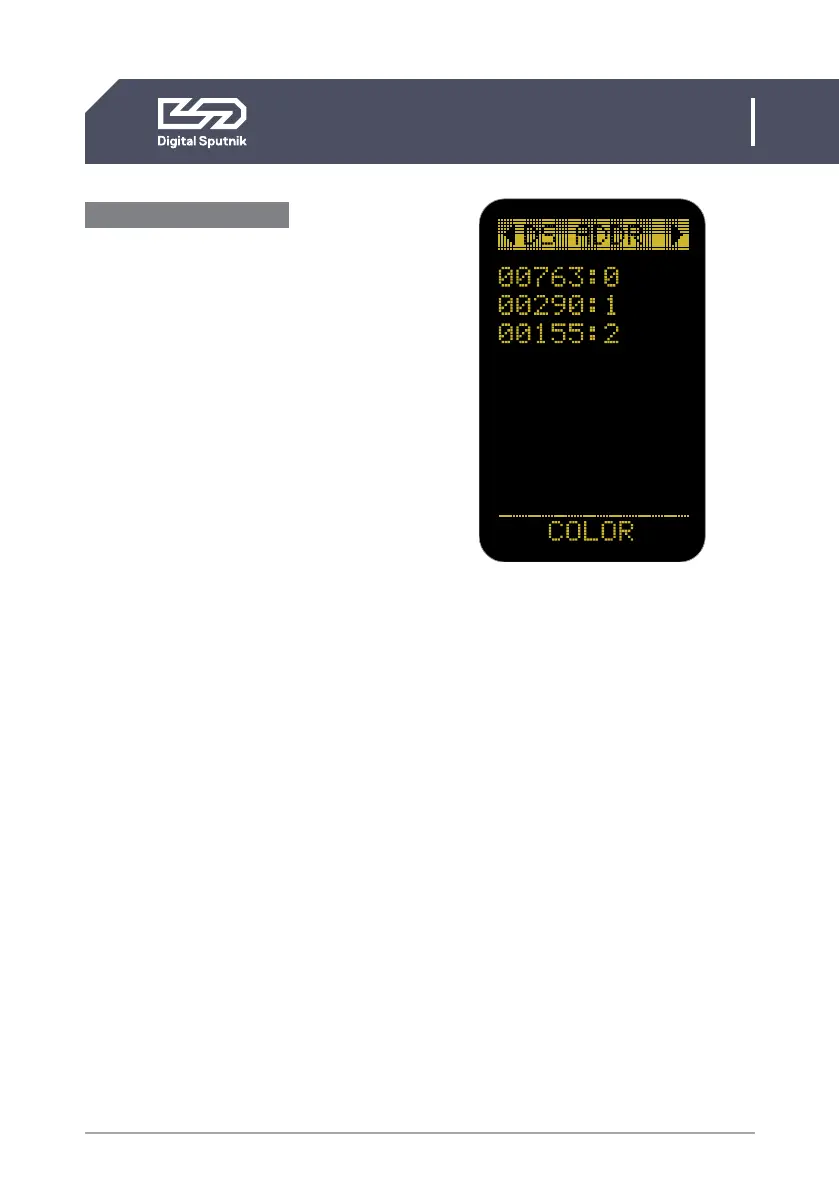
DS mode ON/DS ADDR
“DS mode” “ON” should only be used when
controlling PSU from the “DS DMX” iOS
app. When in need to change DMX universe
or DMX mode set “DS mode” to “OFF”
under “Setup” menu.
DS mode is a more simplistic approach to
DMX setup, eliminating the need to orien-
tate between DMX modes, universe selec-
tion and also making channel numbering
less cumbersome.
When the DS Mode is in use, the starting
page will be named as DS ADDR.
The only variable parameter on the DS
ADDR page is the channel number of a light
module.
DS mode ON example
• 00763:0
last 5 digits of light modules serial number
followed by a channel address
When using DS Mode, DMX personality
and universe settings are hidden and not
modifiable.
The light modules connected to the PSU will
be identifiable by the last 5 digits of their se-
rial number. It is followed by light module’s
DMX CHANNEL number.
A DMX channel is the address or identifica-
tion number assigned to the light module.
It gives a controller an address number to
send DMX packets to when wanting to con-
trol the light module. By default it is 0 when
using DS mode.
DMX addressing info is stored in the light
module. This means that when switching
modules between PSUs the light module
will hold it's address information.
Channels are modifiable. When using the DS
mode, the channel numbers will go from 0
to 50.
Up to 50 DS light modules can be
independently controlled using DS mode
as the DS mode only listens to commu-
nication from one universe (Universe is 0,
Net 0, Subnet 0).
Therefore it is not recommended to use DS
Mode in a configuration with more than 50
light modules.


 To Next Page