10
DS6 User Manual
1. HARDWARE / PSU interface
PSU interface
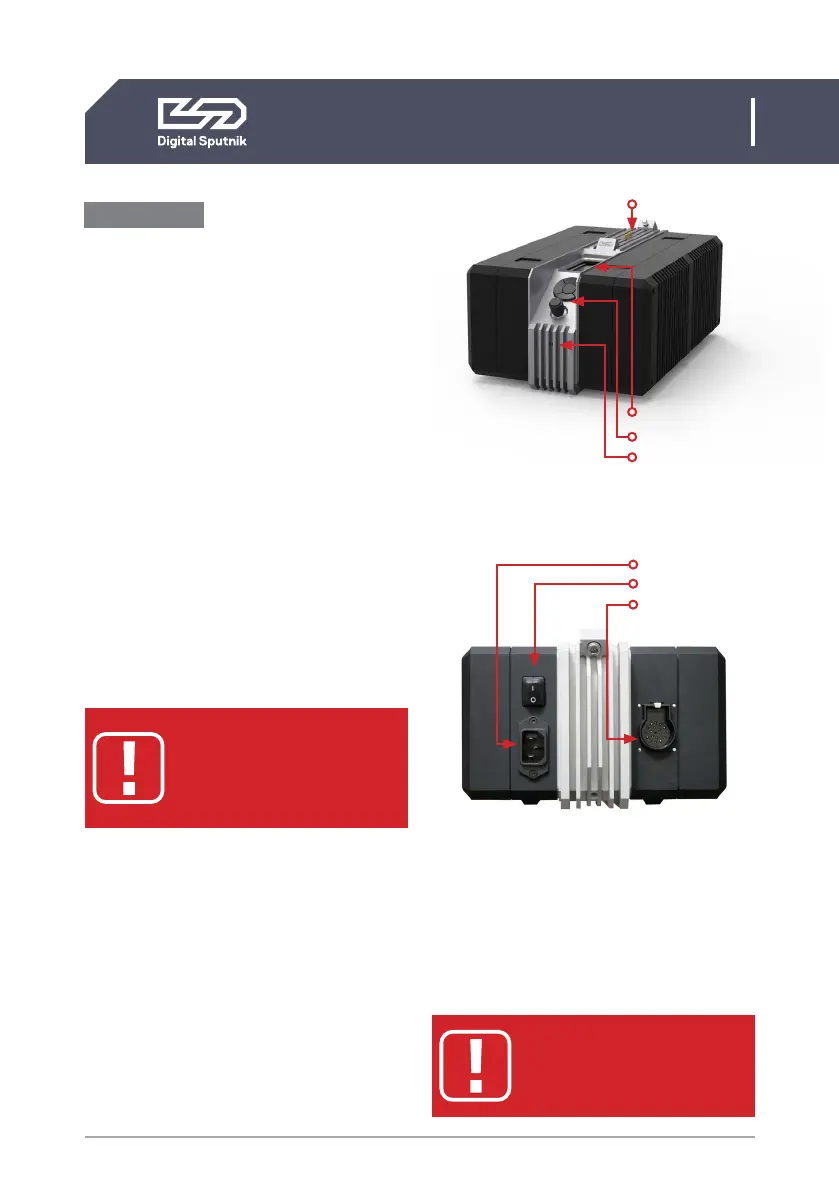
Screen
Gateway to your DS6 system. All color pa-
rameters, settings and system information is
presented on here.
Controls
A keypad, and twist knob. Keypad has
up,down,left,right, and center “OK” buttons.
The twist Knob rotates both clockwise and
counterclockwise and also acts as a button
when pushed down.
AC
The back of the PSU houses the AC IEC Socket
rated for 120V - 240V AC power with power
switch. Plugging in a “HOT” AC IEC power ca-
ble into the PSU while the power switch is in
the ON position is safe.
ELECTRIC SHOCK HAZARD
Use only approved power
cables. Connect only to an
outlet with protective earth.
Frame Cable socket
Turn off the PSU before connecting or
removing the frame cable. Frame Cable can
be run both ways but can only be inserted in
a certain position. A metal fastening indicates
the orientation to be inserted. In this process
it is important to NOT TWIST THE HEAD OF
THE CABLE, the cable head should be pushed
straight in when aligned with its fastening.
When pulling out remember to apply pres-
sure on the safety fastening clip as well.
• DO NOT HANG THE FRAME
OR PSU BY THE CABLE
• DO NOT STRAIN THE CABLE
Screen
Controls
Status indicator
Contact pins
AC
Power Switch
Frame cable socket


 To Next Page