25
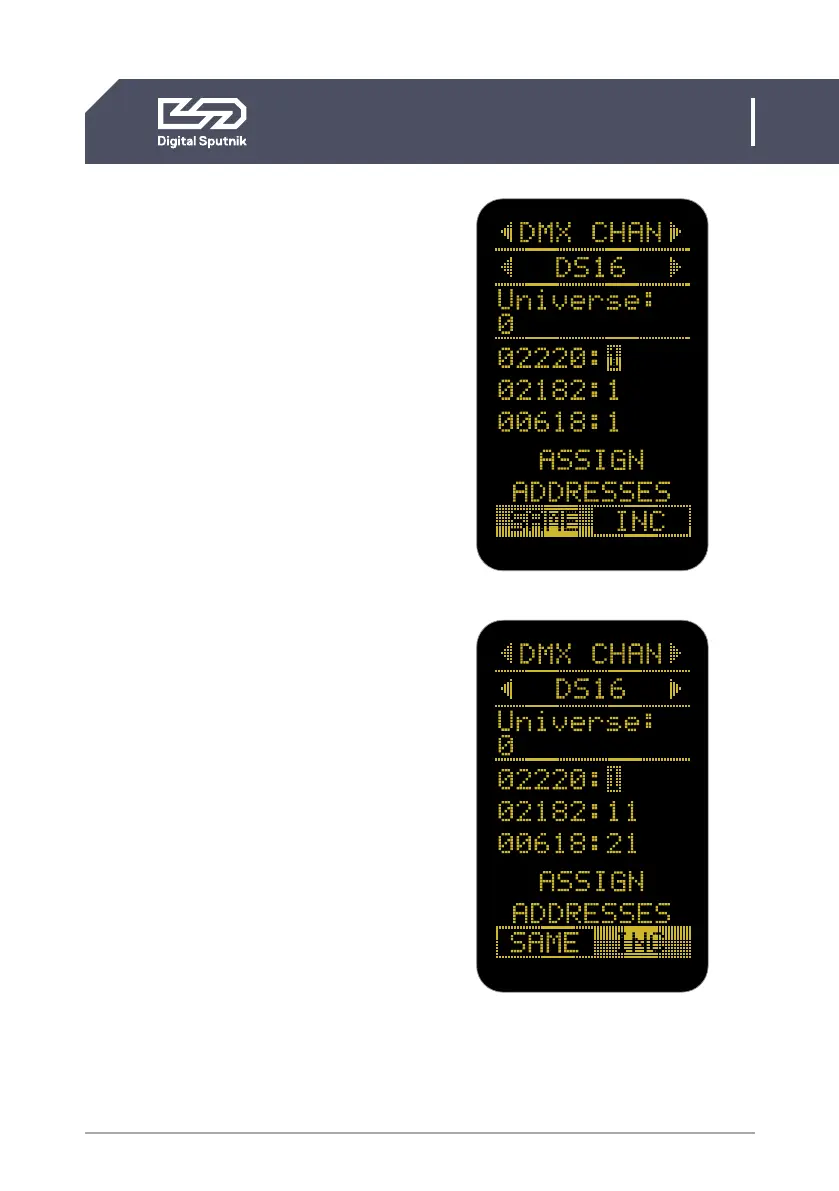
A quick and easy way to address multiple
light modules at once is to highlight any light
modules DMX address and press the “OK”
button on the control pad. This will display
the “ASSIGN ADDRESSES” function where
the user can assign DMX address to “SAME”
to make all light modules DMX addresses
the same to the DMX address highlighted.
This is good for simultaneous control.
The other option is “INC” to incremental-
ly change all light head addresses with
the proper interval dependant on the DMX
profile in use. When wanting independent
control of each light module.*
*This feature is present whether “DS mode” is turned “ON”
or “OFF”.
DMX channels 511 and 512 are used for
the purposes of Port-Address (Universe)
identification, and are ignored if used for
the purposes of channel control. The last
available DMX channel for addressing is
510.
“Loading DMX” message is continuously
displayed on the DS DMX screen when one
or more modules are not connected to the
frame or there is a connection problem. In
this case they are also not present on the
DMX listing on the DS DMX page.
DS6 User Manual
2. CONTROL / DS DMX page


 To Next Page