8
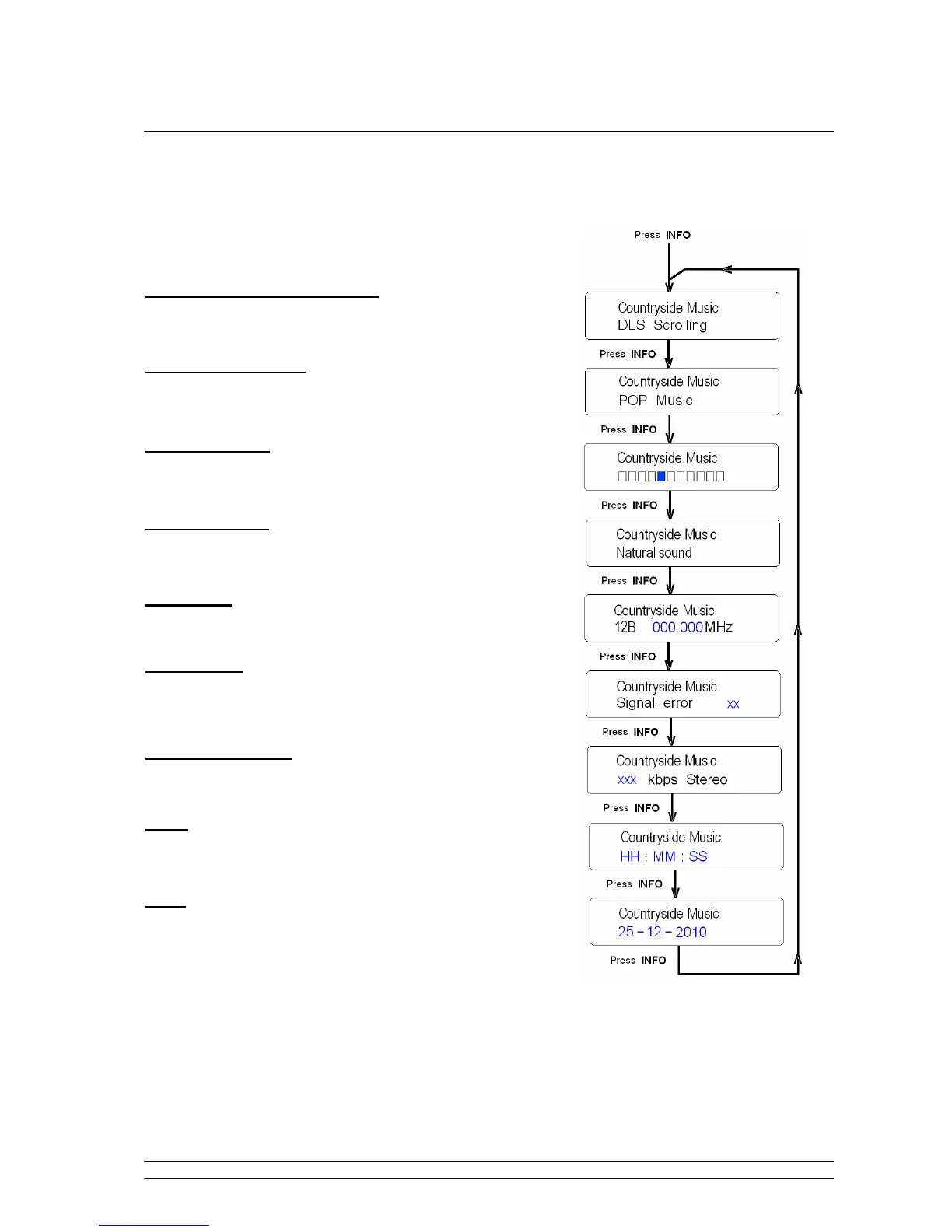
How to Shift the DAB Station Information?
To shift the information displayed by pressing the INFO button repeatedly.
Dynamic Label Segment (DLS)
This is scrolling text information supplied by the DAB station or
by broadcaster.
Program Type (PTY):
This is a description of the type of program provided by the DAB
station or by broadcaster.
Signal Strength:
Show a signal bar with the strength of the current station.
Multiplex Name:
This will show the multiplex that is broadcasting the program
you are listening to.
Frequency:
This displays station transmission frequency.
Signal Error:
This displays the signal error rate being received from 0 to 100.
a. 0 means no error signal being detected,
b. while 100 means it is a bad signal.
Signal Information:
This shows the digital bit rate and the signal mode.
Time:
This displays the time which is provided by the broadcaster so
will be accurate.
Date:
This displays the date which is provided by the broadcaster so
will be accurate.


 To Next Page