14
How to Setting Alarm?
Note: Setting Alarm, make sure Setting Time at first.
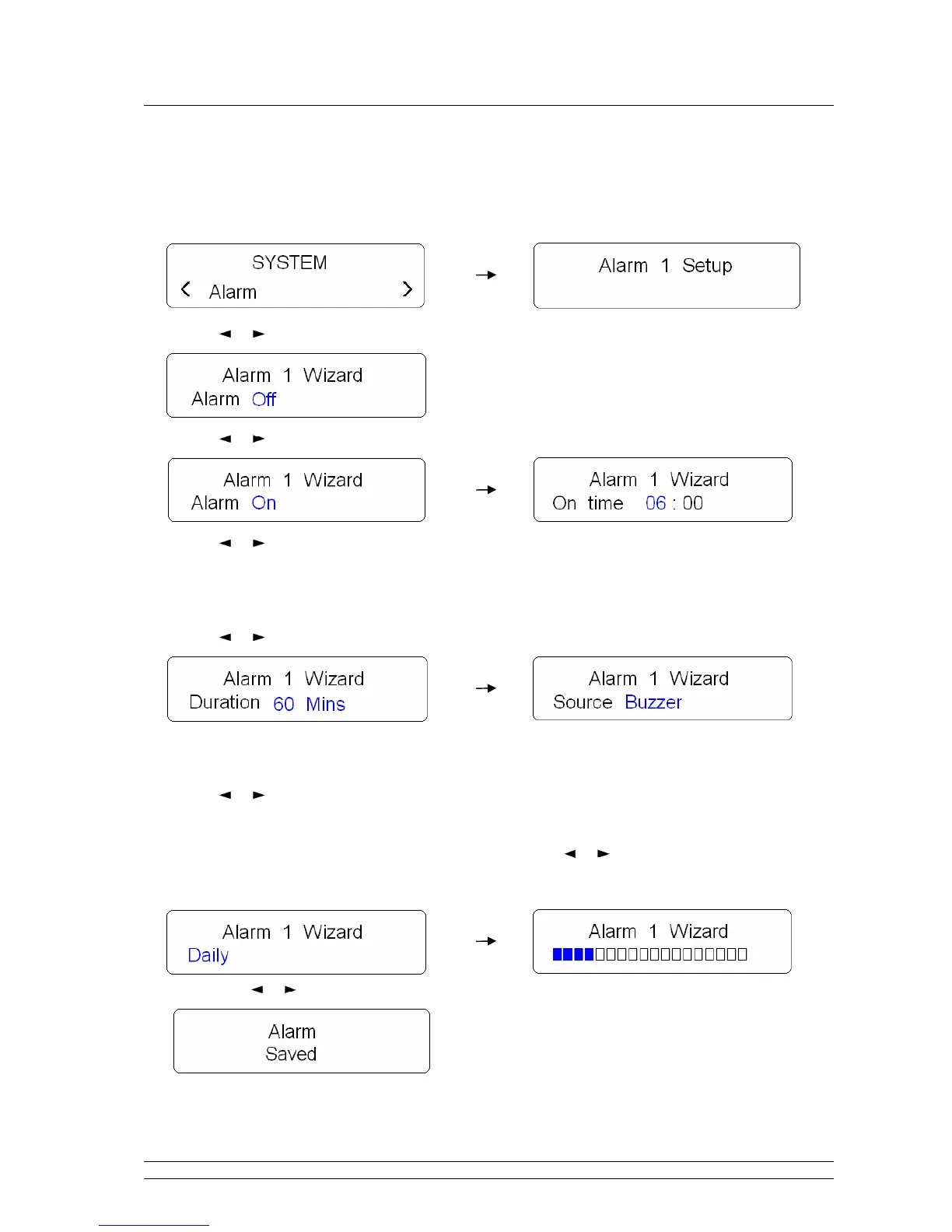
1. It can be active from < System > < Alarm >, press SELECT to confirm.
2. Press or button to view ‘Alarm 1 Setup’ or ‘Alarm 2 Setup’, press SELECT to confirm.
3. Press or button to ‘Alarm On’, press SELECT to confirm.
4. Press or button to alter hours, press SELECT to confirm.
Note: Alter minutes by using the same way, and then it will ask you to set the duration time, in which 15, 30, 45,
60 and 90 minutes in turn.
5. Press or button to your favour duration time, press SELECT to confirm.
Note: while alarm come, if you don’t press any button, it will be sounds until it reaches this pre-defined period
you’ve set.
6. Press or button to your selecting alarm source
,
in which Buzzer/DAB/FM,
press SELECT to
confirm
.
7. Now, radio will ask you to set the frequency of alarm, press or button to your expecting alarm
frequency: Once/Daily/Weekdays/weekends, press SELECT to confirm
.
8. Now press or button to adjust alarm volume level, and then press SELECT to confirm
.
☺ Until now, the alarm setting is done!


 To Next Page