13
How to Set Time?
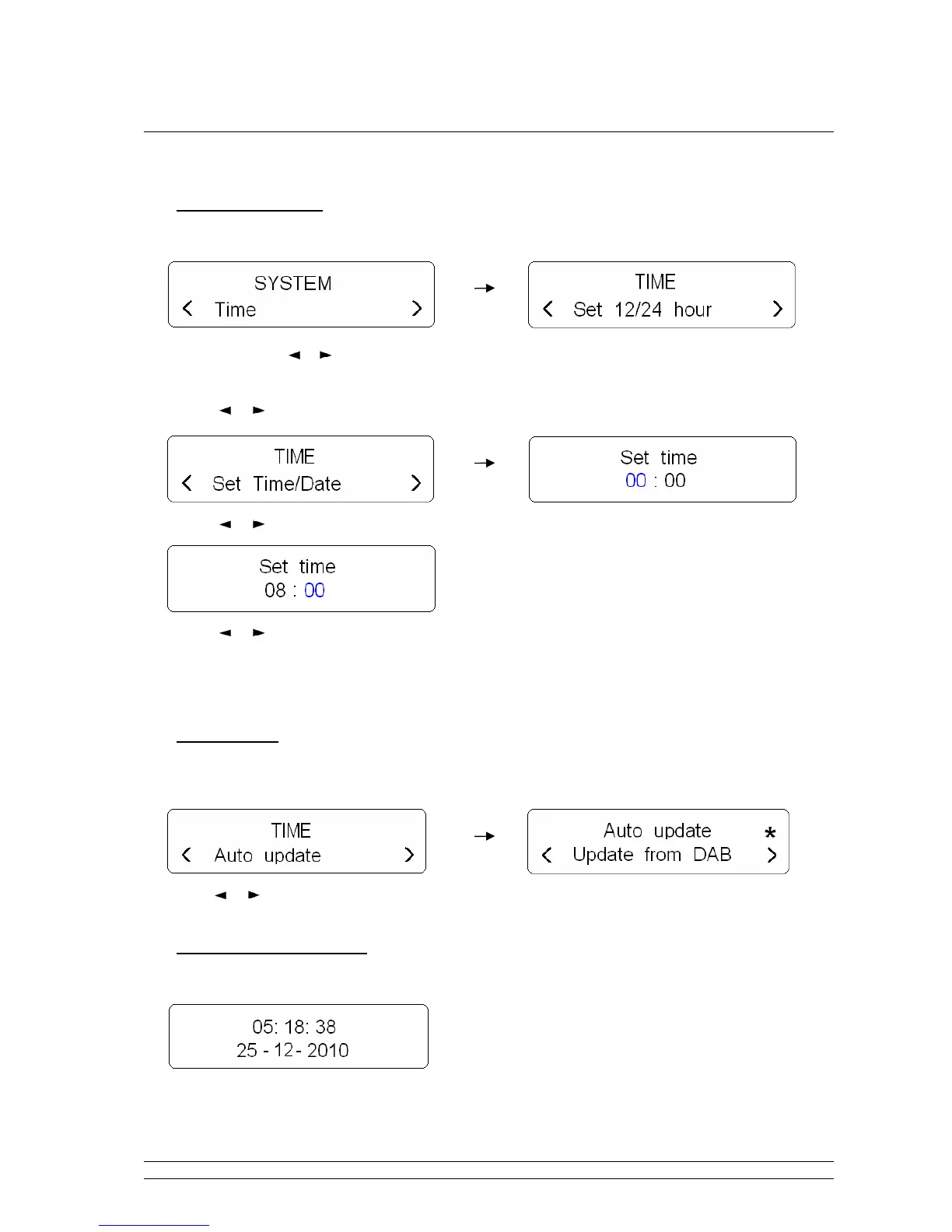
• Manually set time
1. It can be activated from < System > < Time >, and then press SELECT to confirm.
Note: here, press or , which you can browse <Set 12/24 hour format>, <Set Time/date>, <Auto update>,
and <Set date format>.
2. Press or button to ‘Set Time/Date’, press SELECT to confirm.
3. Press or button to change the hour, press SELECT to confirm.
4. Press or button to change the minutes, press SELECT to confirm.
5. Now radio will ask you to set the date, month and year in turn, step by step to set them, the Time
setting should be done in a minute!
• Auto update
1. It can be activated from < System > < Time > < Auto update >, press SELECT to confirm
2. Press or button to ‘Update from DAB’, press SELECT to confirm, then it is done!
• To browse time setting
1. Simply press STANDBY button.
Or alternatively, during playing a station program, press INFO button to browse current time.


 To Next Page