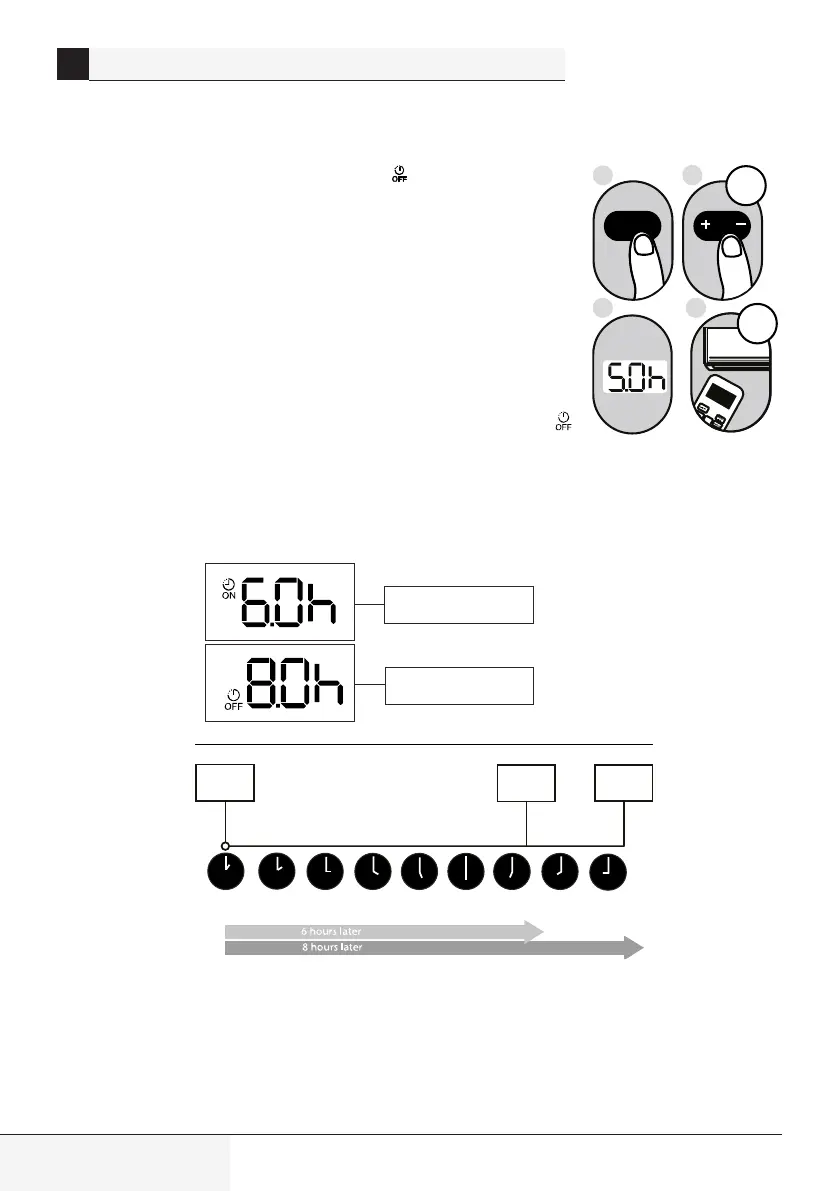
The TIMER OFF function allows you to set a period of time after which the unit will
automatically turn off, such as when you wake up.
1. Press the Timer button, the Timer off indicator "
" displays and flashes. By
default, the last time period that you set and an "h" (indicating hours)will appear on
the display.
Note: This number indicates the amount of time after the current time that you want
the unit to turn off.
For example, if you set TIMER OFF for 5 hours, “
5.0h” will appear on the screen,
and the unit will turn off after 5 hours.
2. Press the Temp + or Temp - button repeatedly to set the time when you want
the unit to turn off.
3. Wait 3 seconds, then the TIMER OFF function will be activated. The digital
display on your remote control will then return to the temperature display. The "
"
indicator remains on and this function is activated.
Note: When setting the TIMER ON or TIMER OFF functions, up to 10 hours, the
time will increase in 30 minute increments with each press. After 10 hours and up to
24, it will increase in 1 hour increments. The timer will revert to zero after 24 hours.
You can turn off either function by setting its timer to
"0.0h".
Example: Setting unit to turn
off after 5hours
Current
time 1PM
2PM 3PM 4PM 5PM
6PM 7PM 8PM 9PM
Timer starts
Unit turns Unit turns
ON
OFF
Timer is set To turn ON
6 hours from current time
Timer is set to turn OFF
8 hours from current time
4
Splt-type room ar condtoner / User Manual
REMOTE CONTROL OPERATION


 To Next Page