15
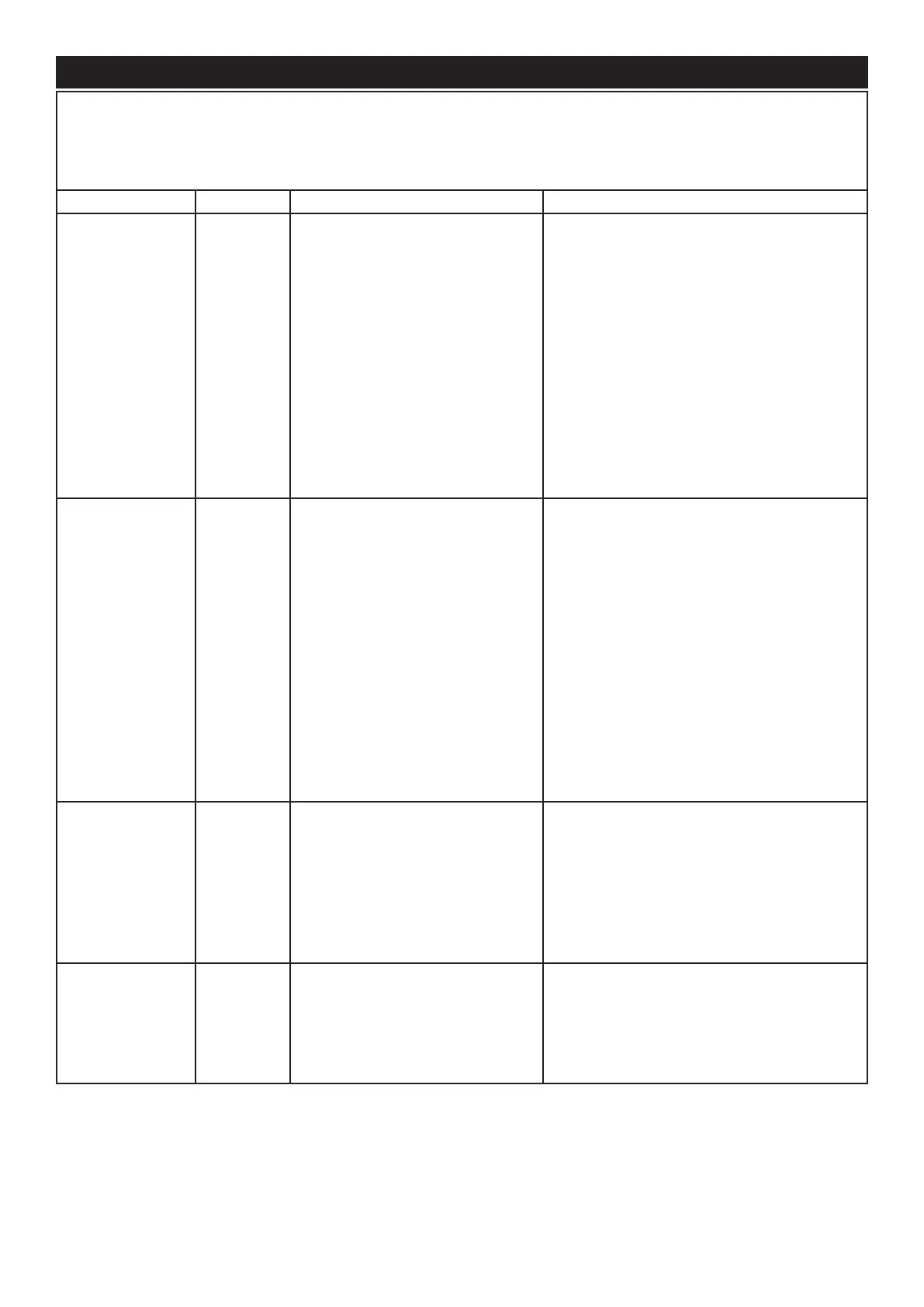
The product has been designed to highlight particular errors by ashing the on board LED lights. The lights will ash
a number of times corresponding to the error that is occurring. The error code corresponding to the error will also be
displayed on the screen of the remote control. Please see the table below for the explanation of the errors.
Symptom Error Code Cause Corrective Action
Product will not
operate. LEDs
continuously blink
twice on one side
Cd51
Low Water reading on side that is
blinking
If experienced during rst ll of product, refer
to ‘Initial Product Start Up’ section above
If the product is being fed by a water tank via
a pump, rell the water tank and reset the
product by switching off ‘Switch A’ (Fig 27) for
20 seconds and switching it back on again.
Or reset the error using the remote control
by following the steps in ‘Remote Control
Operation’
Check if the Leak Prevention Valve has been
activated. Replace pad if necessary (Fig 35).
Product will not
operate. LEDs
continuously blink
four times
Cd56 Fill time from min to max level has
been exceeded
If experienced during rst ll of product, refer
to ‘Initial Product Start Up’ section above.
If the product is being fed by a water tank via
a pump, rell the water tank and reset the
product by switching off ‘Switch A’ (Fig 27) for
20 seconds and switching it back on again.
Or reset the error using the remote control
by following the steps in ‘Remote Control
Operation’.
If the product is being fed from a mains water
supply, check that there is sufcient water
pressure to supply the product.
Product will not
operate. LEDs
continuously blink
three times
Cd57
Time from max level to min level is
too short.
Conicting water level readings
(min and max level being read at
the same time.)
Ensure there are no leaks in the sump.
Ensure that the oats are moving freely with-
in the sump.
Ensure the product is level.
Product will not
operate. LEDs
continuously blink
once every 8 sec-
onds on one side
Cd58
Overow Detection on side that is
blinking
Switch off the product and the water supply.
Contact your dealer for assistance.
Troubleshooting




 To Next Page