Installation Attentions
4
Product model: please check the model of your gateway before installation;
Anti-jamming: to reduce the interference with PSTN lines, it’s highly recommended that
PSTN lines connected to the gateway should be placed away from power cables;
Power supply: DAG1000-4O and DAG1000-8O are equipped with 12VDC power adapter,
while DAG2000-16O, DAG3000-32O and DAG3000-128O accepts AC input voltage of
100-240V. Please ensure safe and stable power supply;
Network bandwidth: please ensure there is enough network bandwidth so as to guarantee
stabilized running of the gateway;
Ventilation: to avoid overheating, please do not pile up the gateway with other devices and
make sure the gateway has good ventilation around;
Temperature and humidity: to avoid any accident that might cause malfunction,it’s advised
to install the gateway in an equipment room where temperature and humidity are
appropriate;
Mechanical load: please make sure the gateway is placed steadily to avoid damage.It’s
highly advised to horizontally place the gateway on a flat surface or a cabinet.
Installation Instructions
5
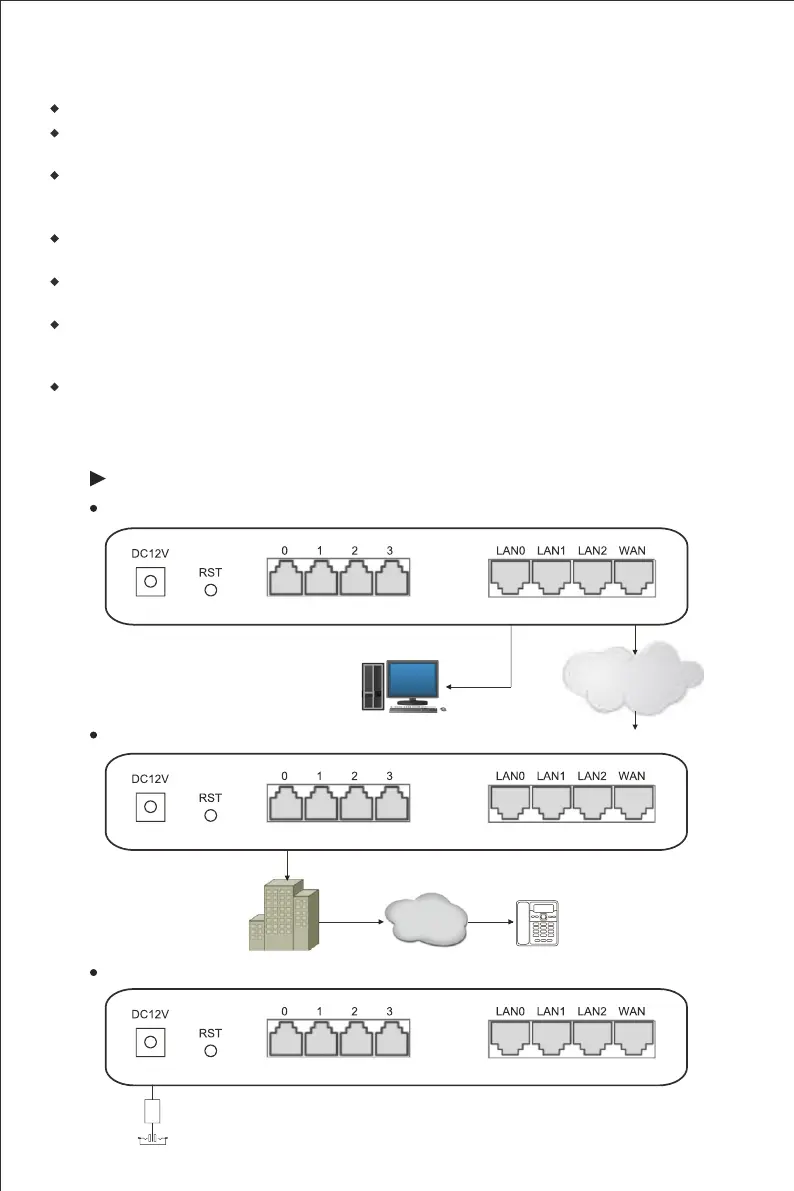
Connection Diagram for DAG1000-4O
Connect gateway with network
Network Cable
PC
Connect FXO port with PSTN line
LAN
Telecom
Operator
User
PSTN
PSTN Line
Network Cable
Router
Connect gateway with power input
DC12V Power Plug














 To Next Page