12
Operation (cont.)
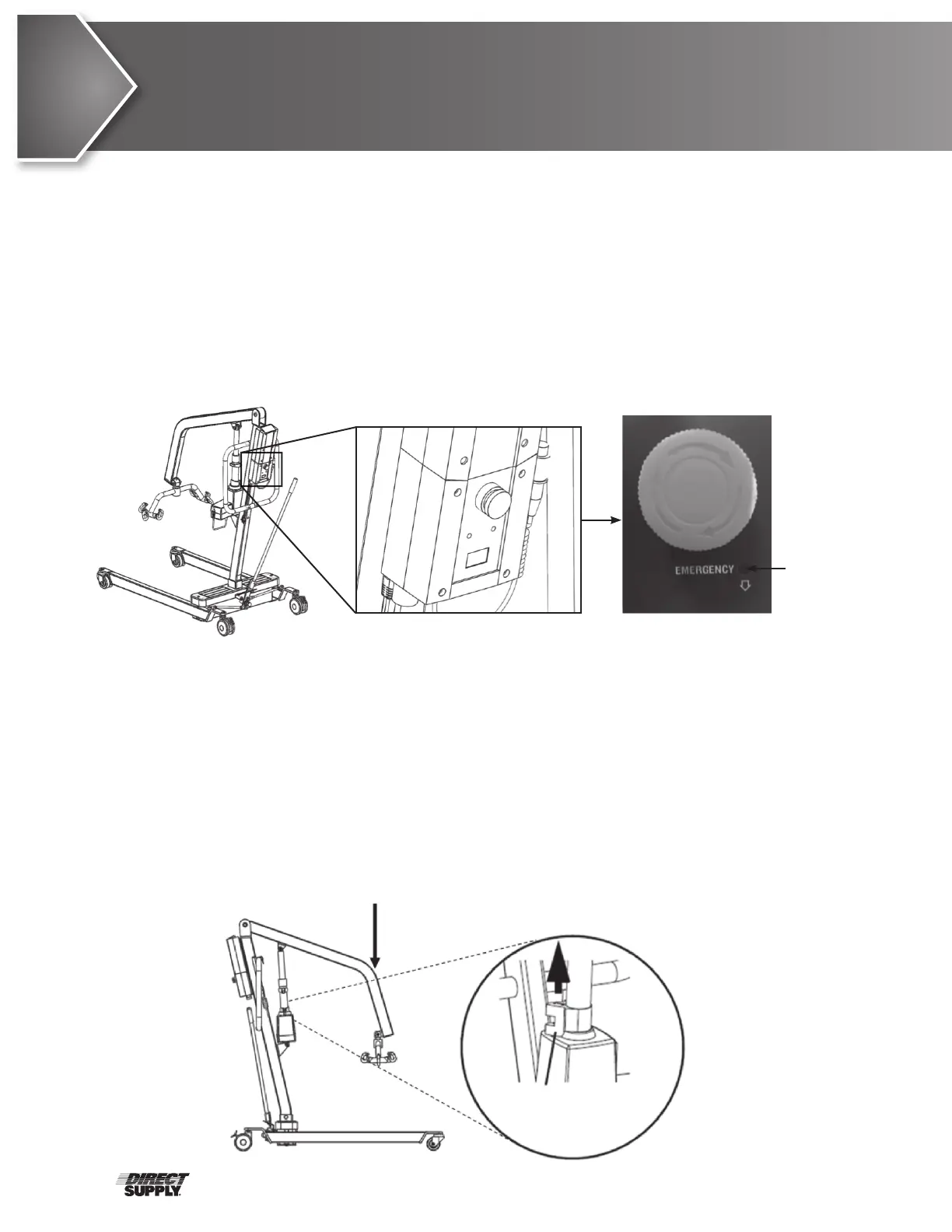
Emergency Release
Always use extreme caution when operating an emergency release.
Primary Emergency Release
To activate the primary emergency release, insert a pen into the hole labeled “emergency” on the
control box of the lift and push down on the boom at the same time.
This product’s lift actuator is equipped with a mechanical emergency release, which enables
retraction without electrical power. The actuator will only retract when the emergency release lever is
pulled while under load. Locate the emergency release red-colored grip lever.
Secondary Emergency Release
• CAUTION: The secondary emergency release is only a backup if the primary emergency release
fails. Use the primary release first.
If the primary release fails to function correctly or is out of reach, the secondary emergency release
may be used.
To activate the secondary release, pull up on the red-colored emergency release lever to the MAX
position, which is about 11 mm, or when the red-colored lever can’t be pulled up any further, and
push down on the boom at the same time. Continue to lift the red emergency release lever to its
maximum position, and push down on the boom until the boom has been fully lowered.
Push Down on Boom
Pull UP on
Emergency
Grip
insert a
pen here
11 mm


 To Next Page