13
1-800-634-7328 DirectSupply.com
Emergency Stop
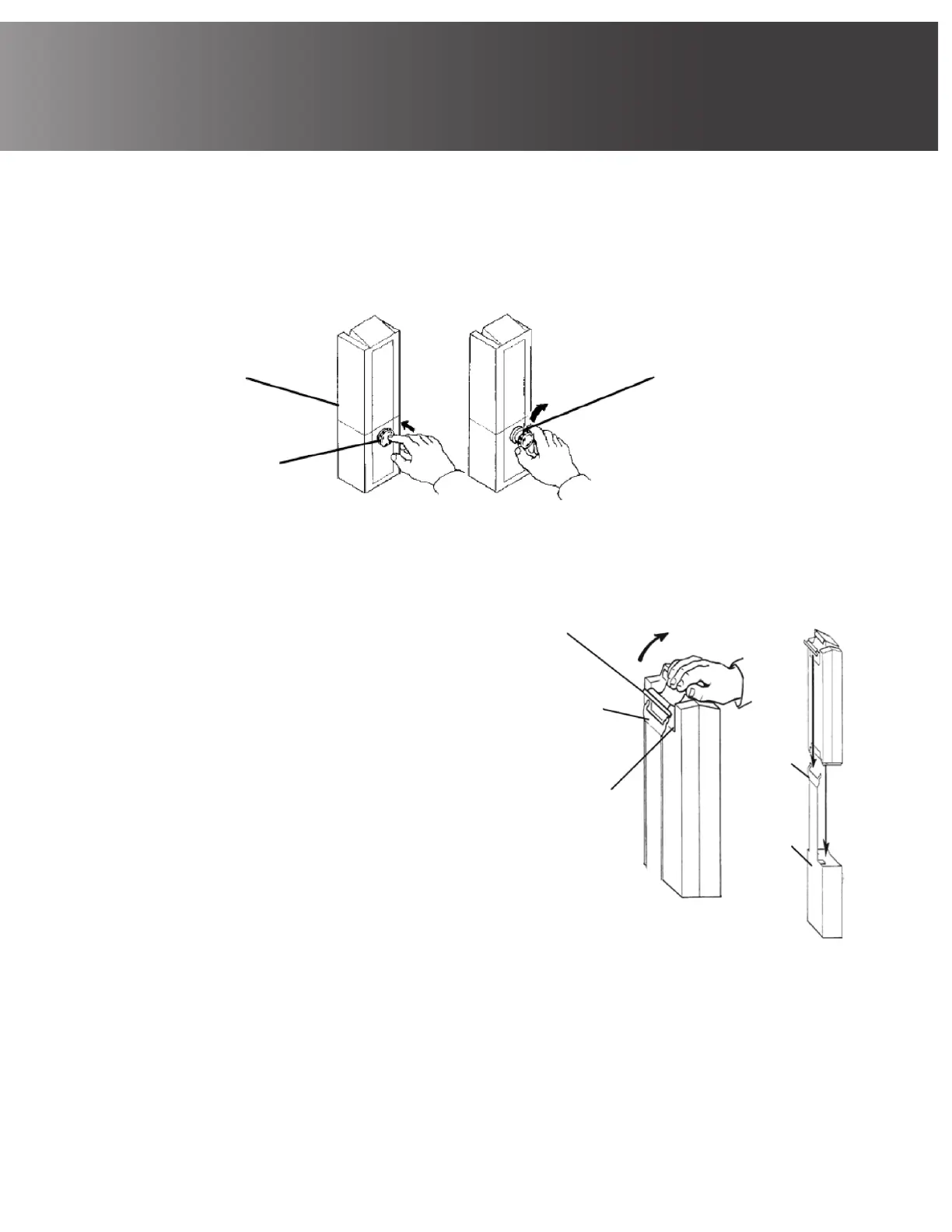
To stop the boom assembly from raising or lowering, press the red emergency button on the
control box.
To disengage the emergency stop, rotate the red emergency stop button clockwise.
Charging the Battery
Attaching battery to unit:
a) Lift the handle on the back of the battery.
b) Lift the battery up and away from the
control box.
c) Place the battery on the battery charger as
shown. Listen for an audible click.
d) Lift the handle on the back of the battery.
e) Lift the battery up and away from the
battery charger.
f) Reinstall the battery onto the control box
as shown. Listen for an audible click.
To prolong battery life, the battery should be
recharged daily. When the battery is low, an alarm
will sound.
• CAUTION: To confirm proper mounting, listen
for a click when mounting the battery on the
battery charger. Otherwise, damage may occur.
When the battery is charging, the charge
LED will illuminate. When charging is
complete, charge LED will stop illuminating.
It takes approximately four hours for a
battery to fully recharge.
Control Box
Press IN to
Stop Boom
Rotate CLOCKWISE to
Disengage Emergency Stop
NOTE: The battery mounts to the control
box and battery charger as shown.
Handle (a, b, d & e)
Audible Click
(c & f)
Battery
Charger
(c)
Battery
Control
Box
(f)


 To Next Page