25
1Overview
GB
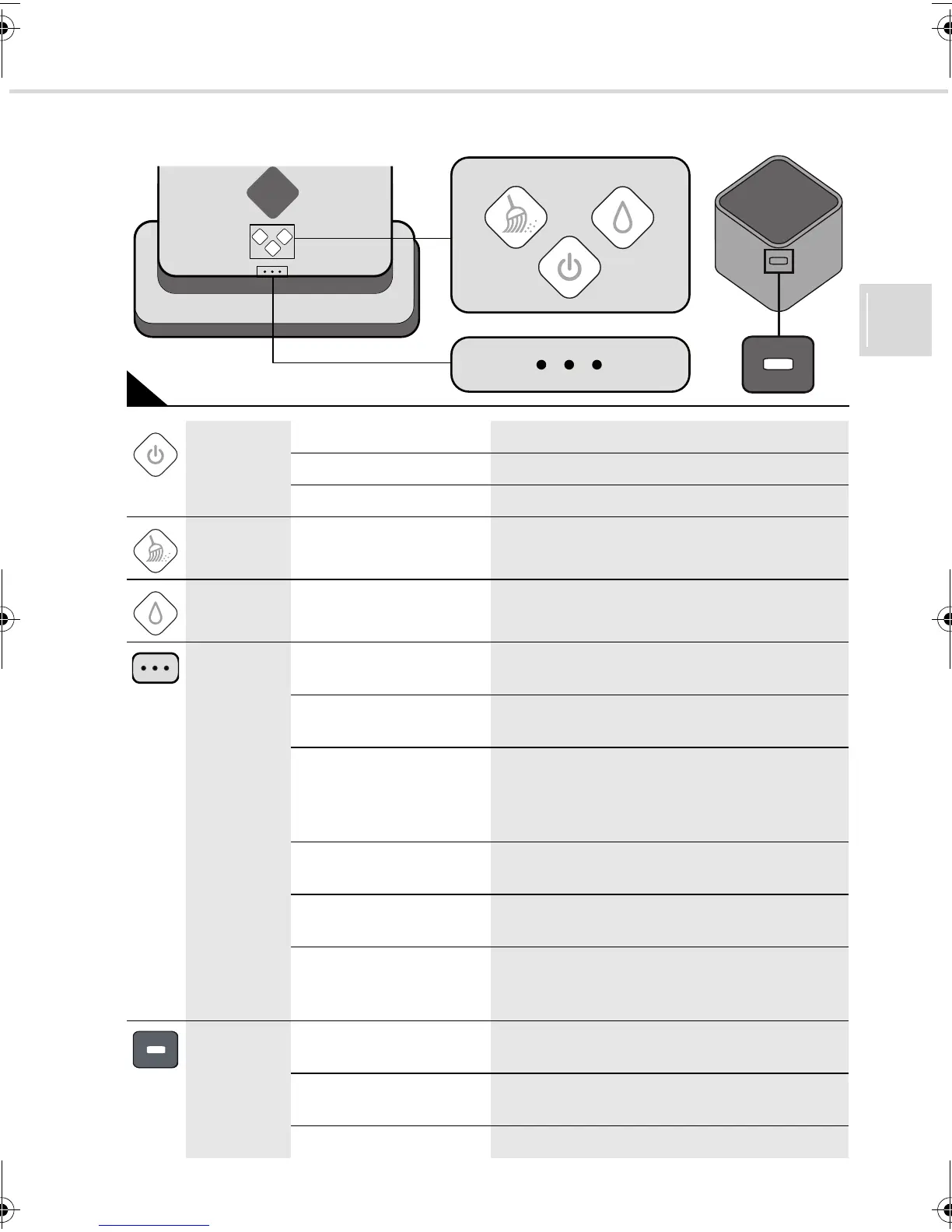
1.2 Lights and illuminated buttons
2
On/off button
on sweeping
robot
continuous blue light
the sweeping robot is on
flashes red
the battery is running low
continuous red light
the batteries have to be charged
‘Dusting’
button
continuous blue light the ‘dusting’ mode was selected after the
sweeping robot was switched on
‘Washing’
button
continuous blue light the ‘washing’ mode was selected after the
sweeping robot was switched on
Status LEDs no LED on the sweeping robot is off or has no connection to
the control cube
an LED is flashing blue
after switching on, it established a connection to
the control cube
continuous blue light is
coming from one to three
LEDs
after selecting the desired mode, one, two or
three LEDs emit light, depending on the strength
of the signal received from the control cube
(the signal is strongest if three LEDs are on)
all three LEDs flash one
after another
the sweeping robot is computing information
all three LEDs flash one
after another periodically
the sweeping robot is in sleep mode
a continuous red light is
coming from the middle
LED
the appliance has a fault, ZPage 38, "Trouble-
shooting"
LED on the
control cube
is flashing blue the control cube is switched on and is broad-
casting a signal
continuous blue light
the control cube is switched on and is receiving
a signal from the sweeping robot
continuous red light
the batteries have to be changed
Evo.book Seite 25 Donnerstag, 21. Oktober 2010 3:34 15














 To Next Page