34
6Use
6Use
6.1 Switching on the appliance
1. Put the sweeping robot on the floor to be
cleaned near the control cube.
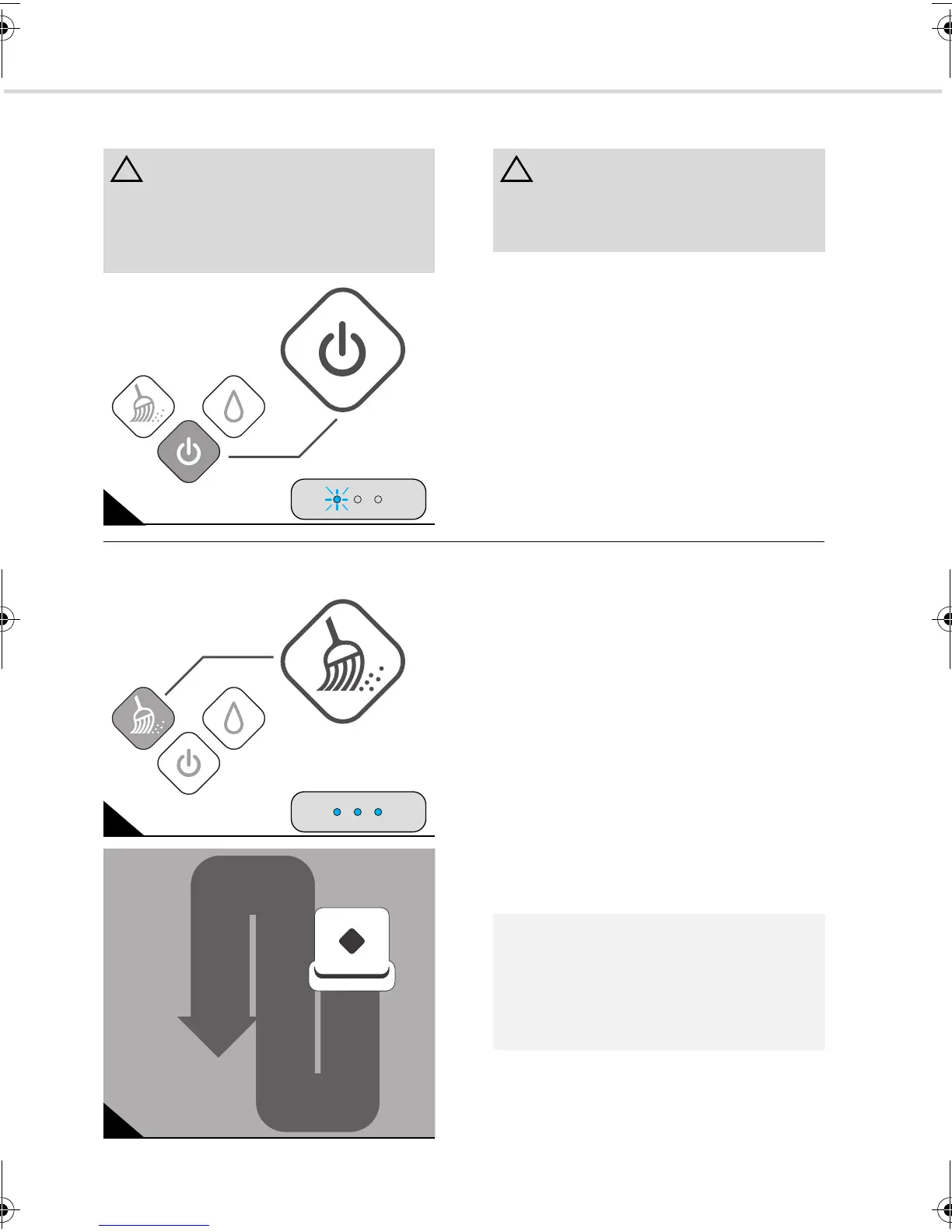
2. Turn on the sweeping robot using the on/
off switch (Fig. 18).
- A continuous blue light is emitted from
the on/off button.
- A short melody sounds.
- The left status LED flashes blue until
you select a cleaning mode.
- If you do not select a cleaning mode, the
appliance will turn itself off after about
five minutes.
6.2 Wiping up dust
1. Press the ‘dusting’ button (Fig. 19) if you
have attached a dust cloth and turned on
the appliance, ZChapter 6.1, "Switching
on the appliance".
- A continuous blue light will be emitted
from the ‘dusting’ button.
- A short melody sounds.
- The appliance will now start up. It begins
by cleaning the surface to its right, al-
ways moving forward in parallel sweeps
(Fig. 20). If it bumps into an obstacle, it
turns accordingly.
- According to the strength of the signal
from the control cube, 1–3 status LEDs
emit continuous blue light.
ATTENTION:
Although your sweeping robot recognises
drops in elevation, we strongly advise
against using it on furniture and similar
objects. It is not suitable for this type of use.
18
ATTENTION:
Never operate the sweeping robot without a
floor cloth attached. Otherwise, surfaces
might be damaged.
19
20
NOTE:
You can stop the robot at any time during
cleaning by pressing one of the illuminated
buttons. However, it then ‘forgets’ the virtual
map it has constructed and starts from
scratch once it is turned back on.
Evo.book Seite 34 Donnerstag, 21. Oktober 2010 3:34 15














 To Next Page