30
4 Before first use
4 Before first use
4.1 Unpacking
1. Unpack the appliance and all its accesso-
ries.
2. Check the contents for completeness and
possible damage (Fig. 1).
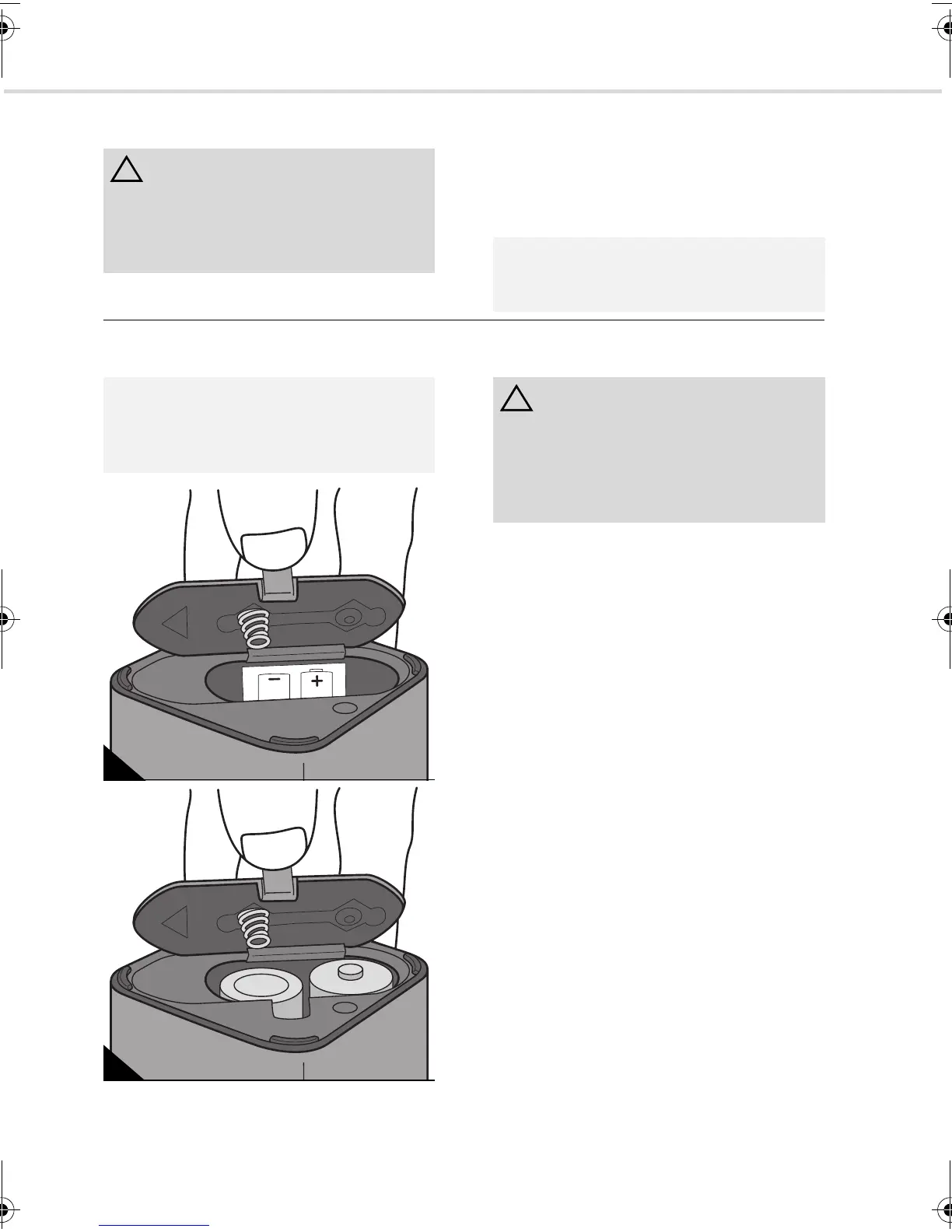
4.2 Inserting batteries into control cube
1. Unlatch and remove the lid of the battery
compartment (Fig. 9).
2. Insert the batteries supplied as shown on
the sticker inside the control cube (Fig. 9).
3. Put the lid of the battery compartment
back on (Fig. 10) at the back and push
down at the front. You will feel and hear
the lid snap into place.
4. Check that the batteries have been insert-
ed properly by turning on the control cube
using its on/off button.
- The LED on the opposite side should
now be flashing.
- If the LED on the control cube does not
flash after switching on, repeat steps 1–
4.
5. If you haven’t done so already, remove the
protective film from the surface of the sen-
sor.
The control cube is now ready to use.
ATTENTION:
Keep the packaging for storing the appli-
ance, or for it to be transported safely.
Always transport or ship the appliance in its
original packaging to avoid damage.
NOTE:
Immediately contact your dealer if you have
found damage resulting from transport.
NOTE:
A sticker inside the control tube indicates
the direction in which to insert the batteries
(Fig. 9).
9
10
ATTENTION:
Only insert into the control cube the batter-
ies supplied or batteries with the same per-
formance characteristics (type C, 1.5 volts).
Always change both batteries at the same
time.
Evo.book Seite 30 Donnerstag, 21. Oktober 2010 3:34 15














 To Next Page