33
5 Before every use
GB
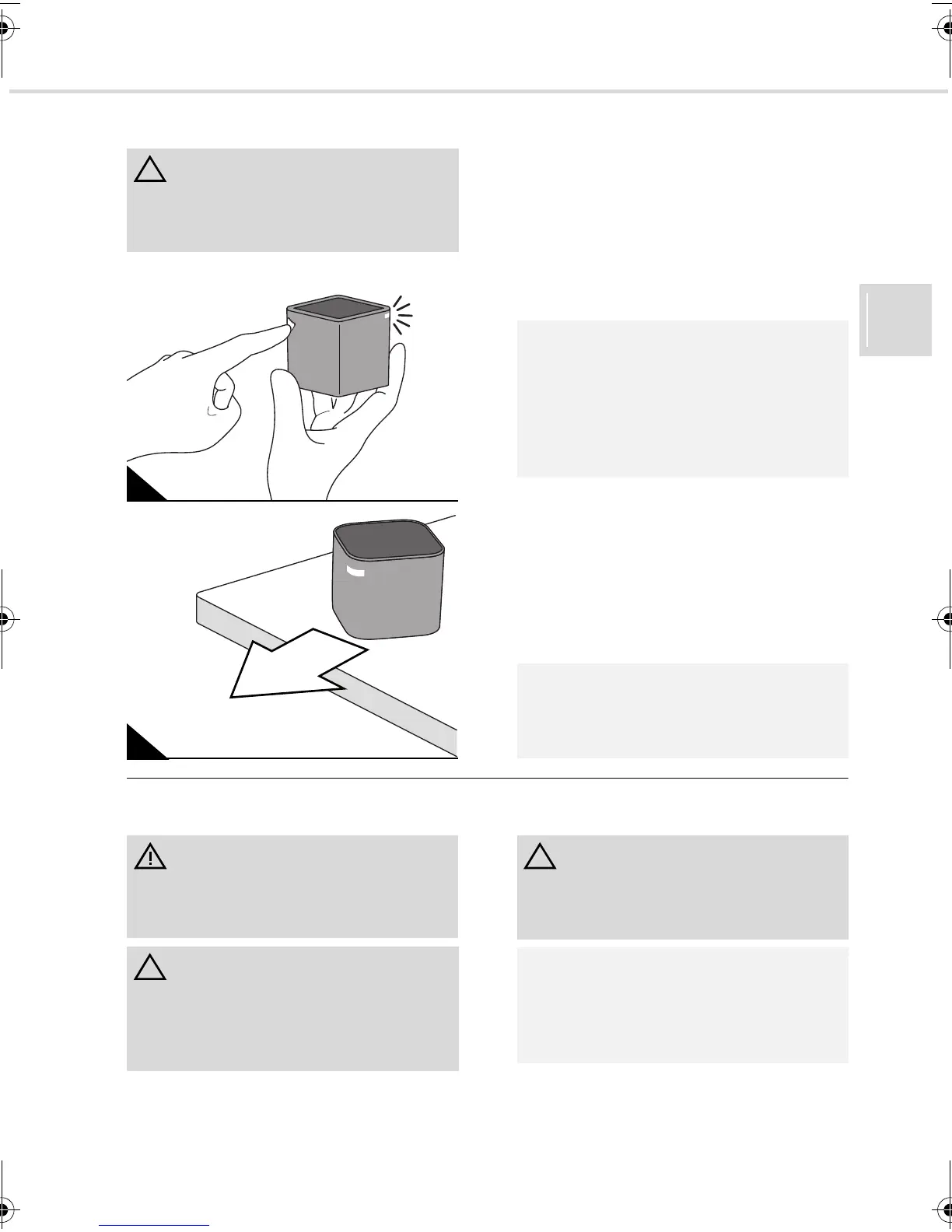
5.2 Positioning the control cube
1. Turn on the control cube using the on/off
switch (Fig. 16).
- The blue LED on the control cube will
flash until a connection is established
with the sweeping robot.
- As soon as a connection has been es-
tablished, a continuous blue light will be
emitted from the LED.
2. Position the control cube so that:
- it is on a high piece of furniture;
- it can send a signal towards the ceiling
without hindrance;
- its blue LED is pointing into the room;
and
- its blue LED points away from the near-
est walls (Fig. 17).
5.3 Preparing the room to be cleaned
ATTENTION:
Do not put the control cube on the floor as it
might be damaged by the appliance or inat-
tentive persons.
16
17
NOTE:
If you forget to turn on the control cube, the
switched-on sweeping robot will automati-
cally attempt to establish a connection to
the control cube later. If it succeeds then a
blue light will be emitted from the LED as
described above, and the control cube is on.
NOTE:
If you want to clean several rooms, you can
purchase additional control cubes to use in
each room.
WARNING:
Ensure that no children or pets are in or
have access to the room you are going to
clean.
ATTENTION:
Your EVO has a powerful drive. Do not
underestimate its power. Put into a safe
place objects that are fragile or could topple
or fall over if the appliance drives into them.
ATTENTION:
Remove pointed and sharp objects from the
floor that could scratch surfaces if they got
under the floor cleaning panel of your EVO.
NOTE:
Your EVO is not a vacuum cleaner and its
floor cloth can only remove a small amount
of dust. Clean particularly dirty rooms with a
vacuum cleaner beforehand.
Evo.book Seite 33 Donnerstag, 21. Oktober 2010 3:34 15














 To Next Page