9 / 15
ON
Must be set to the
OFF (0) position
S1
S1
MAC Address DIP
Switch (S1)
located under the
cover
The MAC Address
weighting for each
switch
1 2
3 4 5 6 7 8
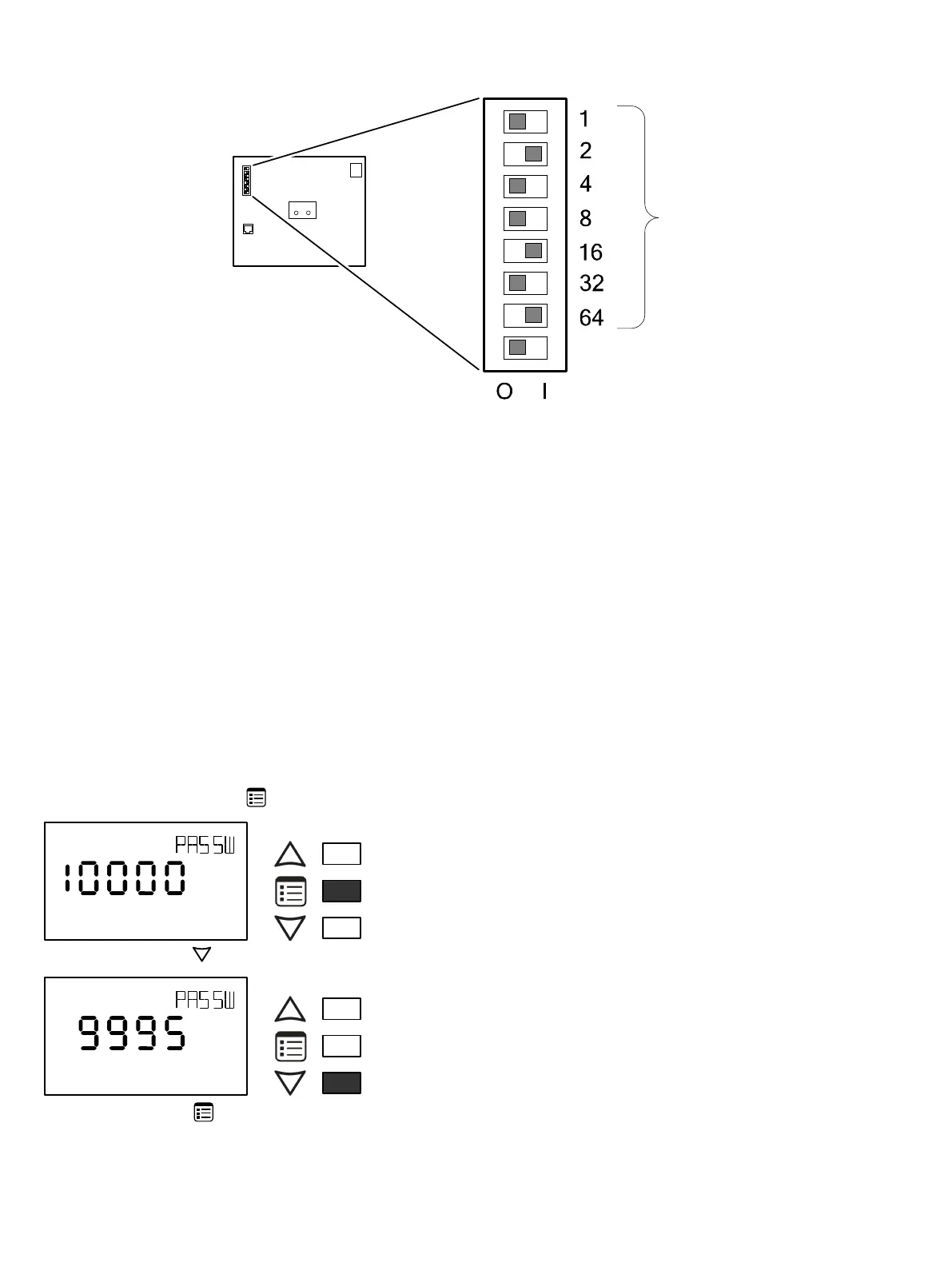
Figure6: Typical Device MAC Address DIP Switch Set to 82
The address is the sum of the numbers set to ON. For example, if the second (2), fifth (16), and seventh (64) DIP switches are set to ON, the device
MAC address is 82 (2 + 16 + 64). Only addresses from 1 to 127 are recommended to be used.
The controller must be power cycled after the MAC address DIP switch has been changed. The device instance (DevID) is automatically configured
when setting the MAC Address to prevent network address conflict. The following formula is used to determine the device instance:
DevID = 364 * 1000 + MAC
For example:
MAC: 37
DevID = 364 * 1000 + 37 = 364037
The Device Instance can be changed once the controller has been commissioned through the network management software interface.
Setting the Communicating Sensor Subnet ID
ECB Series controllers can be commissioned with an Allure EC-Smart-Vue Series Communicating Sensor by connecting it to the controller as shown in
Figure 14.
The default Subnet ID for an Allure EC-Smart-Vue Series Communicating Sensor is 1. To commission an ECB Series controller, the sensor’s Subnet ID
must be set to 1. If the sensor’s Subnet ID has been set to another value (for example, the display flashes error code 1 with the Bell icon when the sen-
sor is connected to a controller for commissioning), change the Subnet ID to 1 as follows:
1. Connect an an Allure EC-Smart-Vue Series Communicating Sensor to the controller with a Cat 5e patch cable. Wait for the Bell icon and the number
1 to flash on the display.
2. Press and hold the Menu button for 5 seconds to enter the password menu. 10000 is shown on the display.
OR
Screen Timeout: 15 seconds
3. Press the down button to set the number to 9995 (this is the default password).
OR
Screen Timeout: 15 seconds
4. Press the Menu button to submit the password. Upon submitting the password, the GEN CFG menu appears on the display.






 To Next Page