26
IP2162EN
EN
Display Description
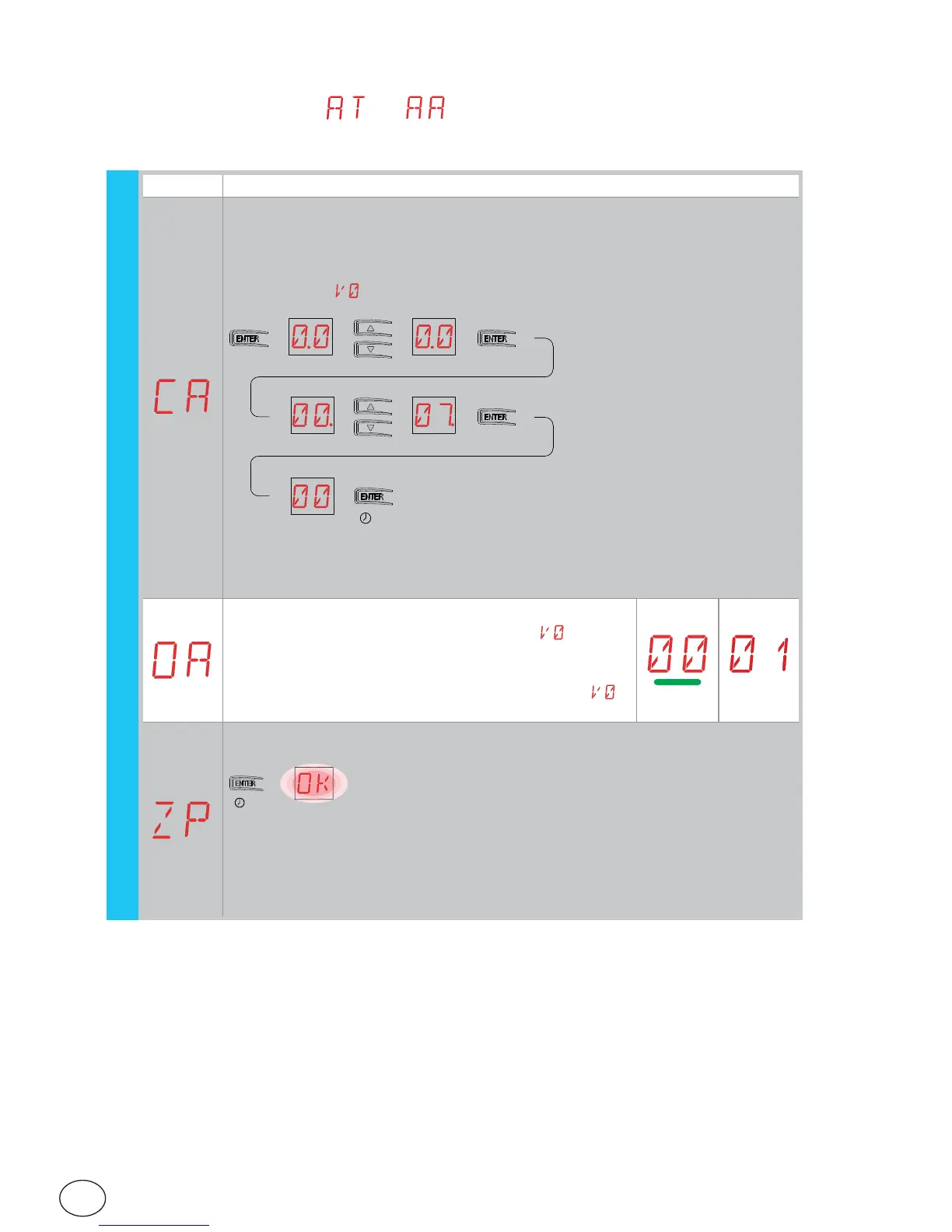
CA - Setting the maintenance alarm.
You can set the required number of operations (regarding the partial opera-
tions counter) for signalling the maintenance alarm.
When the set number of operations is reached, the alarm message appears
on the display .
[esempio]
→→→→→
[esempio]
→→→→→
→→ (00) (07) (00) → 700 manovre [esempio]
2”
OA - Selecting maintenance alarm display mode.
00 - Display (displays the alarm message )
01 - Flashing light (with the automation closed, it
flashes 4 times, repeating this action every 60 min-
utes) and display (it displays the alarm message )
ZP - Zero-setting of partial operations counter.
→
2”
For correct functioning, you are advised to reset the partial operations coun-
ter:
- after maintenance work;
- after setting the maintenance alarm interval.
7.9.1 Additional CC level parameters that can be configured
(available with → enabled)
(example)
(example)
operations (example)
CC


 To Next Page