23
IP2162EN
EN
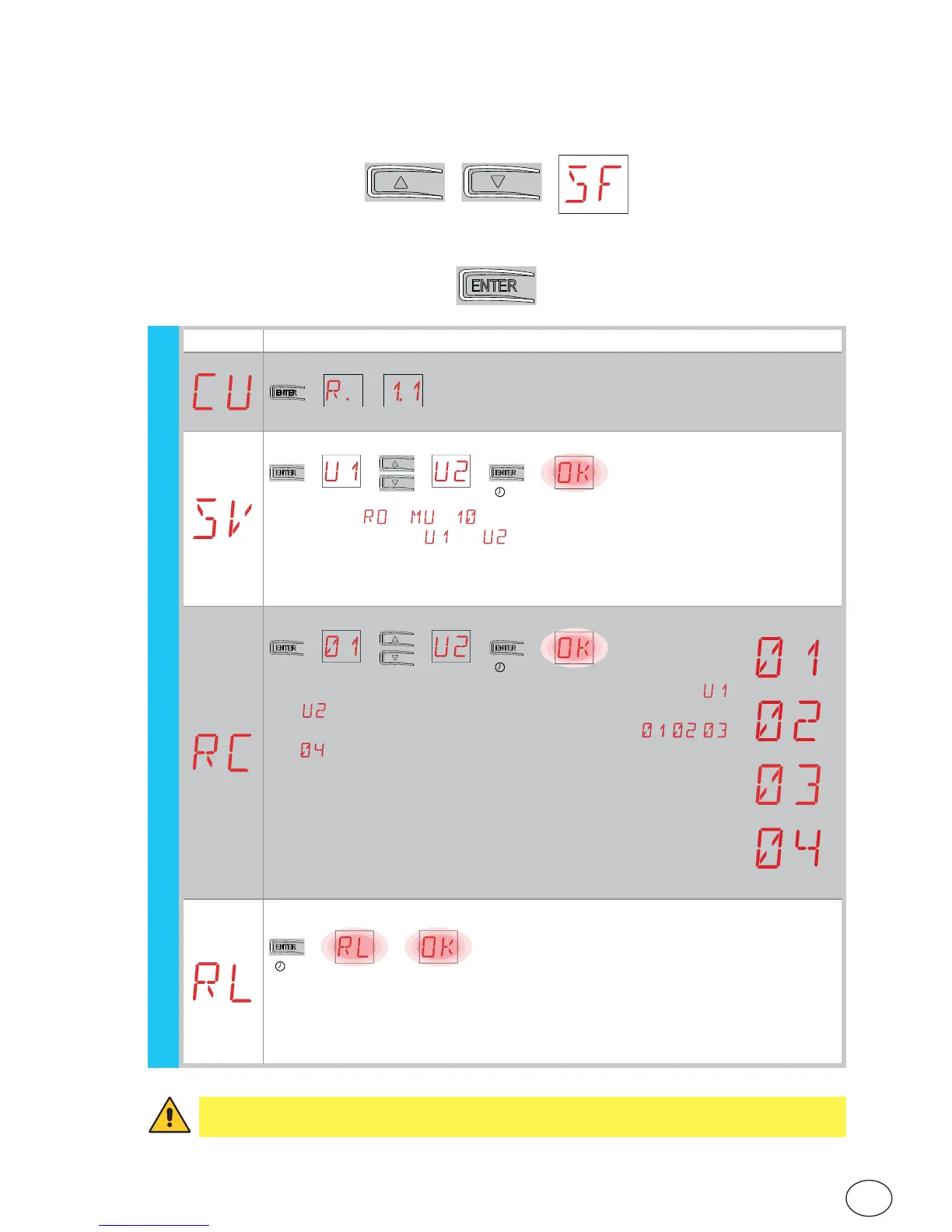
• using keys ↑ and ↓ select the desired function
• press the ENTER key to confirm
7.8 Second level menu - SF (Special Functions)
Display Description
CU - Displaying the control panel firmware version.
→→→ Release 1.1 [esempio]
SV - Saving user configuration on control panel storage module.
[esempio]
→
2”
→→→→
By selecting → → you can save up to 2 personalised configurations
in memory positions and only with the storage module present on the
control panel.
WARNING: if more than 100 remote control codes are stored on the control
panel storage module, you cannot save any user configuration.
RC - Loading configuration.
[esempio]
→
2”
→→→→
You can upload the user configurations previously saved
and on the control panel storage module, or upload the
predefined settings available in memory positions , ,
and .
01 - parameter setting for passive edge on closure edge and
stopping limit switch.
02 - parameter setting for passive edges on both edges and
stopping limit switch.
03 - FUTURE USE
04 - FUTURE USE
RL - Loading the last configuration set.
→
→
2”
The control panel automatically saves the last configuration set, and keeps it
memorised in the storage module. In the event of a fault or the replacement of
the control panel, the last configuration of the automation can be restored by
inserting the storage module and loading the last configuration set.
WARNING: depending on the type of automation and control panel, some menus may
not be available.
(example)
(example)
(example)
SF - Special functions


 To Next Page