14
IP2162EN
EN
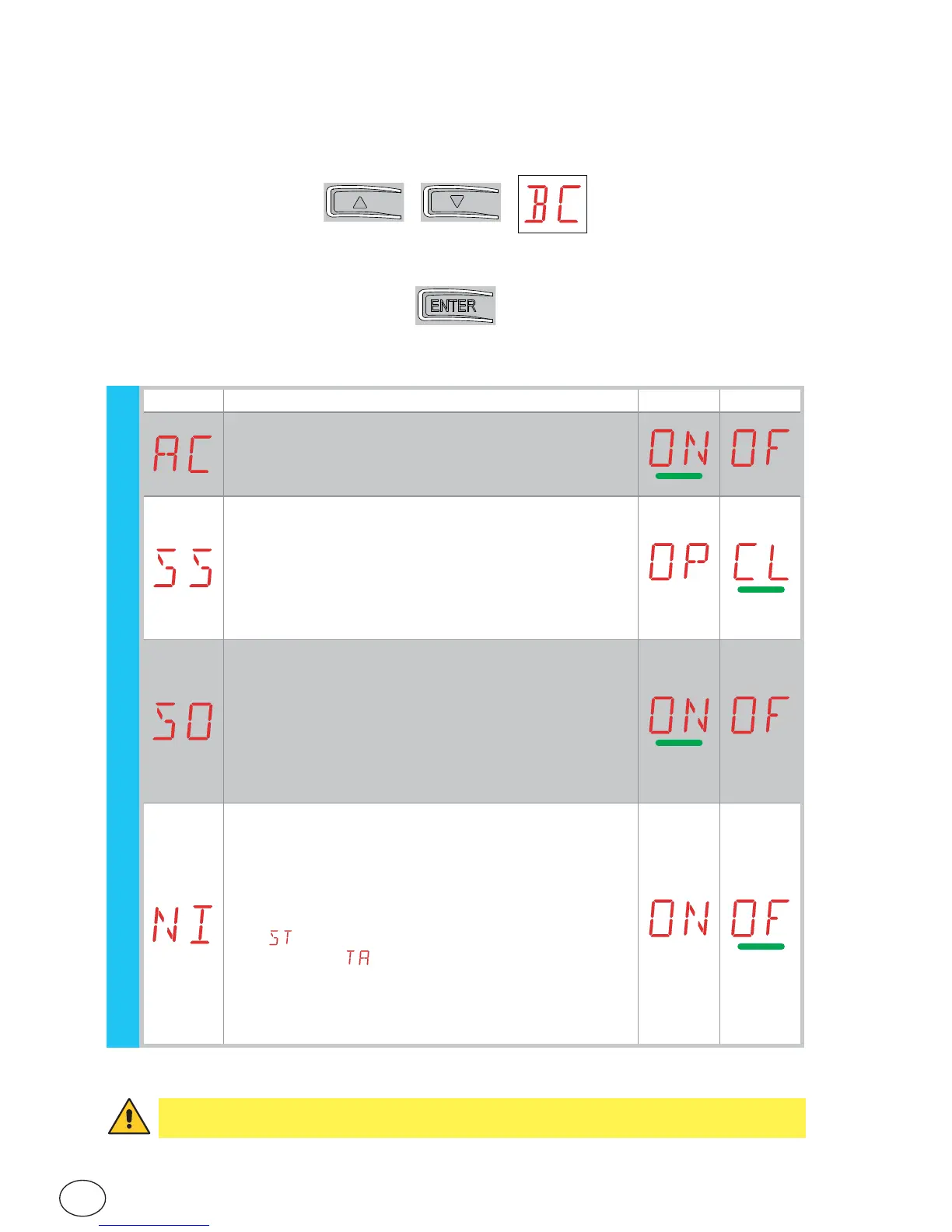
• using keys ↑ and ↓ select the desired function
• press the ENTER key to confirm
7.5 Second level menu - BC (Basic Configurations)
Display Description
AC - Enabling of automatic closing.
ON - Enabled
OF - Disabled
SS - Selection of automation status at start.
OP - Open
CL - Closed
Indicates how the control panel considers the automa-
tion at the time of switch-on, or after a POWER RESET
command.
SO - Enabling of reversal safety contact functioning.
ON - Enabled
OF - Disabled
When enabled (ON) with the automation idle, if the
contact 1-8 is open, all operations are prevented.
When disabled (OF) with the automation idle, if the
contact 1-8 is open, opening operations are permitted.
NI - Enabling of NIO electronic anti-freeze system.
ON - Enabled
OF - Disabled
When enabled (ON) it maintains motor efficiency even
at low ambient temperatures, increases the starting
time to the maximum value and reduces the ac-
celeration time to the minimum value.
N.B.: for correct operation, the control panel must be
exposed to the same ambient temperature as the mo-
tors.
WARNING: depending on the type of automation and control panel, some menus may
not be available.
BC - Basic configurations


 To Next Page