22
IP2162EN
EN
7.7.1 Additional RO level parameters that can be configured
(available with → enabled)
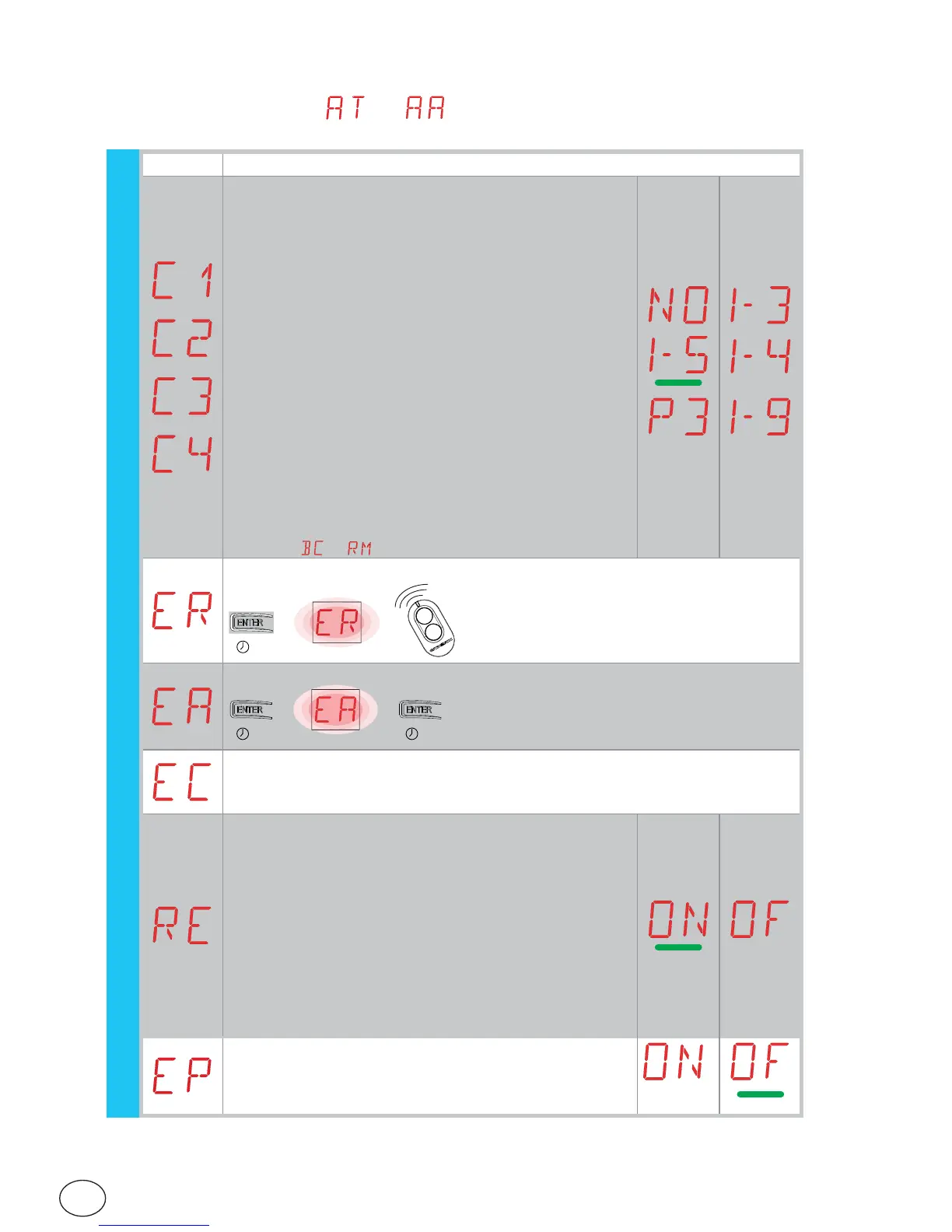
Display Description
C1, C2, C3, C4 - Selection of CH1, CH2, CH3, CH4 func-
tion of stored remote control.
NO - No setting selected
1-3 - Opening command
1-4 - Closing command
1-5 - Step-by-step command
P3 - Partial opening command
1-9 - STOP command
If only one (any) CH key of the remote control is stored,
command 1-3 (step-by-step/opening) is carried out.
If 2-4 CH keys of a single remote control are stored,
the functions matched with the CH keys are as follows:
• CH1 = command 1-3 step-by-step/opening;
• CH2 = partial opening command;
• CH3 = no setting selected;
• CH4 = STOP command.
WARNING: options 1-3 (opening) and 1-5 (step-by-
step) are available as an alternative and depend on the
selection → .
ER - Cancelling a single remote control.
→→
2”
EA - Cancelling an entire memory.
→→
2” 2”
EC - Cancelling a single code.
(FOR FUTURE USE)
RE - Setting memory opening from remote control.
OF - Disabled
ON - Enabled
When enabled (ON), the remote programming is activated.
To store new remote controls without using the control
panel, press the PRG key of an already stored GOL4
remote control for 5 seconds until the LED comes on
(within the range of the receiver) and press any one of
the CH keys on the new remote control.
N.B.: make sure you do not accidentally memorise un-
wanted remote controls.
EP -Setting the coded area messages
If the possibility to receive coded messages is enabled, the con-
trol panel will be compatible with remote controls of the “EN-
CRYPTED” type.
RO


 To Next Page