21
IP2162EN
EN
Display Description
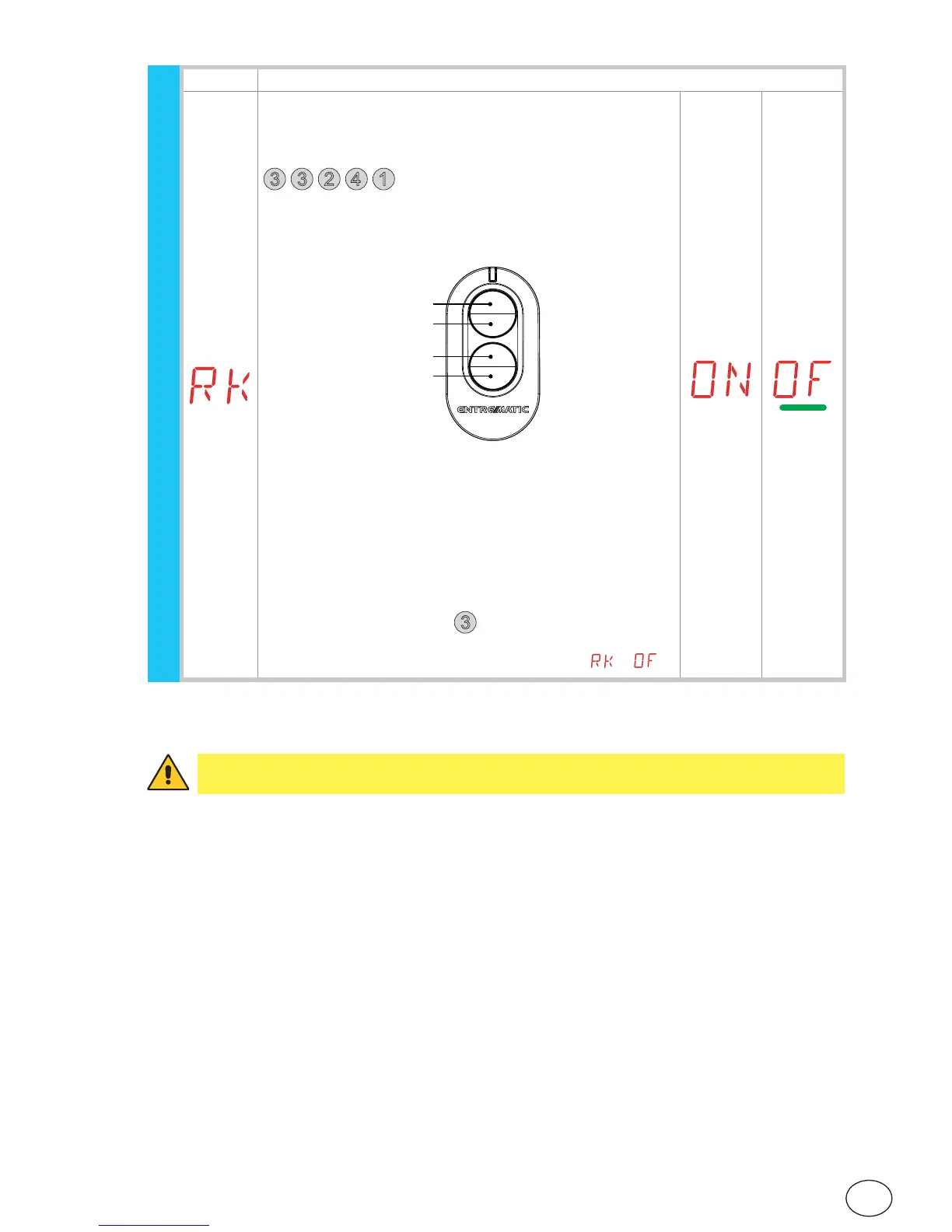
RK - Menu navigation using remote control keyboard
ON - Enabled
OF - Disabled
With the display turned off, quickly type in the sequence of keys
3
3
2
4
1
from the stored remote control you want
to use.
Make sure all the CH keys are stored.
WARNING: during navigation with a remote control keyboard
ALL the stored remote controls are inactive.
4
1 (Enter)
3 (Esc)
2 (∆)
(∆)
To make viewing and adjustment easier (avoiding the need
to continuously press the remote control), press the UP ↑
or DOWN ↓ key once to begin slowly scrolling through the
parameters.
This scrolling movement is faster if the UP ↑ or DOWN ↓ key
is pressed twice.
To stop the scrolling, press ENTER.
To confirm your choice of parameter, press ENTER again.
To test any new setting, switch off the display and issue an
opening command using key
3
.
Navigation using a remote control keyboard is automatically
disabled after 4 minutes of inactivity or by setting
→ .
WARNING: depending on the type of automation and control panel, some menus may
not be available.
RO - Radio operations


 To Next Page