36
IP2162EN
EN
Type of
alarm
Display Description Operation
Power supply
operations alarm
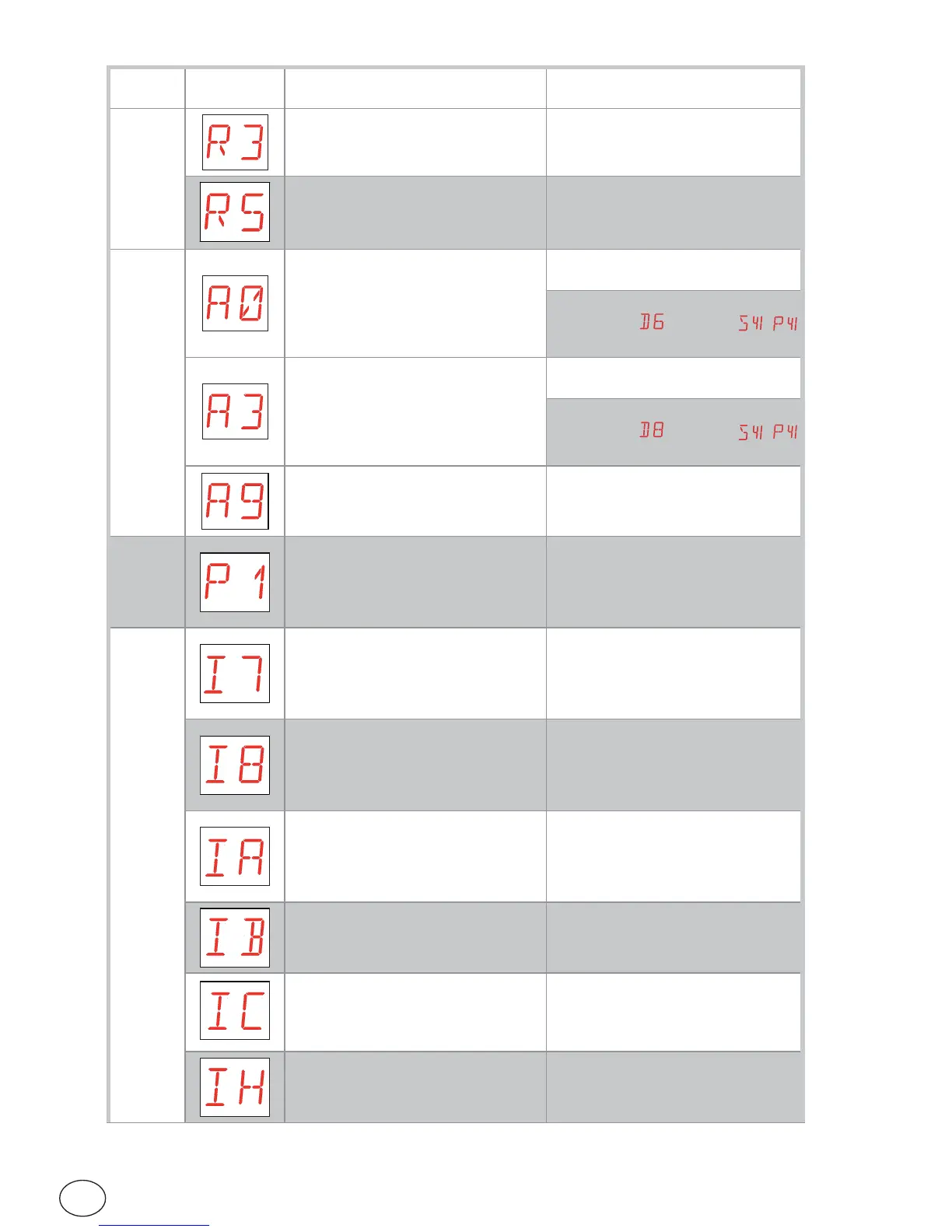
R3 - Storage module not detected (with
JR3=ON).
Insert a working storage module or set
JR3=OFF.
R5 - Storage module not working (re-
gardless of JR3)
Replace the storage module.
Accessories alarm
A0 - Failure of test of safety sensor on
contact 6.
Check that device SOFA1-A2/GOPAV is
working correctly.
If the supplementary card is not insert-
ed, check that
is not set to /
A3 - Failure of test of safety sensor on
contact 8.
Check that device SOFA1-A2/GOPAV is
working correctly.
If the supplementary card is not insert-
ed, check that
is not set to /
A9 - Flashing light output short circuit
alarm
Check that the flashing light is working
properly.
Power
supply
alarm
P1 - Microswitch voltage too low Check the control panel is powered
correctly.
Control panel
internal alarm
I7 - Internal parameter outside limits
error
Reset.
If the problem persists, contact Tech-
nical Support.
I8 - Program sequence error Reset.
If the problem persists, contact Tech-
nical Support.
IA - Internal parameter error (EE-
PROM)
Reset.
If the problem persists, contact Tech-
nical Support.
IB - Internal parameter error (RAM) Reset.
If the problem persists, contact Tech-
nical Support.
IC - Operation time out error (>5 min
or >7 min in acquisition mode)
Manually check that the door wing
moves freely.
If the problem persists, contact Tech-
nical Support.
IH - Overcurrent with motor switched
off alarm
Reset.
If the problem persists, contact Tech-
nical Support.


 To Next Page