http://www.dji.com/zenmuse-l1
Copyright © 2022 DJI All Rights Reserved.
39
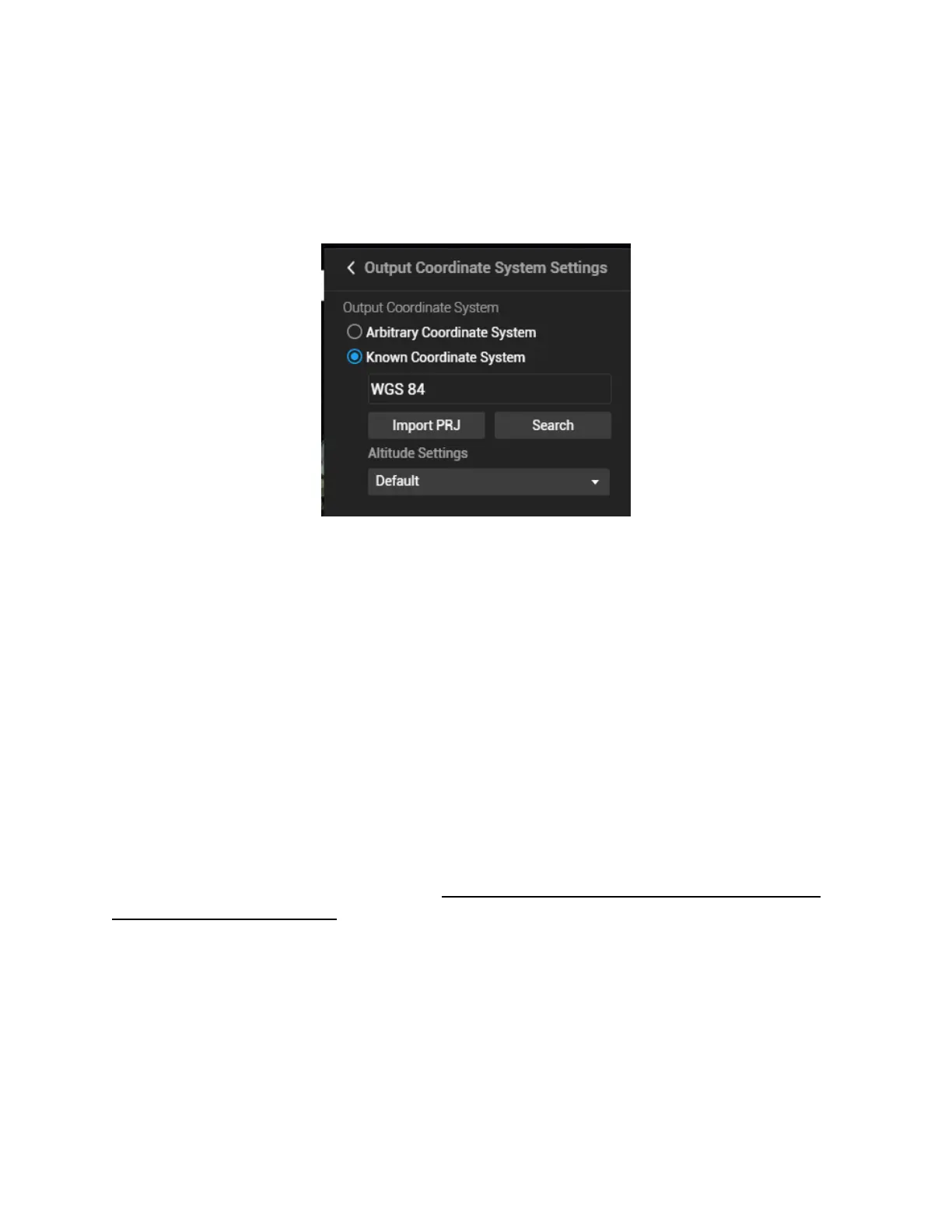
Most point cloud analysis software does not allow users to view LAS point clouds in a geodetic
coordinate system. If you've selected the geodetic coordinate system as the output coordinate system
(such as WGS84: EPSG 4326), the result may not be shown properly when you open it with third-
party software (such as CloudCompare or LiDAR360). To avoid this issue, you need to select a
projection system as the output coordinate system.
Figure: If WGS84 shown above is selected, the point cloud may be shown as a single line in other softwares.
Please change to projection system such as WGS84 UTM projection.
Altitude settings: The Default setting is ellipsoidal height. You may change it to EGM96 height or
other options.
(5) Parameter Settings
Point cloud effective distance: The cloud points with a distance greater than the set value from the
LiDAR emission center will be filtered out during post-processing. The default value of this parameter
is 250 meters. Do not set it too low or most of the points will be filtered out.
Optimize Point Cloud Accuracy: This function optimizes the adjustment of the point cloud data
scanned at different times to improve the overall accuracy. It is recommended to keep this function
enabled for surveying and mapping purposes. However, for power line reconstruction, this option is
recommended to be turned off.
Also if efficiency matters more than accuracy to you, this feature can be disabled, as the processing
time can be significantly longer when it's enabled.


 To Next Page