1838-065-A-9-15
7
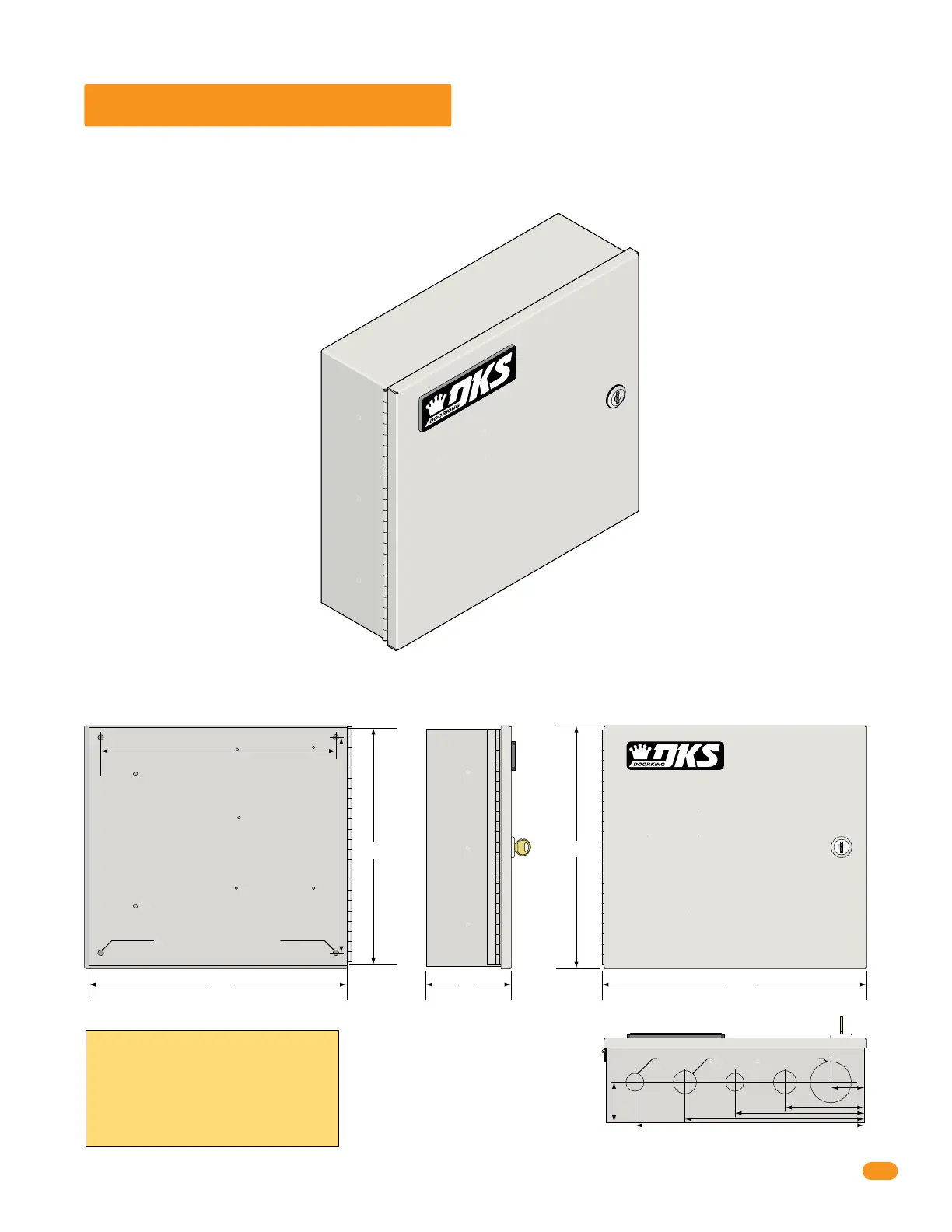
1.2 Mounting Dimensions
If used to control a door or pedestrian gate, try to locate the access controller as close as possible to the entry point. The unit
should be mounted on a rigid wall to prevent excessive shock and vibration from closing doors or gates. Continuous vibration
and shock from slamming doors or spring-loaded pedestrian gates will damage the circuit board. Under no circumstances
should the unit be mounted directly to a moving door or gate.
10.25”
10”
12” 4”
Bottom View
Side ViewBack View Front View
WARNING! If this entry system is used to
control a vehicular gate with an automatic gate
operator, the entry system must be mounted a
minimum of ten (10) feet away from the gate and
gate operator, or in such a way that a person
cannot operate the entry system and touch the
gate or gate operator at the same time.
DoorKing recommends replacing the Standard Key Lock with the “Random” Key Lock that is included. See back cover for more information.
.25” Dia. Mounting Holes
Mounting Hole Mounting Hole
10.75”
9”
.875” Dia 1.125” Dia 2.125” Dia
1.5”
3.75”
8.25”
10.5”
6”
2”
12.25”
Use appropriate hardware to secure
enclosure to surface (not supplied).



 To Next Page