1838-065-A-9-15
19
1
2
3
4
5
6
RS-232
Terminal
1838 Access
Controller
Circuit Board
Board
Pins
Wire
Color
1
2
3
4
5
6
DB-9
Pins
3
2
7
8
5
DB-25
Pins
Board
Function
2
3
4
5
7
Transmit Data
Receive Data
Request to Send
Clear to Send
Signal Ground - Shell
Not Used
Red
Black
White
Brown
Green/
Shield
1 Red
2 Black
3 White
4 Brown
5 Green
5 Shield
The 6-pin terminal can be
removed for easy wiring.
NC
NO
NO
RING
NC C
ON
SPK
VOL
FEED
BACK
RS-232
ELEVATOR
12345 67891011121314
1
2
3
MIC
VOL
OFF
KEYPAD
321
321
321
MASTER
CODE
16AC16ACBAT1NO1NC1C2RY2CAZIMC
5VDCIMDSPKRCOMMICPSWCGNDPHONE
Your PC
RS-232
DB-9 Pin Plug
P/N 1818-040
RS-232 to USB
Adapter
P/N 1815-037
SOFTWARE
INSTALLED
100 ft Max.
DB-9 Pin #s
Male End
Female End
Main Terminal
1234
678 9
9 8 76
5
54321
TONE ON
TONE OFF
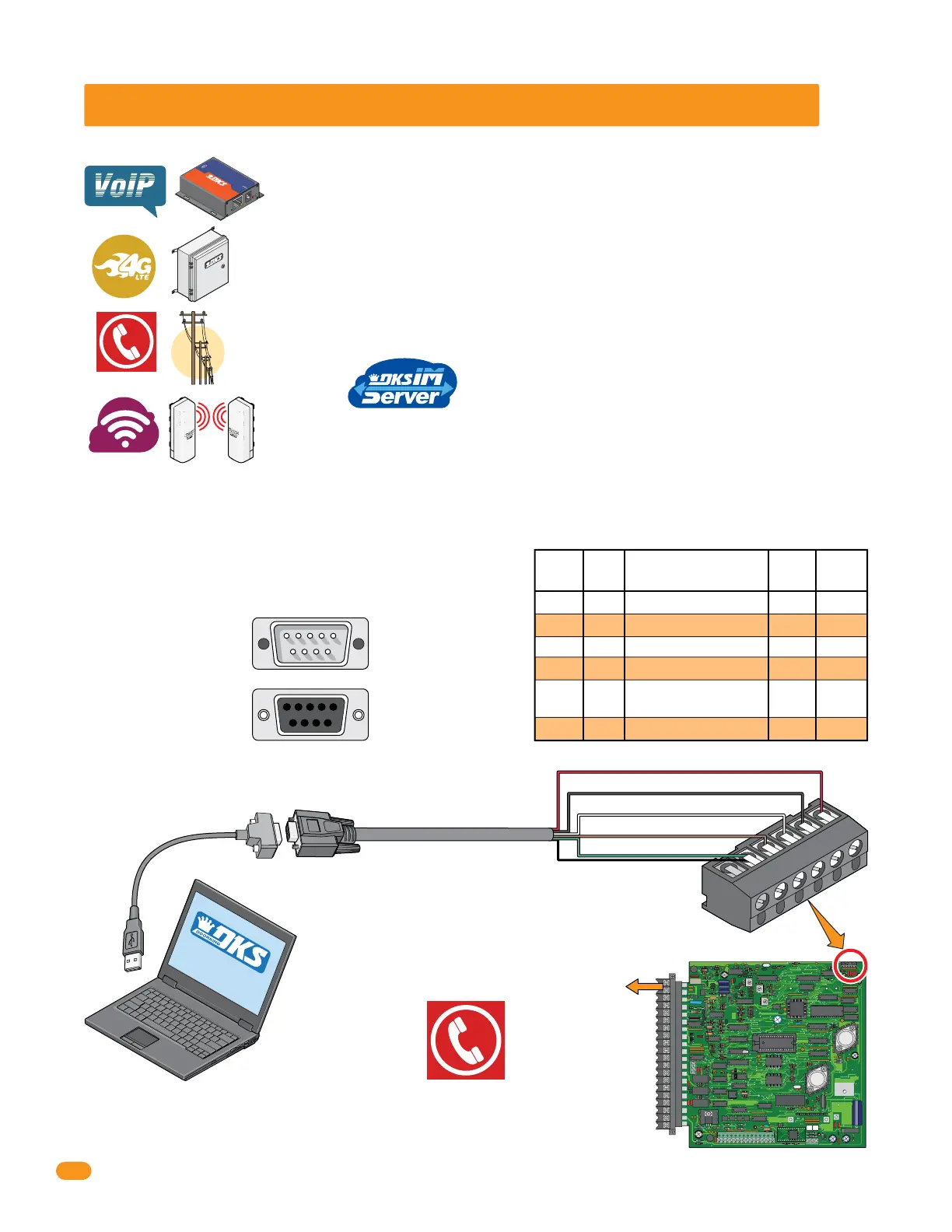
2.4 Phone (Voice) and PC (Data) Connection Options
Connecting the 1838 to a PC and optional phone line if desired, may be accomplished by different methods in this section.
DoorKing VoIP: Works with most VoIP providers for voice communication and data transfer using your
internet connection.
Telephone Company Phone Line: Works with the phone company telephone lines for voice communication and
data transfer. Optional DKS IM server can manage multiple entry systems through the phone line.
DoorKing Wireless Adapter: Connects the DoorKing telephone entry system to your PC wirelessly (2.4 GHz
point-to-point) for data transfer ONLY.
DoorKing Cellular Network: Works with the DKS cellular network for voice communication and data transfer
where cell service is available.
Pw
r
DCS-
1
8
V
Ne
t
w
o
r
k
Re
lo
a
d
D
e
f
a
u
lts
RS
2
3
2
&
4
8
5
T
o
E
th
e
r
n
e
t
Et
he
rne
t
10M/1
00M
A(+
)
B(-)
RS485
R
S23
2
+
-
DO
O
RK
I
N
G
®
®
Requires DoorKing RS-232 9-pin cable P/N 1818-040 and RS-232 to USB Adapter P/N 1835-037 to connect to a PC. Send data
to MULTIPLE 1838s in one programming step. Number of 1838s connected by RS-232 is limited to the number of RS-232
Ports installed.
2.4.1 RS-232 Direct Connection - Data Transfer ONLY
Separate phone line is needed if voice
communication is desired.



 To Next Page