14 15
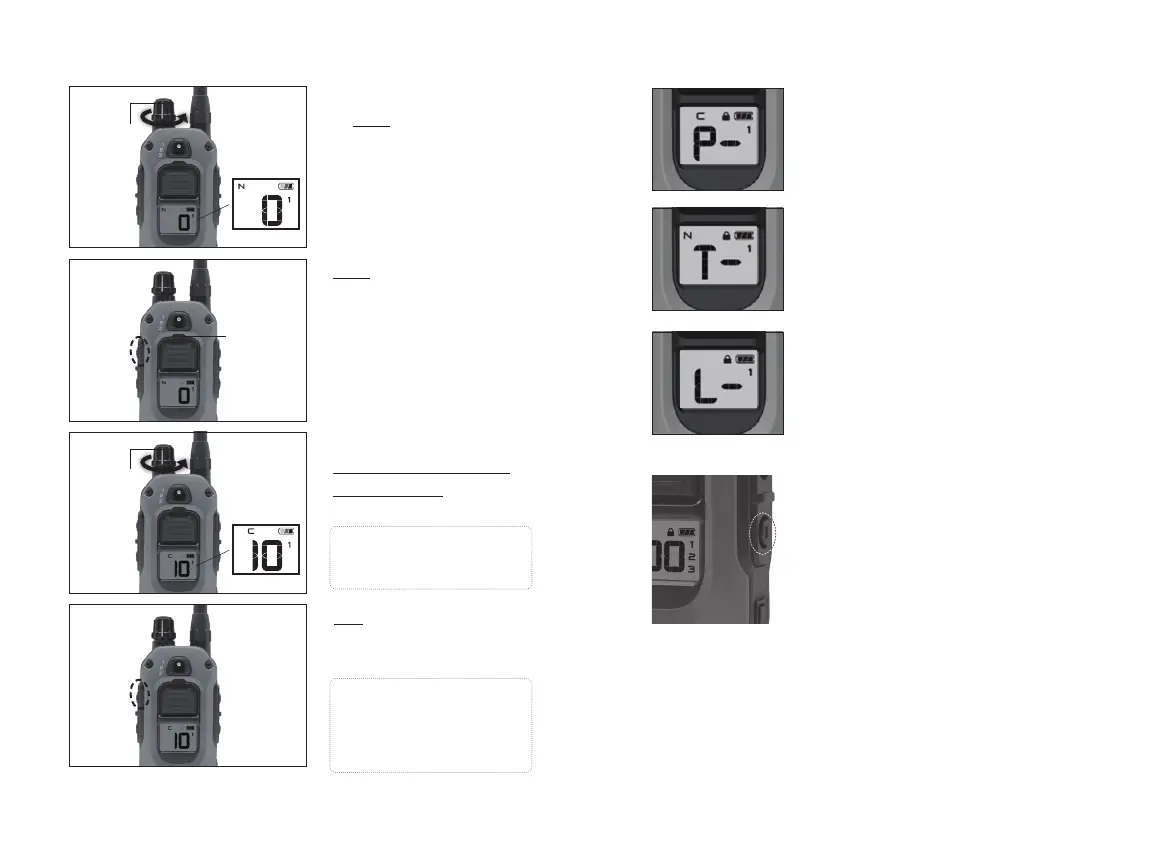
Setting up Boost feature
1. Set the stimulation level
to zero.
LCD Screen
LCD Screen
Rheostat
Dial
Rheostat
Dial
2. Hold the Boosted
Constant button for 5
seconds until the LED
light blinks; then release
it.
LED
Indicator
Light
3. Turn the Rheostat Dial to
select the incremental
Boost amount as shown
on the LCD screen.
Note: Set the Boost level
to 0 to use the Constant
stimulation without Boost.
Note: The saved setting
will remain even if the unit
is turned off. To reset the
setting, repeat the steps
above.
4. Tap the Boosted
Constant button to
save the setting.
Boosted
Constant
Boosted
Constant
XPP (Extreme Performance Pager)
Vibration
Provides vibration for up to 12
seconds when held.
Tone
Provides an audible tone for up to 12
seconds when held.
LED Locate Light
Uses a 1000 lux LED Light on the
receiver to locate your dog in the
dark.
- For continuous blinking, every
4 seconds, tap the Locate Light
button once.
To disable the continuous blinking,
tap Locate button again.
- To manually enable the continuous
blinking, press and hold the Locate
Light button which can stay blinking
for up to 12 seconds.
Non-Stimulation Features





 To Next Page