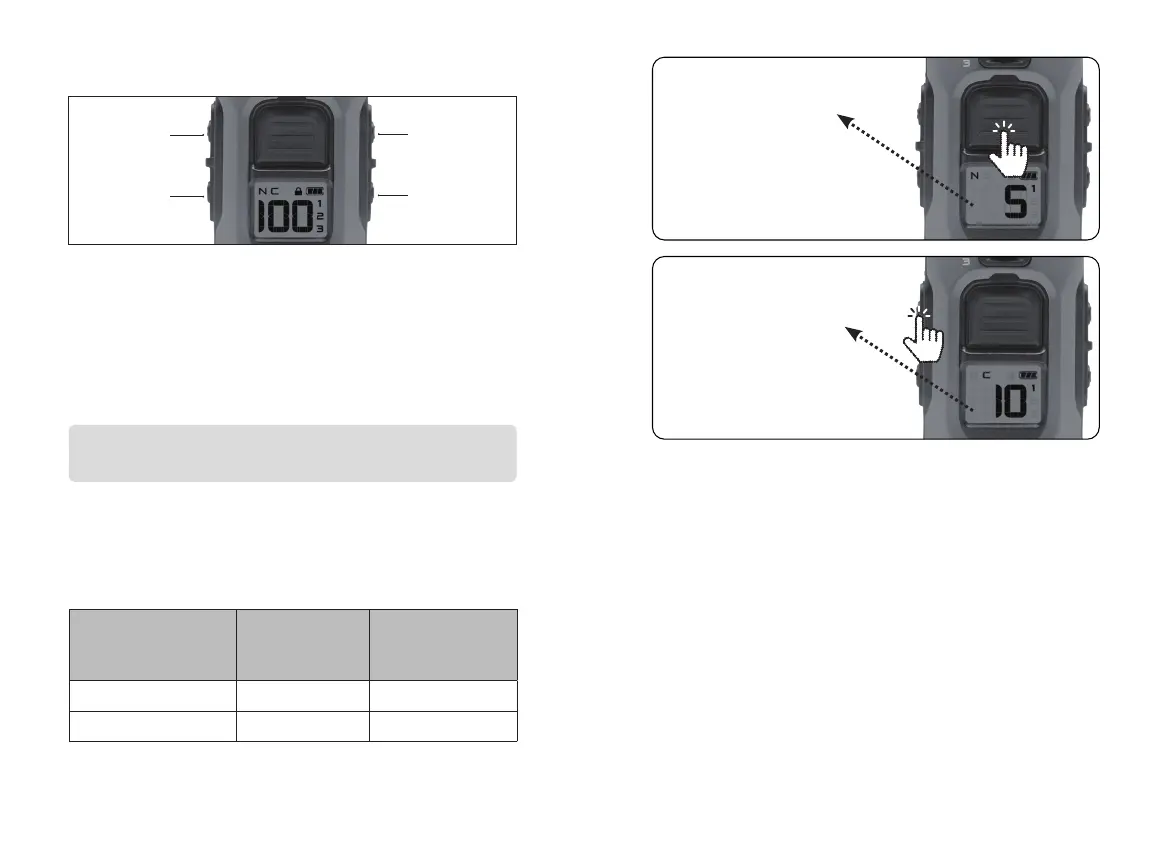
12 13
XPP Vibration
Tone
Locate Light
Boosted
Constant
3. SIDE BUTTONS
Boosted Constant
Apply Constant boost stimulation for up to 12 seconds at
a pre-selected boost level. The stimulation level can be
quickly increased without the user having to manually
increase the level. Users can customize their desired jump
level by pressing Boosted Constant.
Base Displayed Level + Incremental Amount =
Boosted Constant Output
Example
Selecting “5” as the Incremental Amount for the Boosted
Constant button will apply the output level of displayed
level + 5, as shown below.
Base
Displayed Level
Incremental
amount
(Boost amount)
Boosted
Constant Output
1 +5 6
5 +5 10
Press Press
and and
holdhold
Applies Displayed
Base Level.
In this case, level 5
‘Nick’ will apply.
Applies ‘Boosted Constant’
for up to 12 seconds.
In this case, level 10
‘Constant’ will apply.





 To Next Page