22 of 27 PSS5000/INGU/805799/09
PSS 5000 – Installation Guide
3 Maintenance
To insert a HIM
This procedure describes how to insert a HIM into the PSS 5000 cabinet.
1. Turn off the power by removing the plug from the power inlet socket.
2. Open the front cover by releasing the securing screws (and the lock if
present).
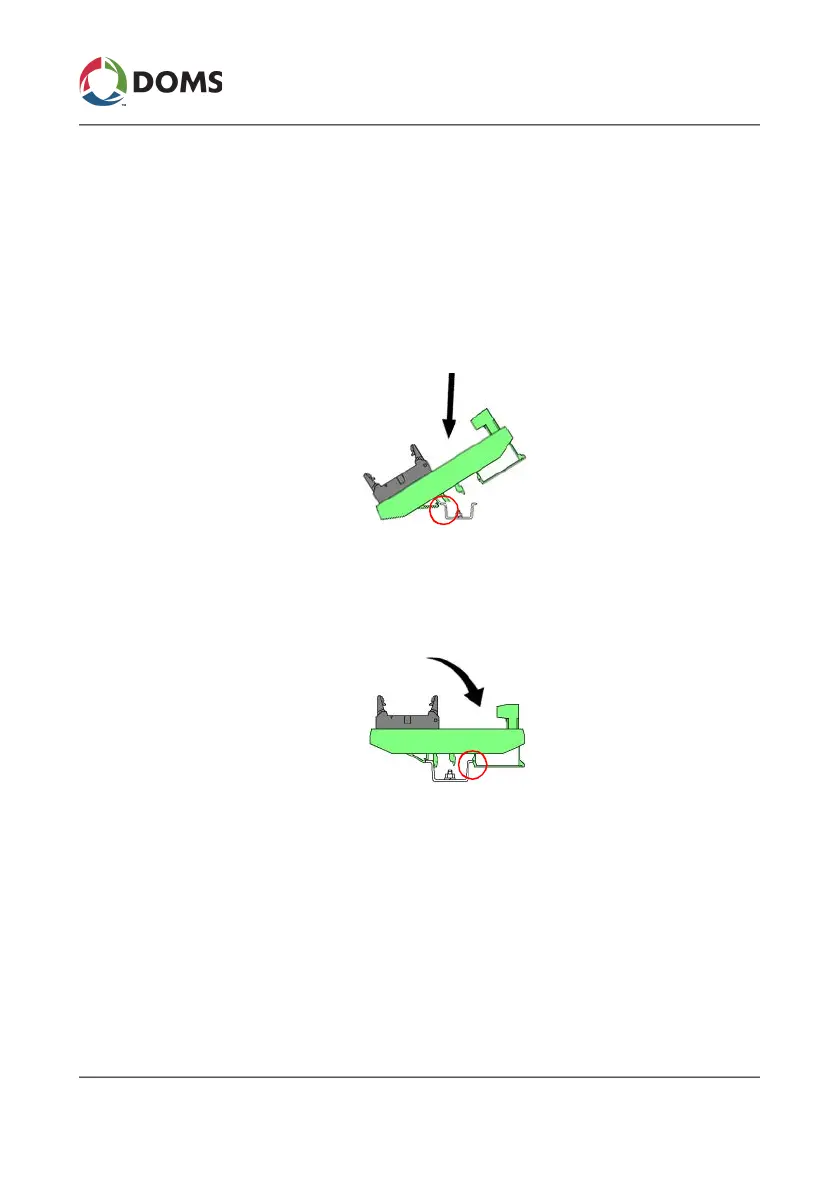
3. Angle the module so that the side closest to the door is inserted on to the
DIN rail.
4. Slide the module along the rail until it is in position, typically opposite
the port to which it will be connected.
5. Press the other side of the module (closest to the cable inlets) until it
clicks on to the DIN rail and is secure.
6. Connect the HIM to the CPB using a flat serial cable.
You are now ready to connect the cable from the forecourt device.
Note: If the cable to the forecourt device is a new connection, remember
to secure this cable connection to the cabinet with a cable clamp.
Note: Remember to select the correct Protocol to Port Assignment.
See Also
• ‘2.4 List the Protocol to Port Assignments’ on page 15



 To Next Page