16 17www.donperusa.com Phone: (844) 366-7371 Email: sales@donperusa.com
S/N-T M D
e following is a brief guide as to how the FREEZING CYLINDERS operate while
your machine is in STANDBY MODE.
1. When the machine is placed into STANDBY MODE, the compressor and drive
motor will power on.
2. e solenoid valves to the freezing cylinders will open and begin to freeze for 15
seconds and then close for 7 minutes repeatedly.
This cycle continues the entire time the machine is in “STANDBY”, and the tempera-
ture in the hoppers is below 20ºC.
This cycle continues the entire time the machine is in “STANDBY”.
3. e solenoid valves to the hoppers will open and close depending on the tem-
perature of the mix inside the hoppers. When the temperature in the hoppers is
above 20C, the solenoid valve will remain open in order to continue cooling the
hoppers.
4. Once the temperature inside the hoppers has dropped below 20C, the solenoid
valve will begin cycling, open for 30 seconds and closed for 7 minutes.
OPERATING SETTINGS
H S
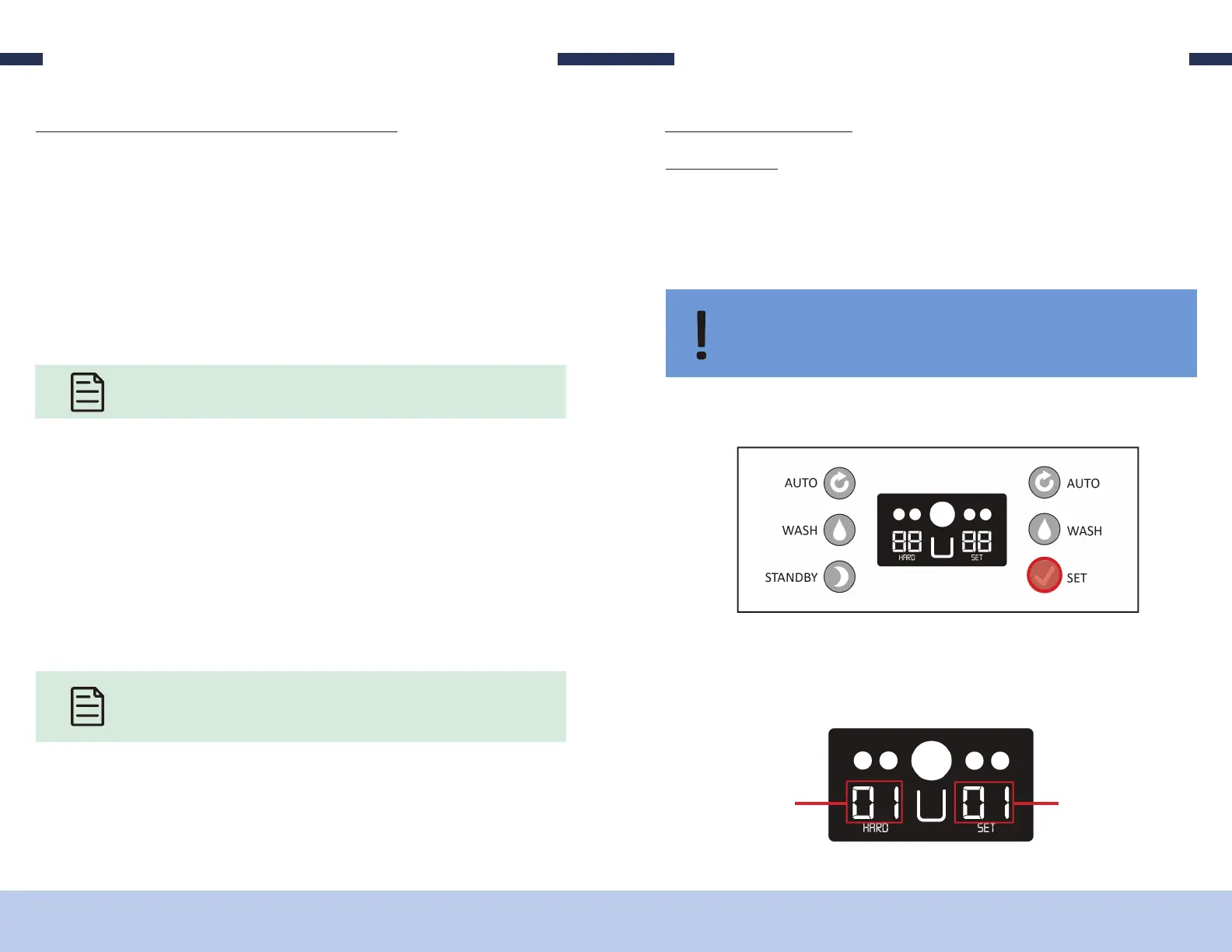
1. Press and HOLD the “SET” button for about 2 seconds. e numbers on the screen
will begin to ash.
IMPORTANT: Make only small adjustments to HARDNESS setting; allow at least 10
to 15 minutes between adjustments to evaluate product firmness. HARDNESS set-
tings should not need continuous adjustment.
HARDNESS SETTING LEFT
CYLINDER
HARDNESS SETTING RIGHT
CYLINDER
2. e number on the LEFT side of the screen is the current hardness setting for
the LEFT freezing cylinder. e number on the RIGHT side of the screen is the
current hardness setting for the RIGHT freezing cylinder.
Hardness Setting - this setting is referring to the consistency of your product. is
setting ranges from “01” which is a so er/less frozen setting for your product and “10”
which is a harder/more frozen setting for your product. e factory settings for the
D250’s hardness is set at “01”. We nd this setting seems to be ideal for most indoor
installations.


 To Next Page