18 19www.donperusa.com Phone: (844) 366-7371 Email: sales@donperusa.com
SETTINGS
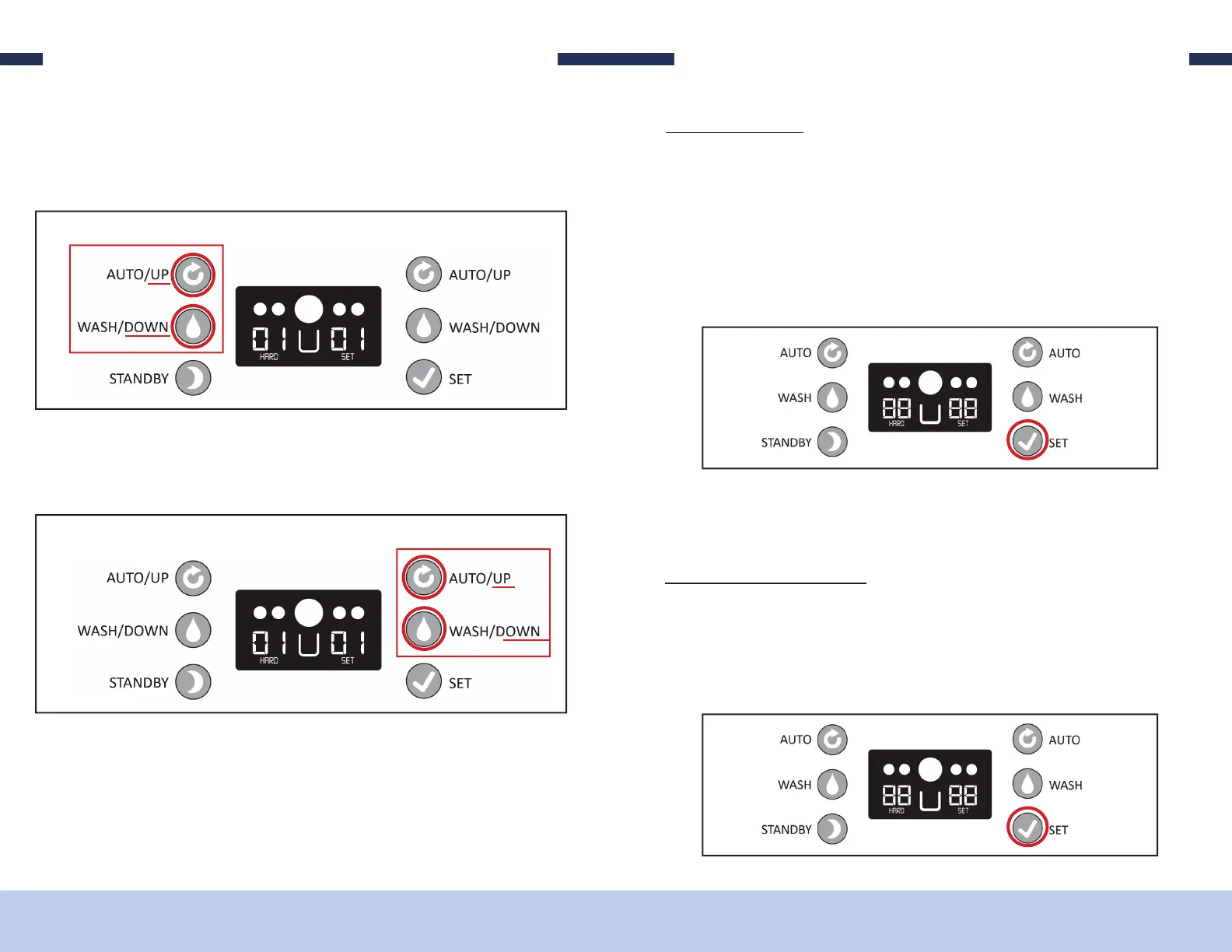
3. To adjust the HARDNESS setting for the LEFT freezing cylinder, use the AUTO
AND WASH buttons on the le side of the control panel. Pressing AUTO will
increase the hardness and pressing WASH will decrease the hardness.
4. To adjust the RIGHT freezing cylinder, use the AUTO and WASH buttons on the
right side of the control panel. AUTO for UP and WASH for DOWN.
LEFT CYLINDER
RIGHT CYLINDER
5. Once you have made the adjustments, wait for about 5 seconds and values on the
screen will stop ashing. e settings are now saved and your machine is back in
“READY MODE”
C C
e D250 has the ability to track the number of cups dispensed by the machine. To
view this value simply do the following;
1. Verify the machine is in “READY MODE”.
2. Single press the “SET” button 1 time and the number of cups dispensed will dis-
play on the screen.
SETTINGS
3. Once the value is displayed, simply wait a few seconds and the screen will return
to READY mode.
R C C
1. Verify the machine is in “READY MODE”.
2. Single press the “SET” button 1 time and the number of cups dispensed will dis-
play on the screen.


 To Next Page