22 23www.donperusa.com Phone: (844) 366-7371 Email: sales@donperusa.com
ADVANCED SETTINGS
To access the ADVANCED SETTINGS con rm your machine is in READY MODE.
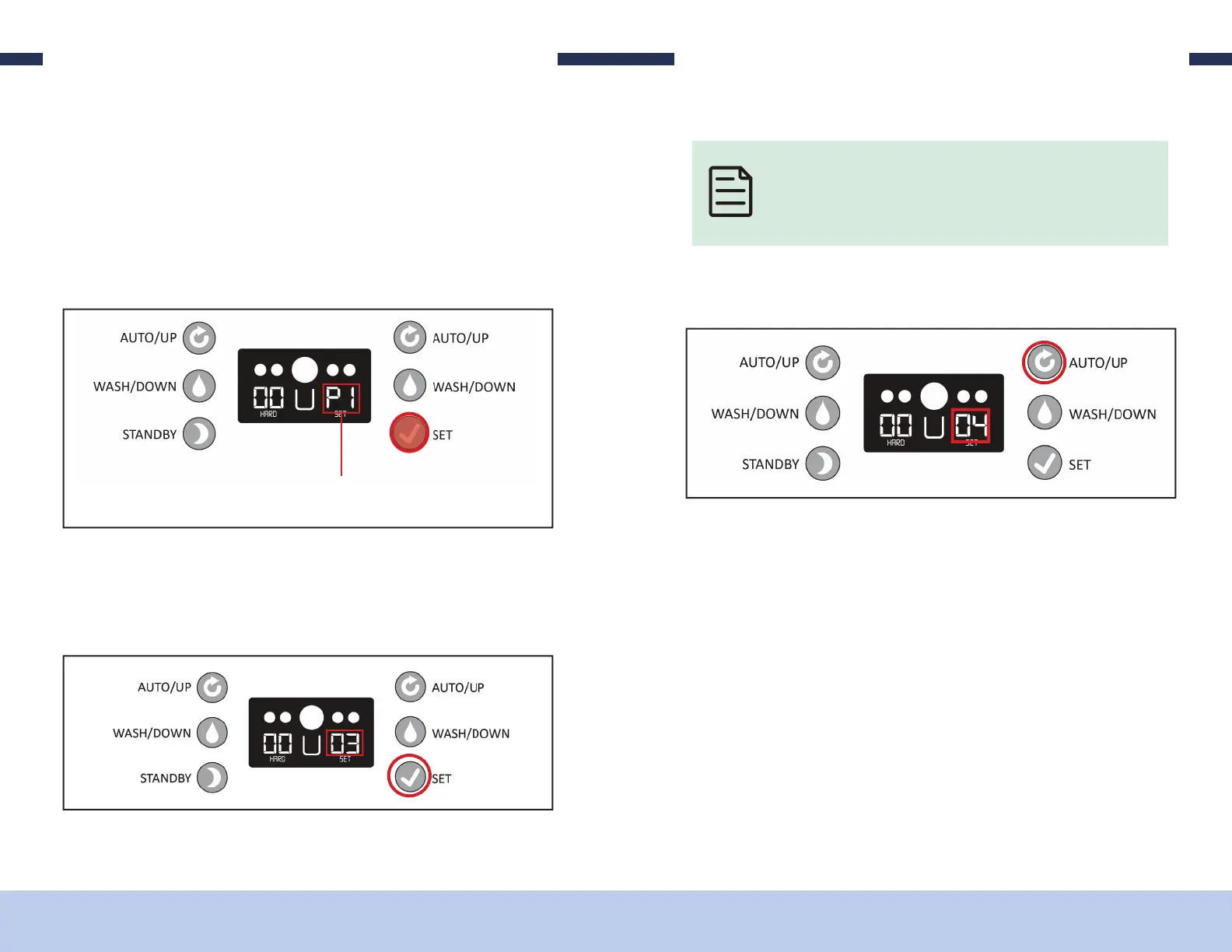
1. Press and hold the “SET” button for about 2 seconds until the numbers on the
screen begin to ash, then release.
2. Press and hold the “SET” button again for about 5 seconds, until the ashing num-
bers change and display “P1” then release. You are now at the “P1” setting.
You are now in the ADVANCED SETTINGS /PARAMETER SETTINGS
3. A single press of the “SET” button again and the P1 displayed will change to the
number “03” which is the factory setting that P1 currently set to.
ADVANCED SETTINGS
Continuing to SINGLE PRESS the SET button after “P1” has been displayed
on the screen will scroll you through all of the parameters/”P” settings,
first displaying the parameter ID then displaying the factory setting for
that parameter.
4. Pressing the “AUTO” button will increase the setting 1 unit for each press.
5. Pressing the “WASH” button will decrease the setting 1 unit for each press.
6. Once you have adjusted the value to your new desired setting, simply wait for
about 10 seconds and the screen will return to ready mode and your setting will
be saved.


 To Previous Page