14 15www.donperusa.com Phone: (844) 366-7371 Email: sales@donperusa.com
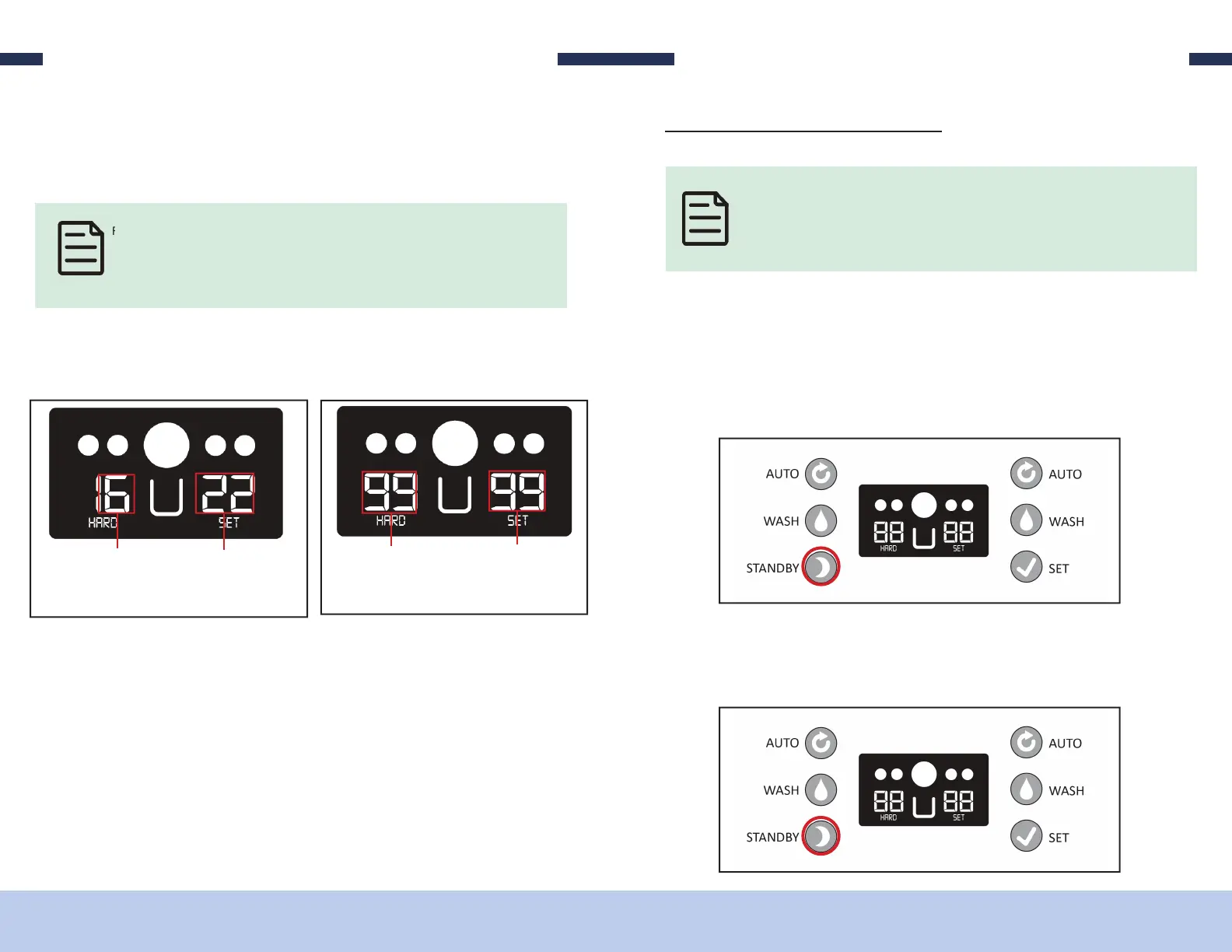
For example, when your mix is in its liquid form its hardness percentage will be
closer 00. As it begins to freeze and change into its ice cream state, the percentage
will begin to go up. Once the percentage reaches 99 the compressor will shut off
and your ice cream is ready.
8. e number displayed on the right side of the control panel above the word “SET”
is the percentage of how ready the product currently is inside the right freezing
cylinder based on it’s “HARDNESS SETTING”.
EXAMPLE:
16% to Hardness
setting in LEFT
freezing cylinder
22% to Hardness
setting in RIGHT
freezing cylinder
STILL FREEZING
99% to Hardness
setting in LEFT
freezing cylinder
99% to Hardness
setting in RIGHT
freezing cylinder
ICE CREAM READY
OPERATING
If you nd your product is not reaching the desired consistency you are looking for,
you can adjust the “HARDNESS SETTING” (page.15) to make your product so er
or more rm.
9. With the product now ready to dispense, pull the draw valve handles to dispense
the product. e side draw valve handles dispense product from their respective
hoppers. e middle draw valve handle dispenses product from both hoppers to
form a twist of the product.
OPERATING
S/N-T M
When the machine will NOT be utilized for several hours, place it in STANDBY mode
to conserve electricity and reduce product loss. While in STANDBY, the product in
the freezing cylinders remains cold but may not be frozen. See STANDBY details for
how the machine functions during STANDBY.
To enter “STANDBY” mode:
1. Verify the machine is back in “READY MODE”. If either freezing cylinder is in
“AUTO MODE” press the “AUTO” button for that side and the machine will re-
turn to “READY MODE”.
2. Press the “STANDBY” button to enter “STANDBY MODE”.
To EXIT “STANDBY” mode:
3. Press the “STANDBY” button.


 To Next Page