21
1838-065 Issued 3-19
Version D
Optional
Phone Line
Voice ONLY
Optional
Phone Line
Voice ONLY
Optional
Phone Line
Voice ONLY
Voice Note: ONLY connect a phone line
when using a DoorKing Call Station.
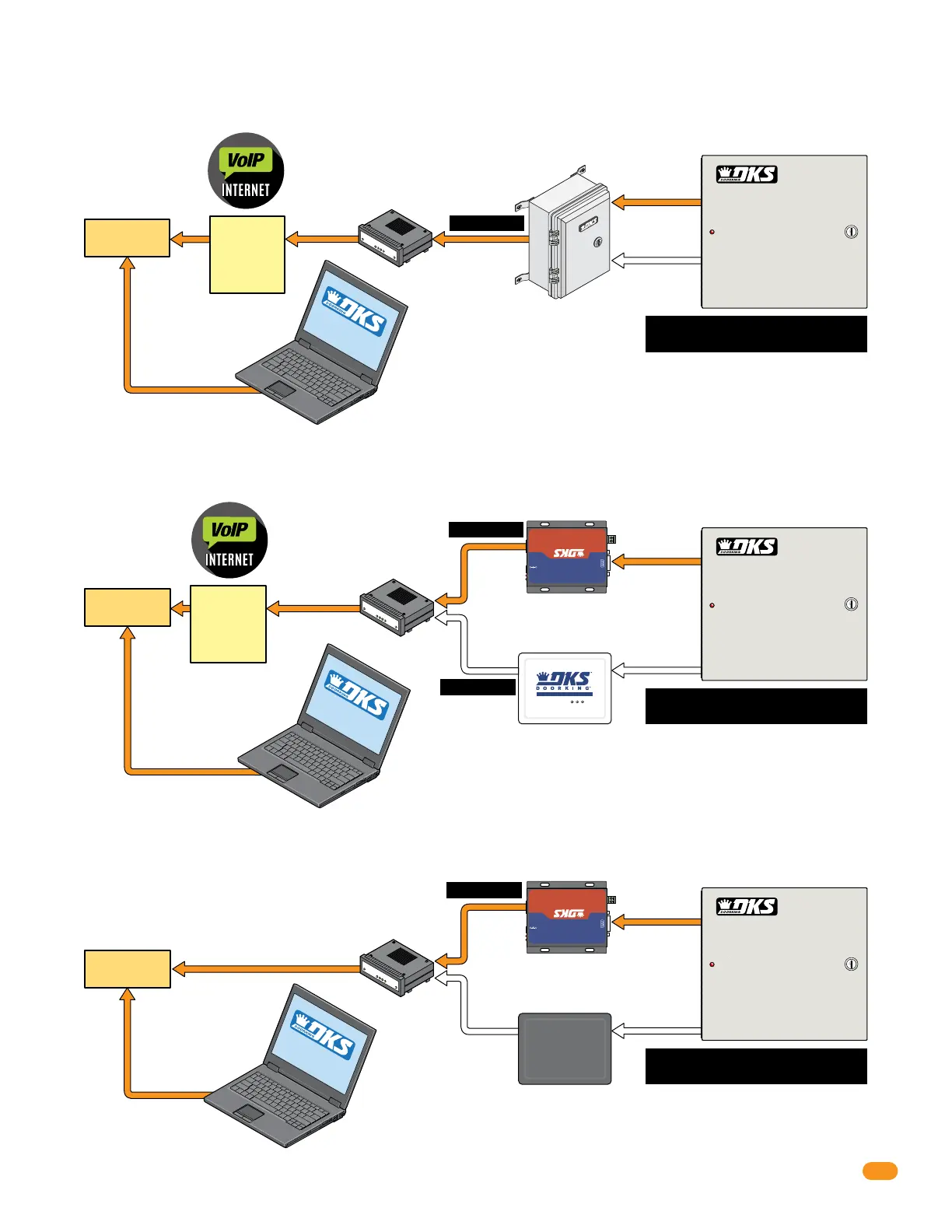
Requires a DKS TCP/IP Converter Kit P/N 1830-186 and VoIP Adapter Kit P/N 1815-568. Works with DoorKing’s Data over IP through the
internet.
2.4.2b DoorKing VoIP Internet Connection - Data Transfer/Optional Voice
Requires DKS VoIP/RS-232 Control Box P/N 2334-080. Works with DoorKing’s Data over IP through the internet.
2.4.2a DoorKing VoIP/RS-232 Control Box - Data Transfer/Optional Voice
Cat-5
Cat-5
Cat-5
325 ft Max.
325 ft Max.
325 ft Max.
325 ft Max.
Your
Router
Your
Router
RS-232
Data ONLY
DoorKing
TCP/IP Converter
P/N 1830-186
DoorKing
VoIP Adapter
P/N 1815-568
DoorKing
VoIP/RS-232 Control Box
P/N 2334-080
Pwr
DCS-18V
Network
Reload Defaults
RS232 & 485 To Ethernet
Ethernet
10M/100M
A(+) B(-)
RS485
RS232
+
-
DOO
RKI
N
G
®
®
Internet
SOFTWARE
INSTALLED
Your PC connected to the
internet, wired or wireless.
Internet
SOFT
WARE
INSTALLED
Your PC connected to the
internet, wired or wireless.
VoIP Analog Telephone Adapter
PWR
L
N
K
/
A
CT
Ph
o
ne
DoorKing VoIP service and data transfer service is available
for one low monthly fee without any long term contracts.
DoorKing VoIP service and data transfer service is available
for one low monthly fee without any long term contracts.
Select you own VoIP service and data transfer service.
Requires a DKS TCP/IP Converter Kit (Third Party) P/N 1830-185 and Your VoIP Adapter (most VoIP adapters will work).
2.4.2c Third Party VoIP Internet Connection - Data Transfer/Optional Voice
Cat-5
Cat-5
Your
Router
RS-232
Data ONLY
DoorKing (Third Party)
TCP/IP Converter
P/N 1830-185
Pwr
DCS-18V
Network
Reload Defaults
RS232 & 485 To Ethernet
Ethernet
10M/100M
A(+) B(-)
RS485
RS232
+
-
DOO
RKI
N
G
®
®
Your Chosen
VoIP Adapter
DKS
Data
over IP
DKS
Data
over IP
Internet
SOFTWARE
INST
ALLED
Your PC connected to the
internet, wired or wireless.
RS-232
Data ONLY
Voice Note: ONLY connect a phone line
when using a DoorKing Call Station.
Voice Note: ONLY connect a phone line
when using a DoorKing Call Station.



 To Next Page