ð The actuator is in the bootloader.
2. Connect the programmer 1460 and the actuator with the programming cable.
ð All technology variants of the actuator firmware which are on the programmer are
displayed.
3. Select the technology variant and confirm with ENTER.
ð All actuator types (firmware) on the programmer are displayed.
4. Select the actuator type and confirm with ENTER.
ð The actuator firmware versions available for the actuator type selected are displayed.
5. Select Firmware version and confirm with ENTER.
ð The upgrade is performed.
6. After the upgrade from remote reader or compact reader, move DIP switches 5 and 6 to
OFF.
Note: Always interrupt the energy supply before switching and restore it afterwards.
5.6.2.2 Remote and compact reader crossgrade
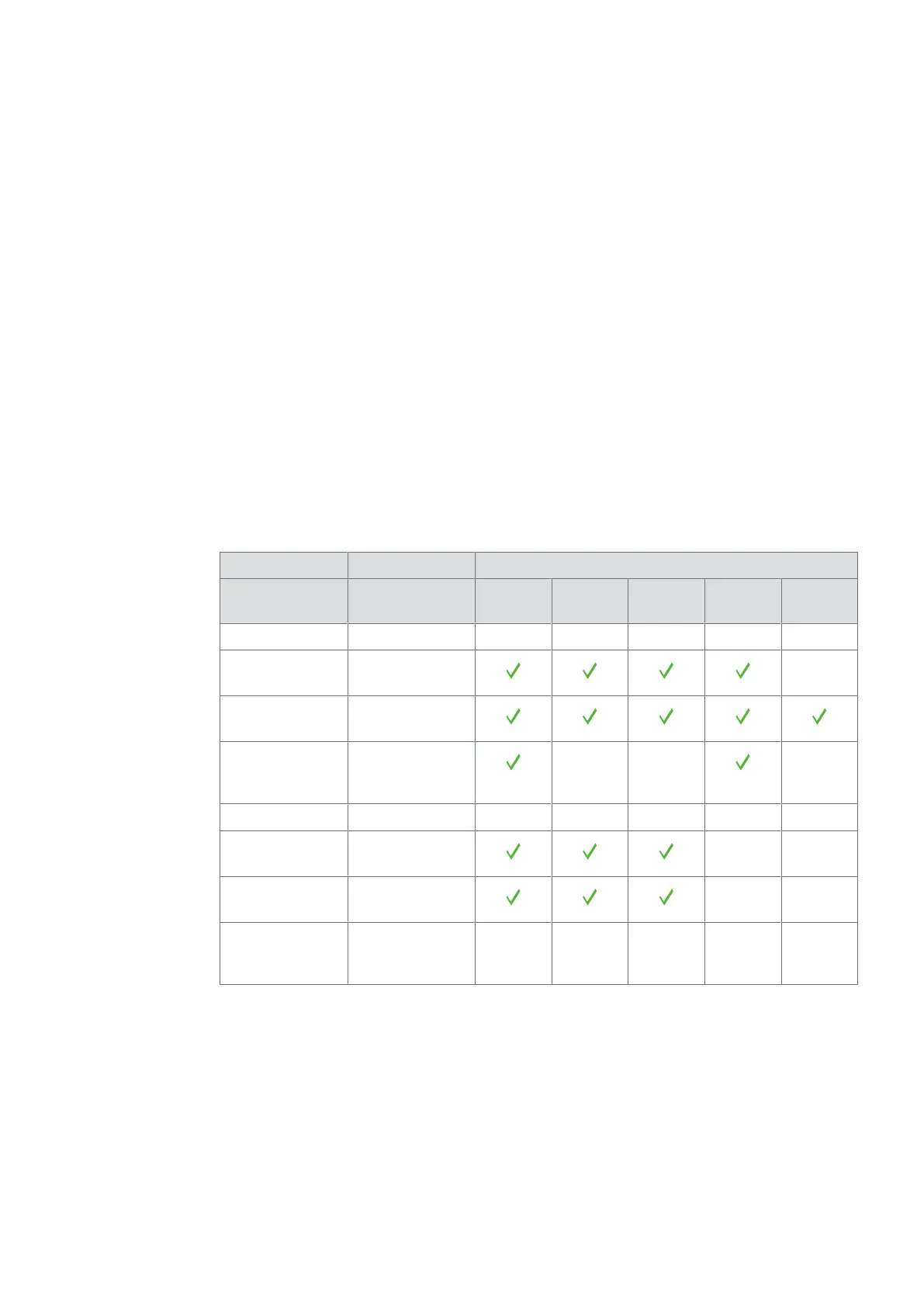
The crossgrade variants for the readers are shown in the following table. The products can be
used in various function types and system software. The functions can differ in each function
type. The functional type is based on the firmware used – as an online reader in the Access
Manager functional type (Kaba exos, B-COMM), as an online reader in the Subterminal
functional type (B-COMM) or as a standalone reader in the Standalone functional type (Kaba
exos, KEM).
Crossgrade between the components
Technology Actuators V4 Online
reader
Subter-
minal
V3
1;3
cDML
LEGIC
Remote reader —
Compact reader
c-lever, c-lever
compact, digital
cylinder
— — —
MIFARE
Remote reader — —
Compact reader — —
2
c-lever, c-lever
compact, digital
cylinder
— — — — —
Key:
1
Before the upgrade to V3, select the line (provided the firmware supports what was pre-
viously on the actuator).
2
Crossgrade not possible.
3
After the downgrade, only the programmer 1364 can be
used for programming.
ProgrammingUser Manual
37- 06/2021 dormakaba Programmer 1460



 To Next Page