English
2. Select Calls and press OK.
3. Select Call setup and press OK.
4. Select Call divert and press OK.
5. Select one of the following options and press OK.
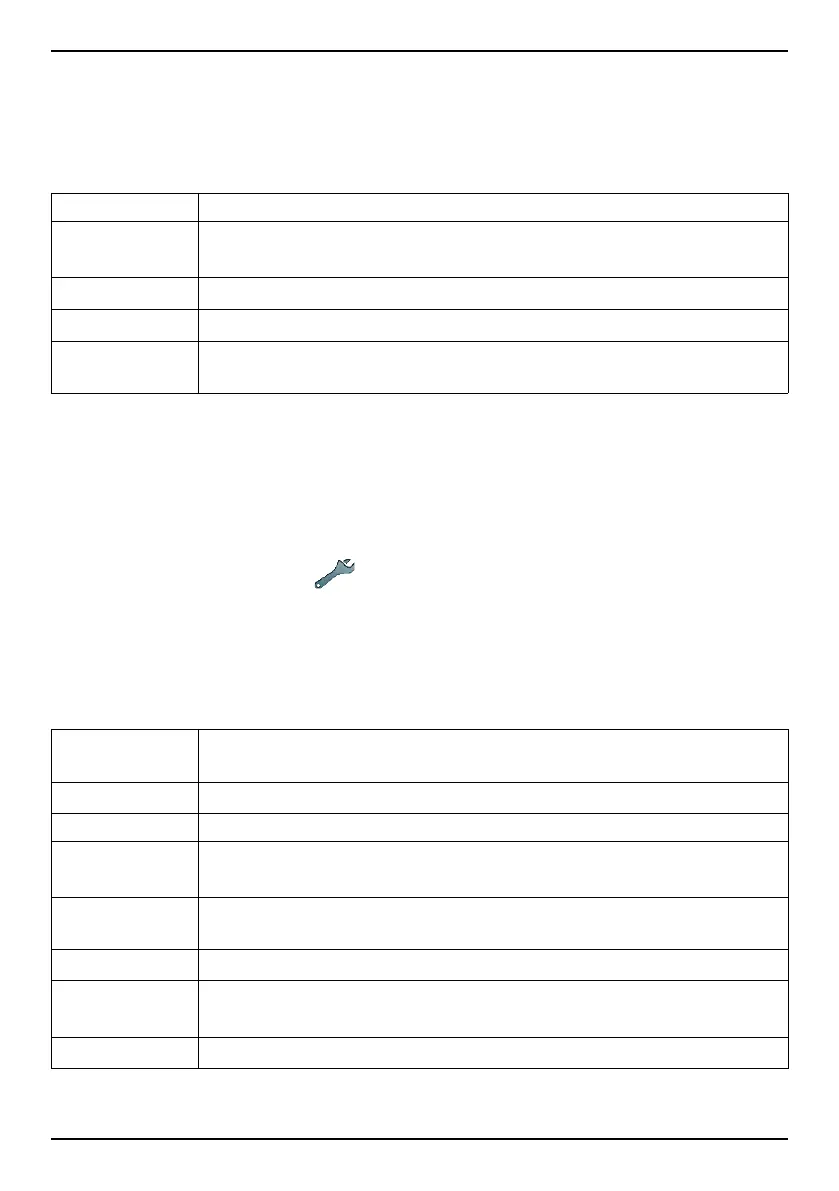
Voice calls Diverts all voice calls.
Unreachable
Diverts incoming calls if the phone is turned off or out of
range.
No reply
Diverts incoming calls if unanswered.
If busy Diverts incoming calls if the line is busy.
Cancel
diverts
Do not divert calls.
Call barring
Your phone can be restricted to disallow certain types of calls.
Note! A password is needed to apply Call barring. Contact your service
provider to get the password.
1. Press Menu, scroll to
and press OK.
2. Select Calls and press OK.
3. Select Call setup and press OK.
4. Select Call barring and press OK.
5. Select one of the following options and press OK.
Outgoing
calls
Press OK then select:
All calls User can answer incoming calls but not dial out.
Internat.calls User can not call international numbers.
Int. except
home
User can not call international numbers except to the coun-
try associated with the SIM card.
Incoming
calls
Press OK then select:
All calls User can dial out but not receive incoming calls.
When
roaming
User can not receive incoming calls while roaming (operat-
ing in other networks).
Cancel all Cancel all call barring (password needed).
34















 To Next Page