22 23
OPERATION WITH DETECTOR OF MAGNETIC AND IR MARKS DORS 15
Connect detector DORS 15 to any of jacks:
M1 or M2 on the device rear panel. The DORS 1300 must be connected to
the power supply and switched on with a power switch but it may remain in a -
standby mode.
Then perform the following:
UNIVERSAL COUNTERFEIT DETECTOR DORS 1300 UNIVERSAL COUNTERFEIT DETECTOR DORS 1300
Magnetic verification with use of the DORS 15:
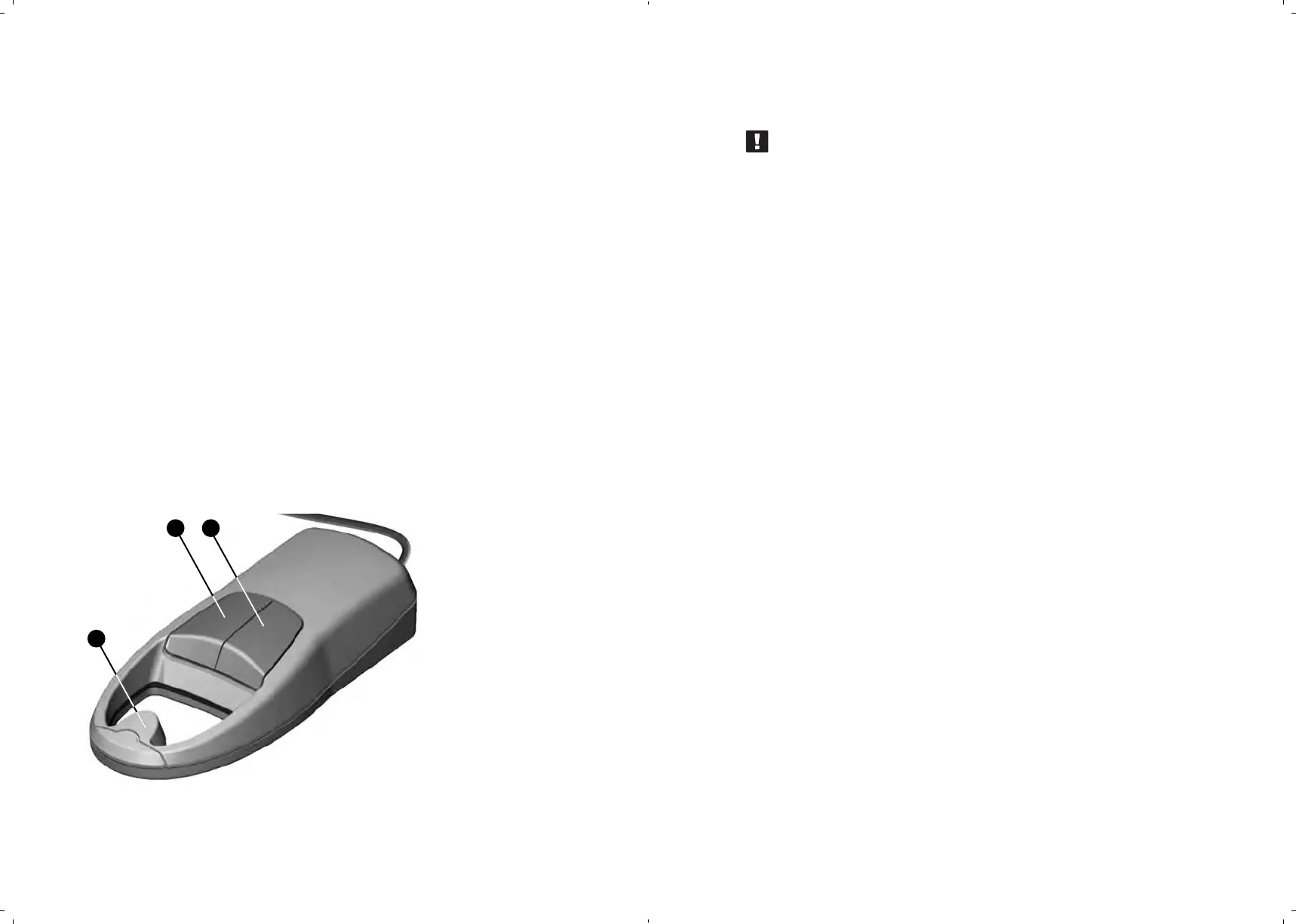
1. When detector DORS 15 (see Fig. 6) is in use, the operation mode of
the device itself may be any.
2. The device and the banknote to be examined should be on a special
mat for verification (included in the delivery set of the DORS 15).
3. Press any key (, ) to switch on the DORS 15.
4. A short pressing of the SELECT key () selects the magnetic verifi-
cation mode (built-in LED is lighted in green color).
Put the DORS 15 on a banknote in such a way that the area to be
examined is under the sensor . Moving the sensor along the area
to be examined, determine the places where the sensor is trigge-
ring and nontriggering. A sound signal and a glowing indicator in-
form about the sensor triggering. The sound signal may be swit -
ched ON/OFF at any moment of operation. To switch it off, press
SELECT key
VOLUME
key
Sensor
The places where the sensor is
triggering are magnetic, and where
it's non-triggering are non-magnetic.
Thus, location of the magnetic and
nonmagnetic inks of the text and the drawings
is detected with a high accuracy.
24 25
26
the VOLUME key () and
Fig. 6.
Visualizer of magnetic
and IR marks
DORS 15
5. The obtained data shall be compared with the location of the magnetic
marks on an authentic banknote (this information is usually
available on the web site of the appropriate Central (National) Bank).
ATTENTION! THE MAGNETIC SENSOR OF THE DORS 15 IS
DISTINGUISHED WITH HIGH SENSITIVITY; THAT IS WHY ANY
SWITCHED ON MOBILE PHONE WITHIN THE RANGE OF 2.5 m
FROM THE DEVICE MAY CAUSE THE DEVICE'S ERRORS.
Note:
If the marks are not clearly detected during verification, it is necessary
to adjust the sensitivity. It is caused by a wide variation of the
magnetic characteristics among banknotes of different currencies. Be-
side this, banknotes of the same type may also differ significantly be-
cause of the printing technological peculiarities and due to their wear and
tear and blotting during circulation.
If it's necessary to change the sensitivity, press shortly the VOLUME key
() to select the required sensitivity level. The red illumination of the
VOLUME key corresponds to the highest sensitivity, yellow to the middle
sensitivity and green to the lowest one. Being switched on the detector
goes to the mode in which it was before the last switching off.
If the DORS 15 actuates in the areas that shall be devoid of magnetic
marks, repeat the examination with the lowest sensitivity mode. If even
now the device actuation is still preserved for the banknote non-magnetic
areas or ceased on the magnetic ones, the banknote may be counterfeit-
ed and requires examination according to the other marks. If the problem
does not exist any more, the banknote is authentic but it may have some
printing defects.
It is recommended to set the highest sensitivity level to verify the worn
banknotes with vague magnetic properties: The Euro, US dollars etc.
It is worth mentioning that the magnetic sensor has a reliable
reaction to the protection marks based on the use of conductive materials
(including semiconductors), and special magnetic ones the conventional
magnetic detectors do not react to. To avoid false triggering, take into
account the given feature of the magnetic sensor as well as its high sen-
sitivity: do not touch either the sensitive element or the metal parts, avoid
any mechanical impact on the sensor.



 To Next Page