41
40
TROUBLESHOOTING
Table 4
The sorter fails
to switch on
Make sure about the sorter connection to the
power supply and the power cord plugging into
the connector on the back of the machine.
Make sure that the power switch is in position
«I».
If these terms are observed but the machine
still fails to switch on, call the technician
Failure
Elimination method
The display shows the
message not described in
the «Error Messages» table
Switch off the sorter and then switch it on. if the
sorter still doesn't work, call the technician.
An abnormal noise
level or foreign sounds
inside the machine
Switch off the machine. Call the technician.
TRANSPORTATION AND STORAGE
The machine in the original package can be shipped by sea (in containers),
by railway (in closed wagons), by air (in the pressurized modules) and by cargo
(in covered truck or in container with water-resistant top) along the paved
roads. The transportation conditions: temperature - 30 to + 50°C, relative
humidity up to 98% without water condensation at 25°C and atmosphere
pressure 84 to 107 kPa (630 to 800 mm Hg).
The machine in the original package can be stored in a heated and
ventilated warehouse, at the temperature of +5°C to +40°C and a relative
humidity not exceeding 80% at +25°C. A warehouse should be free of the
agressive agents (acid and alkali vapors) that might cause corrosion.
SUPPORT AND WARRANTY
DORS authorizes the local distibutors to provide after-sales technical
support to the customers. In case of machine's malfunctioning, please contact
your local supplier. If you fail to get support from your supplier, please inform us
at web site www.dors.com.
To avoid any misunderstanding, we ask you to read the terms and
conditions of the machine's operation, its transportation and storage, the
warranty conditions.
DORS reserves its right to cancel the warranty if a customer violates the
rules listed in the Warranty Conditions section.
FIRMWARE UPGRADE
Among the advantages of DORS 800 there is the remote way of firmware
(FW) update by means of Internet. If a customer has Internet connection, there
DORS 800 BANKNOTE SORTERDORS 800 BANKNOTE SORTER
is no need to call technician for update. Just choose the time frame for update
(we suggest to do it every two weeks) and your machine will be updated with
new fake and real notes recognition as well as with other improvements
automatically.
For firmware upgrading, use application «BVS Update» that can be
downloaded from the site: http://dors.com/service/download.
For FW upgrading, use the following equipment:
1 A personal computer (PC) with installed operation system Windows
(Windows XP and higher) with the Internet connection and installed
program «BVS Update».
2 The USB cable (A-B type) (from the delivery set).
FW upgrading procedure:
1 Connect USB port of DORS 800 (item 16 at Fig. 2) to your PC by
USB cable.
Attention: avoid to connect USB cable to the jack for external
display (item 17 at Fig. 2), it may cause its damage!
2 Switch on the sorter.
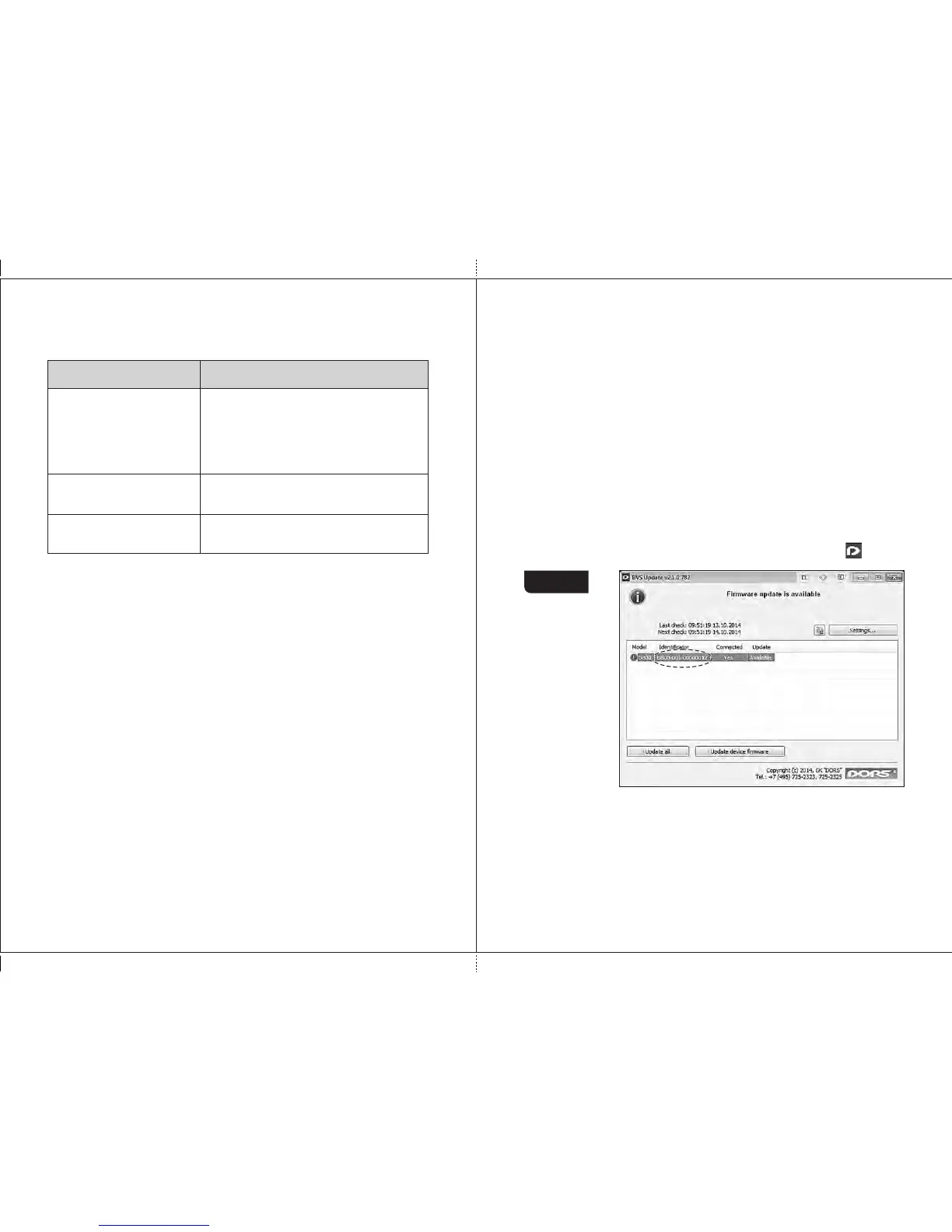
3 Run BVS Update application on your PC, the icon with logo appears
in the taskbar's tray of your desktop, click its icon.
Figure 56
4 Use the mouse left button to select the connected sorter, and press
the «Update device firmware» key (see Fig. 56), the process of
upgrading starts, and the progress bar is appeared in the Update
column (see Fig. 57). The progress bar will also appeared on the
screen of the sorter.
Attention! Do not disconnect USB cable from the sorter, do not
switch off the sorter, and do not disconnect the power cord during
upgrading.


 To Next Page